

Simple Pixel Art Maker
Chaleepa Mallawa Graphics & Design iPhoneiPadiPod touch
Simple Pixel Art Maker is a free Graphics & Design app for iPhone and iPad by Chaleepa Mallawa. Requires iOS 17.0. Updated May 13, 2026.
- Price
- Free
- on the App Store
- Size
- 6 MB
- Age 4+
- Updated
- May 13
- 2026 · v1.0
Screenshots



About Simple Pixel Art Maker
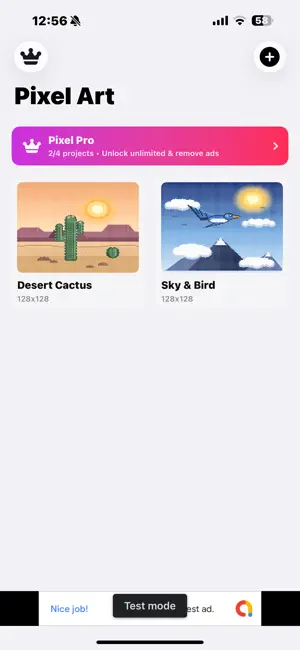
Pixel art, made simple. Simple Pixel Art Maker is a clean, fast drawing studio for iPhone and iPad — designed for the way pixel art actually works: a precise grid, a tight set of tools, and colors that snap to curated palettes. Tap a square. Pick a color. Build a tiny world, one pixel at a time. EVERYTHING YOU NEED, NOTHING YOU DON'T • Pencil, Eraser and Fill — the three tools you actually use • Adjustable brush size from 1 to 8 pixels • Eyedropper to sample any pixel on the canvas • Pixel-perfect Line, Rectangle and Circle tools • Move tool to nudge layer pixels around • Unlimited Undo and Redo CANVAS SIZES FROM 8×8 TO 128×128 Pick a preset — 8, 16, 32, 64, 128 — or set a custom width and height up to 256 px. Lock the 1:1 aspect or go rectangular. Pixel grid lines and a checkerboard background are toggles, not requirements. LAYERS Build sky, mountains and the cactus on separate layers. Hide them, lock them, and reorder them as you sketch. The free version supports a comfortable starting stack; Pixel Pro unlocks unlimited layers for more ambitious scenes. CURATED COLOR PALETTES Swipe through Basics, Beach, Forest, Sunset, Retro and more — each carefully picked so your art looks intentional from the first pixel. Or use the eyedropper to grab any color already on the canvas. MIRROR MODE Horizontal, vertical, or both. Perfect for sprites, faces and symmetrical icons — every stroke mirrors instantly. EXPORT TO PHOTOS Save your art to the Photo Library as a PNG at 1×, 2×, 4× or 8× scale, with an optional transparent background. Your pixel art stays crisp at every size. PIXEL PRO — $2.99, ONCE Simple Pixel Arts Maker is free to download with non-personalized ads. A single in-app purchase unlocks Pixel Pro for $2.99: • Unlimited Layers — build complex scenes with as many layers as you need • Unlimited Projects — the free version keeps 4 recent projects; Pixel Pro removes that ceiling • No Ads — no banners, no interstitials, ever • One-time purchase. No subscriptions. Yours forever. QUIETLY PRIVATE No account. No sign-up. No analytics. Your pixel-art projects are stored locally on your device and are never uploaded anywhere. The free version uses Google AdMob to serve ads; if you choose "Ask App Not to Track," only non-personalized ads are served. PERFECT FOR • Game designers prototyping sprites and tile art • Kids and beginners discovering pixel art for the first time • Logo, icon, and emoji designers who want pixel-perfect output • Anyone who finds drawing on a grid relaxing
App privacy
The developer, Chaleepa Mallawa, reported these privacy practices to Apple.
Data Used to Track You
The following data may be used to track you across apps and websites owned by other companies:
- Location: Coarse Location
- Identifiers: Device ID
- Usage Data: Advertising Data
Data Linked to You
The following data, which may be collected and linked to your identity, may be used for the following purposes:
- Location: Coarse Location
- Identifiers: Device ID
- Usage Data: Advertising Data
- Purchases: Purchase History
Used for: Third-Party Advertising, App Functionality
Alternatives to Simple Pixel Art Maker
Looking for apps like Simple Pixel Art Maker? Here are 6 similar apps on the App Store.
-
 Pixel Forge: Pixel Art Maker
-
 Piksel Cep: Pixel Art
-
 dotStudio
-
 Pixel Art Maker - Anywhere
-
 TAME Pixel Art
-
 PixelCreater
| App | Rating | Price | Last updated | Compare |
|---|---|---|---|---|
| Simple Pixel Art Maker | – | Free | May 13, 2026 | |
| Pixel Forge: Pixel Art Maker | – | Free | Sep 29, 2026 | Compare |
| Piksel Cep: Pixel Art | – | Free | Sep 24, 2026 | Compare |
| dotStudio | – | Free | Jan 29, 2026 | Compare |
| Pixel Art Maker - Anywhere | – | Free | Aug 4, 2026 | Compare |
| TAME Pixel Art | – | Free | Sep 24, 2026 | Compare |
| PixelCreater | – | Free | Aug 28, 2026 | Compare |