

PixelCreater
Hung-Yu Lin Graphics & Design iPhoneiPadiPod touch
PixelCreater is a free Graphics & Design app for iPhone and iPad by Hung-Yu Lin. Requires iOS 17.0. Updated August 28, 2026.
- Price
- Free
- on the App Store
- Size
- 2 MB
- Age 4+
- Updated
- Aug 28
- 2026 · v1.1.0
Screenshots
About PixelCreater
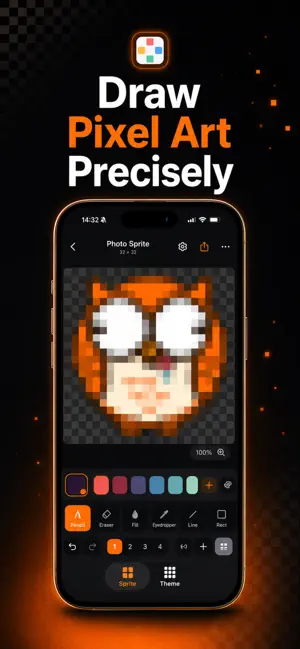
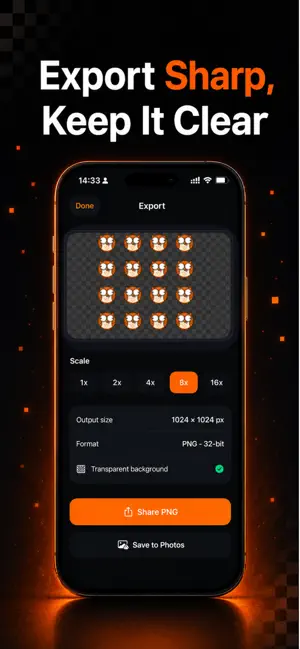
PixelCreater is a clean, modern pixel-art studio for iPhone and iPad. Sketch crisp sprites, pixelate your photos, and export transparent PNGs that are ready for games, stickers, emoji and icons. FEATURES • Precise drawing — pencil, eraser, fill, eyedropper, line and rectangle • Photo to pixel art — import a photo, pinch to choose the area, pick a resolution, done • True transparency — untouched pixels stay clear; export crisp 32-bit PNG • Pro tools — layers with opacity, mirror symmetry, adjustable brush, unlimited undo/redo • Tilemaps — arrange sprites into tilesets and level maps, export as a single PNG • Export up to 16× — sharp nearest-neighbor scaling; share or save to Photos • Stay organized — folders, duplicate, rename and manage every project • Made for touch — smooth pinch-zoom, pan and a delightful dark interface • iPhone & iPad — no account, no sign-up, just create Whether you're making game sprites, app icons, pixel emoji or just doodling, PixelCreater makes pixel art fast, precise and fun. Download PixelCreater and start creating today.
What’s new
Version 1.1.0 · Updated August 28, 2026
Version 1.1.0 — draw with an AI, and make it move. GENERATE WITH AI Describe what you want and tap Copy Prompt. Paste it into any AI chat you already use, bring the reply back, and it becomes a sprite you can edit pixel by pixel. No account, no API key, nothing to subscribe to. Set the canvas size, view angle, colour limit and how ornate it should be — then add details of your own, like a cape, a helmet or gem accents. Already have a sprite? Ask an AI to change it, and the edit comes straight back into the editor. ANIMATIONS A new tab for frame-by-frame animation. Scrub the filmstrip, duplicate a frame and nudge a few pixels, hold a frame longer where the timing needs it, then set the frame rate and looping. Export as a transparent sprite sheet for your game engine, or as an APNG that keeps every soft edge — the detail a GIF throws away. ALSO IN THIS UPDATE • Every animation frame opens in the full editor, layers and all • Folders now organise animations as well as sprites • Ask for 32×32 and you get 32×32 — a reply that comes back the wrong size is refitted, and the change is shown • Pasted replies survive messy formatting: code fences, stray commentary, curly quotes and dropped characters are repaired for you
App privacy
The developer, Hung-Yu Lin, reported these privacy practices to Apple.
Data Not Collected
The developer does not collect any data from this app.
Alternatives to PixelCreater
Looking for apps like PixelCreater? Here are 6 similar apps on the App Store.
-
 RGB Retro: Pixel Art Filter
-
 dotStudio
-
 Pixel Art Maker - Anywhere
-
 DotMaker Studio
-
 Pixel Forge: Pixel Art Maker
-
 Simple Pixel Art Maker
| App | Rating | Price | Last updated | Compare |
|---|---|---|---|---|
| PixelCreater | – | Free | August 28, 2026 | |
| RGB Retro: Pixel Art Filter | – | Free | Sep 5, 2026 | Compare |
| dotStudio | – | Free | Jan 29, 2026 | Compare |
| Pixel Art Maker - Anywhere | – | Free | Aug 4, 2026 | Compare |
| DotMaker Studio | – | Free | Aug 10, 2026 | Compare |
| Pixel Forge: Pixel Art Maker | – | Free | Sep 29, 2026 | Compare |
| Simple Pixel Art Maker | – | Free | May 13, 2026 | Compare |
Compare PixelCreater with the top alternatives: ratings, updates, ASO score and keyword gaps →