

Lifely: Envelope Budgeting
Adrian Garcia Finance iPhoneiPadiPod touch
Lifely: Envelope Budgeting is a free Finance app for iPhone and iPad by Adrian Garcia. Requires iOS 17.0. Updated October 14, 2026.
- Price
- Free
- on the App Store
- Size
- 21 MB
- Age 4+
- Updated
- Oct 14
- 2026 · v1.3
Screenshots
About Lifely: Envelope Budgeting
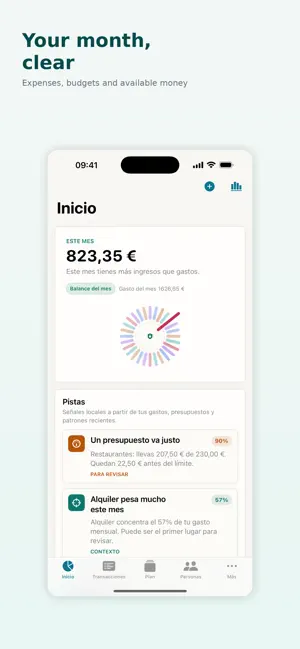
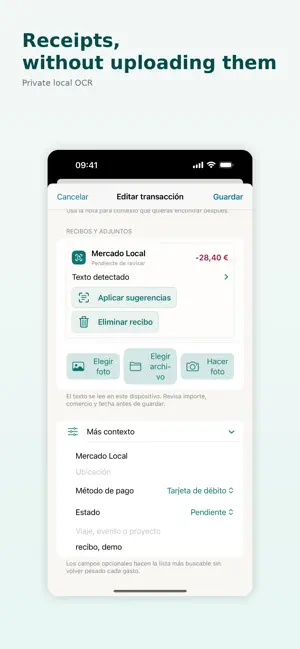
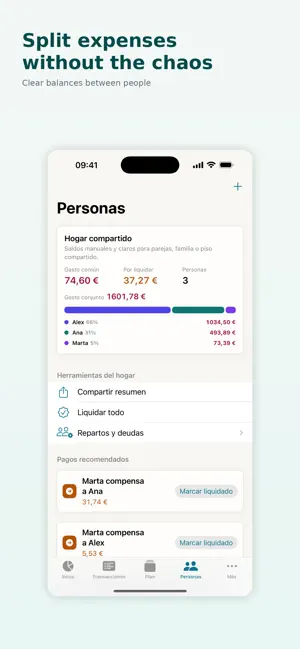
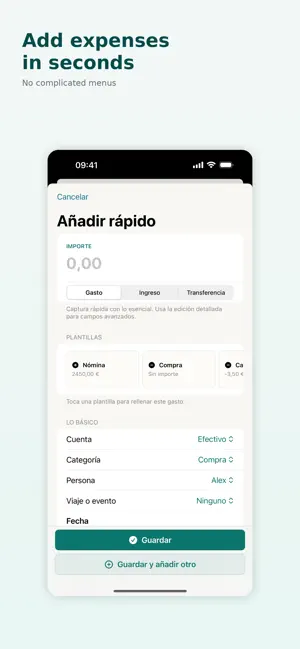
Split the month into envelopes, log what you spend in two taps, and see what is left in each one. No bank account to connect, no ads, and none of your figures leave the device. ENVELOPES, BECAUSE THAT IS HOW MONEY MAKES SENSE Food, rent, going out, the unexpected. Each envelope holds an amount and empties as you spend, so at any moment you know what is left for a thing without doing any arithmetic. It is the method your grandparents used, minus the paper. TWO TAPS AND IT IS IN Adding an expense is the thing you will do most, so it is the fastest thing in the app. Amount, category, done — straight from the widget, without even opening it. NO BANK, AND THAT IS THE POINT Lifely does not connect to your bank, never asks for credentials, and sends nothing to a server. There is no account to create and no password to remember. Your spending, budgets and receipts stay on the device, and they stay there when you have no signal. WHEN THE COST IS SHARED A flatshare, a trip with friends, a dinner. Log who paid for what and the app keeps the balances: who owes whom, and how much. No groups, no invitations, and nobody else has to install anything. TRIPS AND EVENTS, KEPT SEPARATE A trip has its own spending and should not muddy the monthly budget. In Lifely every trip, move or event is its own context, with its own total and its own split, and you can close it when it is over. THE THINGS THAT COME EVERY MONTH Subscriptions, bills, standing costs. Enter them once and they appear on their own each month, so the budget accounts for them before they land instead of after. RECEIPTS WITHOUT TYPING Photograph a receipt and Lifely reads the amount on the device itself. Neither the photo nor the text goes anywhere: the recognition is local, with no cloud involved. ALSO - Savings goals with visible progress - Debts and loans, with what is paid and what is left - Reports by category, month and context - A weekly close and a monthly review - Home Screen widgets and quick actions - Manual exports and backups, kept by you Lifely carries no ads, sells no data and talks to no bank. Your data stays yours. LIFELY PRO Recording, reading, editing and exporting your transactions is free forever, and anything you have already created stays as it is. Pro removes the three-envelope cap, opens the full history in reports, and adds shared expenses, spending contexts and receipts. Terms of Use: https://www.apple.com/legal/internet-services/itunes/dev/stdeula/ Privacy Policy: https://techy.eus/lifely/privacy
What’s new
Version 1.3 · Updated October 14, 2026
Stability improvements and small refinements.
App privacy
The developer, Adrian Garcia, reported these privacy practices to Apple.
Data Not Linked to You
The following data, which may be collected but is not linked to your identity, may be used for the following purposes:
- Purchases: Purchase History
Used for: App Functionality
Alternatives to Lifely: Envelope Budgeting
Looking for apps like Lifely: Envelope Budgeting? Here are 6 similar apps on the App Store. The highest rated is Tarsave: Daily Expense Tracker (5.0/5), and all 6 are free to download.
-
 Bow: Envelope Budget Planner
-
 BudgetBox Envelopes
-
 Moneys – Personal Finance
-
 Tarsave: Daily Expense Tracker
5.0
Tarsave: Daily Expense Tracker
5.0
-
 Budler: Budget Expense Tracker
-
 Tap to Tick
5.0
Tap to Tick
5.0
| App | Rating | Price | Last updated | Compare |
|---|---|---|---|---|
| Lifely: Envelope Budgeting | – | Free | October 14, 2026 | |
| Bow: Envelope Budget Planner | – | Free | Oct 20, 2026 | Compare |
| BudgetBox Envelopes | – | Free | Oct 16, 2026 | Compare |
| Moneys – Personal Finance | – | Free | Oct 15, 2026 | Compare |
| Tarsave: Daily Expense Tracker | 5.0 / 5 (1) | Free | Oct 22, 2026 | Compare |
| Budler: Budget Expense Tracker | – | Free | Oct 20, 2026 | Compare |
| Tap to Tick | 5.0 / 5 (4) | Free | Sep 23, 2026 | Compare |