

Tap to Tick
Thomas Klein Finance iPhoneiPadiPod touchApple Watch
Tap to Tick is a free Finance app for iPhone and iPad by Thomas Klein. Rated 5.0/5 from 4 ratings. Requires iOS 17.0. Updated September 23, 2026.
- Rating
- 5.0
- 4 ratings
- Price
- Free
- on the App Store
- Size
- 4 MB
- Age 4+
- Updated
- Sep 23
- 2026 · v1.3
Screenshots


About Tap to Tick
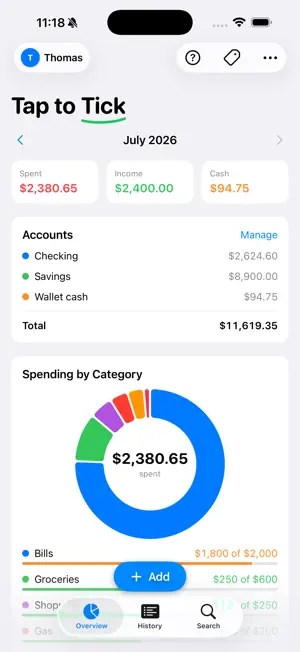
Tap to Tick is the fastest way to track where your money goes — on your own or shared with the one person who spends from the same pot as you. LOG A PURCHASE IN SECONDS Open the app (or the lock-screen widget, or ask Siri) and tap in the amount. Pick a category with one tap. Done. No sign-up, no linking your bank, no ads. SHARE ONE BUDGET Invite your partner with a single link. From then on you both see and edit the exact same purchases, categories, and account balances. Every entry shows who logged it, and you can get a quiet notification the moment they add one — so the budget is never a surprise. SEE THE WHOLE MONTH AT A GLANCE A clean overview shows what you've spent, what came in, and how each category is tracking against its monthly budget. A spending-by-category ring makes it obvious where the money went. ACCOUNTS THAT ADD UP Keep Checking, Savings, or any accounts you like. Income, card purchases, ATM cash, and transfers between accounts all update the right balance automatically. Merge two accounts into one whenever your setup changes — the history and balances combine cleanly. CASH, TOO Take out ATM cash and spend it down with "paid with cash" purchases. Your wallet balance stays honest alongside your bank accounts. SET IT AND FORGET IT Add recurring items — rent, paychecks, subscriptions — once, and they post themselves each month. PRIVATE BY DESIGN There is no Tap to Tick account and no server we can see. Your budget lives on your device and syncs through your own private iCloud. We can't read your data, and there are no trackers or ads. You can export everything to a spreadsheet, or wipe every trace from the app and iCloud, at any time. Also included: Apple Watch app, home-screen and lock-screen widgets, Siri shortcuts, and search across your whole history.
What’s new
Version 1.3 · Updated September 23, 2026
• Sharing fix: owner purchases stay linked to the shared budget when the device forgets the share root ID. • Settings and merge-duplicates polish.
App privacy
The developer, Thomas Klein, reported these privacy practices to Apple.
Data Not Collected
The developer does not collect any data from this app.
Alternatives to Tap to Tick
Looking for apps like Tap to Tick? Here are 6 similar apps on the App Store. The highest rated is Tarsave: Daily Expense Tracker (5.0/5), and all 6 are free to download.
-
 Bow: Envelope Budget Planner
-
 BudgetBox Envelopes
-
 Tarsave: Daily Expense Tracker
5.0
Tarsave: Daily Expense Tracker
5.0
-
 Lifely: Envelope Budgeting
-
 Marble Budget: Expense Tracker
5.0
Marble Budget: Expense Tracker
5.0
-
 TYM: Budget & Expense Tracker
5.0
TYM: Budget & Expense Tracker
5.0
| App | Rating | Price | Last updated | Compare |
|---|---|---|---|---|
| Tap to Tick | 5.0 / 5 (4 ratings) | Free | September 23, 2026 | |
| Bow: Envelope Budget Planner | – | Free | Oct 20, 2026 | Compare |
| BudgetBox Envelopes | – | Free | Oct 16, 2026 | Compare |
| Tarsave: Daily Expense Tracker | 5.0 / 5 (1) | Free | Oct 22, 2026 | Compare |
| Lifely: Envelope Budgeting | – | Free | Oct 14, 2026 | Compare |
| Marble Budget: Expense Tracker | 5.0 / 5 (4) | Free | Oct 12, 2026 | Compare |
| TYM: Budget & Expense Tracker | 5.0 / 5 (2) | Free | Jul 8, 2026 | Compare |
Compare Tap to Tick with the top alternatives: ratings, updates, ASO score and keyword gaps →