

MicDesk: Record & Transcribe
ZHENGQIAO JIANG Productivity iPhoneiPadiPod touch
MicDesk: Record & Transcribe is a free Productivity app for iPhone and iPad by ZHENGQIAO JIANG. Rated 5.0/5 from 1 ratings. Requires iOS 17.0.
- Rating
- 5.0
- 1 ratings
- Price
- Free
- on the App Store
- Size
- 17 MB
- Age 4+
- Updated
- Oct 18
- 2026 · v1.4.0
Screenshots


About MicDesk: Record & Transcribe
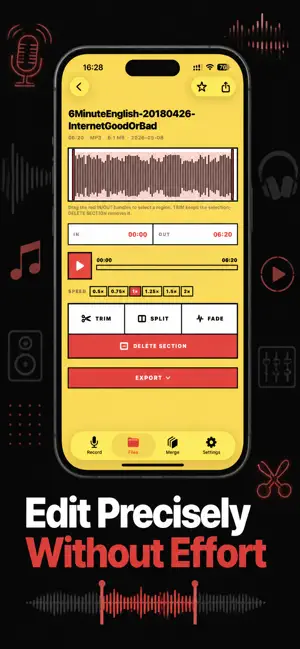
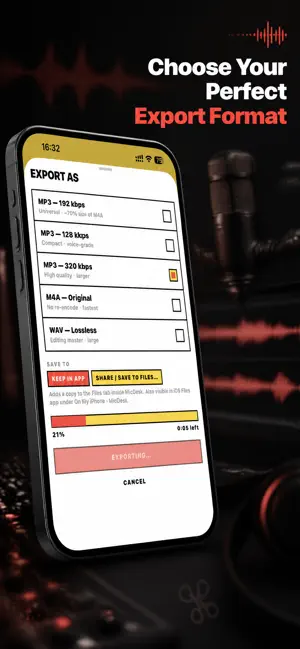
For podcasters who need to record interviews, transcribe them, and stitch them into a finished episode. For students who want to capture lectures, get a summary, and trim out the noise. For musicians who record voice memos, demo tracks, and song ideas on the go. MicDesk is the audio recorder and editor that just works. → Unlimited recording in studio quality (M4A, WAV), with stereo and external microphone support → AI transcription and live captions while you record — fully on-device → AI summary of any recording, and automatic speaker labels for interviews → Custom vocabulary teaches transcription the names and terms specific to you → Voice-activated recording starts automatically once you start speaking → Export a transcript as SRT or VTT subtitles → Precise waveform editor: trim, split, fade, delete sections → Merge multiple recordings with optional gaps and crossfades → Attach text notes and photos to any recording → Export to MP3, M4A, or WAV — share anywhere via AirDrop, Files, or any app → Background recording with Lock Screen controls PRIVACY FIRST Everything happens on your iPhone. Recordings never leave the device. AI transcription and summarization run entirely on-device — nothing is ever uploaded. No accounts. No cloud sync. No analytics. No advertising. No third-party SDKs. No tracking of any kind. Built for iOS 17. 100% offline. One-time purchase of $34.99. No subscription, no trial, no recurring charge. Terms of Use: https://taxlite.net/mic_desk/terms.html Privacy Policy: https://taxlite.net/mic_desk/privacy.html
What’s new
Version 1.4.0 · Updated October 18, 2026
What's new in 1.4.0 • Built for iPhone Duo — pages sit side by side when the phone is half open, stack above and below when it stands on a table, and nothing important lands on the fold • Works at any size — landscape, larger windows and larger text sizes now work across the whole app • Your place is kept — folding or unfolding the phone no longer resets what you were doing in the editor • Safer recording and merging — recordings saved back to back no longer overwrite each other, a merge stops and names any clip it can't read instead of skipping it, exports can be cancelled, and a phone call pauses your recording • Fixes a launch problem some people saw after updating from an older version, and tells you clearly if your library had to be repaired • Clearer wording on the purchase screen Thanks for using MicDesk!
App privacy
The developer, ZHENGQIAO JIANG, reported these privacy practices to Apple.
Data Not Collected
The developer does not collect any data from this app.
Alternatives to MicDesk: Record & Transcribe
Looking for apps like MicDesk: Record & Transcribe? Here are 6 similar apps on the App Store. The highest rated is Dictofon: AI Voice Recorder (5.0/5), and all 6 are free to download.
-
 Voicicle: AI Voice Recorder
-
 VoiceRec: Audio Recorder
-
 Recordhz: Voice Recorder
-
 SceneBox
-
 AI Text to Speech: Audio Books
2.0
-
 Dictofon: AI Voice Recorder
5.0
| App | Rating | Price | Last updated | Compare |
|---|---|---|---|---|
| MicDesk: Record & Transcribe | 5.0 / 5 (1 rating) | Free | October 18, 2026 | |
| Voicicle: AI Voice Recorder | – | Free | Sep 16, 2026 | Compare |
| VoiceRec: Audio Recorder | – | Free | Oct 11, 2026 | Compare |
| Recordhz: Voice Recorder | – | Free | Oct 2, 2026 | Compare |
| SceneBox | – | Free | Jul 23, 2026 | Compare |
| AI Text to Speech: Audio Books | 2.0 / 5 (1) | Free | Oct 3, 2026 | Compare |
| Dictofon: AI Voice Recorder | 5.0 / 5 (2) | Free | Oct 12, 2026 | Compare |