

Laiya: AI Chat & Keyboard
Talk2View Pty Ltd Productivity iPhoneiPadiPod touch
Laiya: AI Chat & Keyboard is a free Productivity app for iPhone and iPad by Talk2View Pty Ltd. Requires iOS 18.6. Updated October 12, 2026.
- Price
- Free
- on the App Store
- Size
- 86 MB
- Age 12+
- Updated
- Oct 12
- 2026 · v4.4
Screenshots


About Laiya: AI Chat & Keyboard
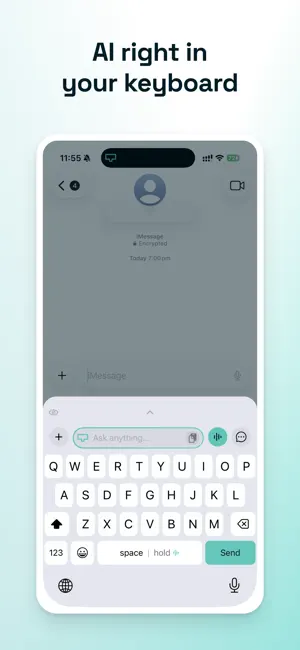
You're mid-conversation and you need help with what to say. So you leave. Open the AI app, retype the context, wait, copy the answer, come back, paste, fix the formatting. Then do it again twenty minutes later. T2Board is an AI keyboard from Talk2View. Tap the globe key to switch to it — in Messages, Mail, Slack, anywhere you type — ask your question, and tap Insert. The answer lands in the field you were already writing in. You never left. TALK INSTEAD OF TYPING Hold the space bar and speak. Let go, and your words are typed where your cursor was. No dictation screen, no "tap the mic first" — just hold, talk, release. Slide before you release to send it to the AI instead, or to translate it. SPEAK ONE LANGUAGE, SEND ANOTHER Say it your way and it arrives in theirs. Translation is ready from the start — hold to talk, slide to Translate, and your words land in the other language. Change which one any time. Useful for a team split across time zones, or family who'd rather read their own language. THE ANSWER GOES WHERE YOU'RE WRITING Every reply has Insert next to Copy. Tap it and the text drops into the message, the email, the doc — whatever had your cursor. That one button is the difference between using an AI and doing data entry for one. PROMPTS YOU ALREADY REPEAT Save the instructions you type over and over — fix the grammar, make it warmer, shorten this — and hold Send to apply one. CHOOSE YOUR MODEL Several leading AI models, switchable from the keyboard's + menu. Ask about a screenshot without leaving the app. Turn on web search when the answer needs to be current, with sources. WHY IT ADDS UP Each switch costs a few seconds and a little attention. It's the coming back that's expensive — finding your place, remembering the sentence you'd half written. Do that thirty times a day and it isn't a workflow, it's a tax. T2Board removes the trip. GETTING STARTED T2Board is a keyboard, so iOS asks you to turn it on first: Settings > General > Keyboard > Keyboards > Add New Keyboard > T2Board. Allow Full Access so it can reach the AI. The app walks you through it in about a minute, and you can try it before making an account. PRIVACY Laiya doesn't collect or send what you type in other apps: to suggest and correct words, the keyboard reads the text before your cursor on your device only. What you type in Laiya's Ask anything bar, and what you dictate, is sent over HTTPS to our backend: prompts go to the AI model you've selected, recordings are turned into text. We don't sell your data and don't train AI models on your prompts. To learn which ads lead to installs, the Laiya app uses one outside measurement tool, AppsFlyer. It receives an identifier specific to our apps on your device (never Apple's advertising identifier), your account ID, and in-app events such as the setup steps you reach or starting a subscription. It never receives your prompts, audio or attachments. Laiya's own server also records the setup steps you reach and the days you use the keyboard, never what you type or say. Full Access is required for Laiya to reach the network. Without it, the keyboard still launches and accepts input, but cannot send prompts. You can revoke Full Access at any time in Settings → General → Keyboard → Keyboards → Laiya. ACCOUNT T2Board uses your Talk2View account for sign-in. You can delete your account from inside the app at any time on the signed-in screen. Terms of Use (EULA): https://www.apple.com/legal/internet-services/itunes/dev/stdeula/ Privacy Policy: https://talk2view.com/legal/t2board-privacy
What’s new
Version 4.4 · Updated October 12, 2026
Laiya 4.4 tidies up the keyboard, and new users now see each move before they try it. - Tap the voice button on the keyboard and the line showing your model and language now sits above the waveform, not on top of it. - On iOS 26, the top of the line you're typing in the keyboard's Ask anything bar is no longer blurred. - New to Laiya? The first run shows each move in a slow demo, as many times as you need, before you try it on your own keyboard. - In the first run, dictation is tap, talk, tap: tap the voice button, say the line on screen, tap to finish. If you picked texting in another language, your words land in that language. - If Getting started is still in Chat, its Try it in a message tour now labels the keyboard itself: which key to hold for Quick Prompts, and which card to tap. Plus general polish and fixes.
App privacy
The developer, Talk2View Pty Ltd, reported these privacy practices to Apple.
Data Linked to You
The following data, which may be collected and linked to your identity, may be used for the following purposes:
- Purchases: Purchase History
- Identifiers: Device ID, User ID
- Usage Data: Product Interaction
- Contact Info: Email Address
- User Content: Photos or Videos, Audio Data, Other User Content
Used for: Analytics, App Functionality
Alternatives to Laiya: AI Chat & Keyboard
Looking for apps like Laiya: AI Chat & Keyboard? Here are 6 similar apps on the App Store. The highest rated is Francis Keyboard (5.0/5), and all 6 are free to download.
-
 ProPrompt Keyboard
-
 fix me - AI keyboard
-
 SwiftPen: AI Writing Keyboard
-
 Librio: Read What Matters
-
 Francis Keyboard
5.0
Francis Keyboard
5.0
-
 Finally: Countdown
5.0
Finally: Countdown
5.0
| App | Rating | Price | Last updated | Compare |
|---|---|---|---|---|
| Laiya: AI Chat & Keyboard | – | Free | October 12, 2026 | |
| ProPrompt Keyboard | – | Free | Jul 6, 2026 | Compare |
| fix me - AI keyboard | – | Free | Jul 5, 2026 | Compare |
| SwiftPen: AI Writing Keyboard | – | Free | Jun 27, 2026 | Compare |
| Librio: Read What Matters | – | Free | Oct 20, 2025 | Compare |
| Francis Keyboard | 5.0 / 5 (1) | Free | May 28, 2026 | Compare |
| Finally: Countdown | 5.0 / 5 (1) | Free | Aug 10, 2026 | Compare |