

AI Keyboard & Watch - Promptly
Michal Novotnik Productivity iPhoneiPadiPod touchApple Watch
AI Keyboard & Watch - Promptly is a free Productivity app for iPhone and iPad by Michal Novotnik. Requires iOS 16.6. Updated October 13, 2026.
- Price
- Free
- on the App Store
- Size
- 14 MB
- Age 4+
- Updated
- Oct 13
- 2026 · v1.2.2
Screenshots


About AI Keyboard & Watch - Promptly
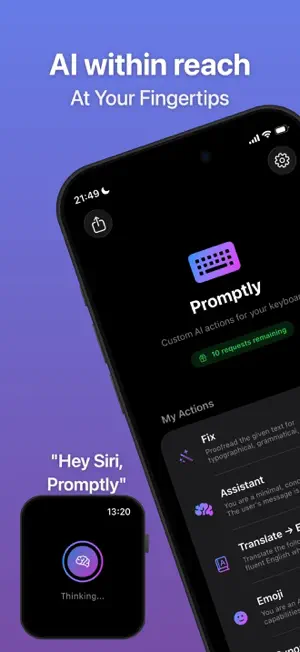
YOUR AI KEYBOARD Promptly adds smart AI buttons right into your keyboard. Create custom one-tap actions — translate, fix grammar, shorten, expand, change tone, or anything else you can describe. Works in every app where you type. One tap. Done. No copy-paste. No switching apps. BUILT-IN ACTIONS TO START • Ask — Get answers to questions • Fix — Correct grammar and spelling • Translate — Any language • Professional — Polish your tone • Emojis — Add expression • Hashtags — Generate for posts CREATE YOUR OWN - Translate to any language - Fix grammar & spelling - Rewrite in a different tone (formal, casual, friendly) - Summarize or expand text - Write anything you can describe in a prompt APPLE WATCH Promptly comes to your wrist as a voice AI assistant. - Raise your wrist and ask anything by voice - Get instant AI answers — text or read aloud - Works independently — no iPhone needed nearby - Conversation history — revisit your past questions - Text-to-Speech — answers read aloud (PRO & BYOK) - 9 premium AI voices to choose from (BYOK) - Auto-listen and auto-send for fully hands-free use WORKS IN EVERY APP Promptly works in every app with a text field: Messages, Mail, Notes, Safari, third-party messengers, social media, and more. Wherever you type on iPhone, your AI assistant is just one tap away. HOW IT WORKS 1. Enable the Promptly keyboard in Settings 2. Create custom actions (or use the built-in ones) 3. Start typing anywhere 4. Tap an action — AI generates or improves your text instantly THREE PLANS FREE — 30 requests/month Everything you need to try Promptly. Full keyboard access, custom actions, Apple Watch. PRO For power users. Higher limits (2,000/month), Text-to-Speech on Watch, priority support. BYOK (Bring Your Own Key) Use your own OpenAI API key. Unlimited requests. Choose your model. 9 TTS voices on Watch. Full control, no middleman. Your key stays on your device. PRIVACY FIRST - No accounts, no emails, no personal data collected - BYOK keys are stored locally and never touch our servers - AI requests are anonymized — we cannot read your text - No ads. No tracking. No data selling. ___ Support: [email protected] Privacy Policy: https://aipromptly.app/legal/privacy.php Terms of Use: https://aipromptly.app/legal/terms.php
What’s new
Version 1.2.2 · Updated October 13, 2026
• Optimized for iOS 27: fast, responsive typing with instant haptic feedback • Improved keyboard stability and performance • Minor fixes and improvements
App privacy
The developer, Michal Novotnik, reported these privacy practices to Apple.
Data Linked to You
The following data, which may be collected and linked to your identity, may be used for the following purposes:
- Purchases: Purchase History
- User Content: Other User Content
- Identifiers: User ID
- Usage Data: Other Usage Data
- Diagnostics: Other Diagnostic Data
Used for: Third-Party Advertising, App Functionality
Alternatives to AI Keyboard & Watch - Promptly
Looking for apps like AI Keyboard & Watch - Promptly? Here are 6 similar apps on the App Store. The highest rated is AI Writing Tools - FireType (5.0/5), and all 6 are free to download.
-
 LudyType - AI Keyboard
4.7
-
 AI Writing Tools - FireType
5.0
-
 AI+Pro
3.3
-
 Fontfy: Smart AI Keyboard
4.0
-
 PromptKit - AI Prompt Manager
-
 Lumiere: OpenClaw & AI Agents
5.0
| App | Rating | Price | Last updated | Compare |
|---|---|---|---|---|
| AI Keyboard & Watch - Promptly | – | Free | October 13, 2026 | |
| LudyType - AI Keyboard | 4.7 / 5 (16) | Free | Apr 1, 2026 | Compare |
| AI Writing Tools - FireType | 5.0 / 5 (2) | Free | Oct 13, 2026 | Compare |
| AI+Pro | 3.3 / 5 (3) | Free | Oct 6, 2026 | Compare |
| Fontfy: Smart AI Keyboard | 4.0 / 5 (14) | Free | Apr 5, 2026 | Compare |
| PromptKit - AI Prompt Manager | – | Free | Aug 17, 2026 | Compare |
| Lumiere: OpenClaw & AI Agents | 5.0 / 5 (2) | Free | Feb 21, 2026 | Compare |