

AI Keyboard: Rewrite & Grammar
Aleksandr Ziulikov Productivity iPhoneiPadiPod touch
AI Keyboard: Rewrite & Grammar is a free Productivity app for iPhone and iPad by Aleksandr Ziulikov. Requires iOS 15.0. Updated September 23, 2026.
- Price
- Free
- on the App Store
- Size
- 42 MB
- Age 4+
- Updated
- Sep 23
- 2026 · v1.0.9
Screenshots

About AI Keyboard: Rewrite & Grammar
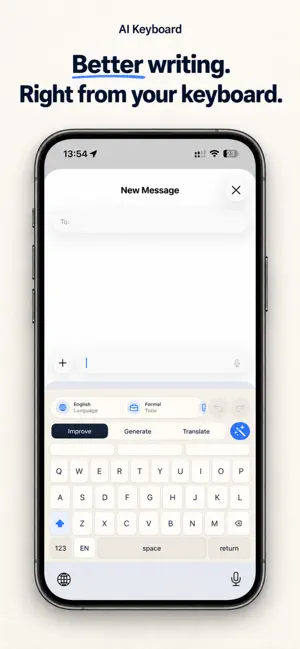
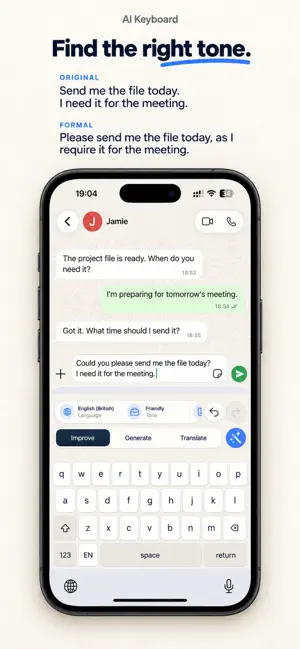
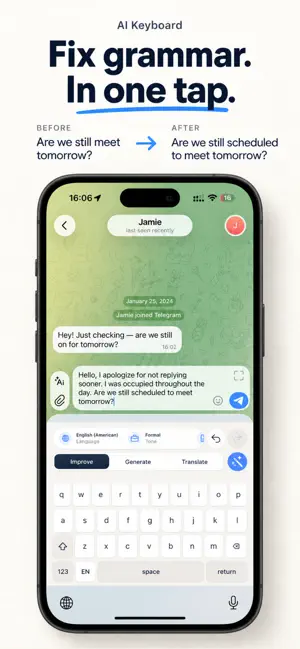
Write clearly. Find the right words. Make every message sound like you. AI Keyboard brings writing assistance to your iPhone keyboard. Rewrite a rough draft, fix grammar, generate a message, or translate text while you write in your favorite apps. From a quick reply to an important work email, choose the language, tone, and context that fit what you want to say. • Improve your writing Fix grammar and spelling, smooth out awkward sentences, and make your text clearer while keeping your meaning. • Create a draft from an idea Describe what you want to say and generate a starting point for an email, message, social post, thank-you note, or other everyday text. • Find the right tone Sound professional, friendly, confident, or concise. Adjust how strongly the tone changes your text, or create a custom tone for your own style. • Translate as you write Translate between supported languages directly from the keyboard. Choose your output language to communicate across work, travel, and everyday conversations. • Write for the situation Adapt your wording for work emails, job applications, customer support, apologies, and more. Create custom situations for the messages you write most often. • Choose your language level Adjust the complexity of your writing, from simple wording to more advanced expression. Open the main app to turn recorded speech into text, extract text from an image, and revisit your saved results. You stay in control: choose when to run an AI action, review the result, and use Undo to restore the previous text after a keyboard replacement. Some features require a subscription and are subject to usage limits. Terms of Use: https://www.apple.com/legal/internet-services/itunes/dev/stdeula/
What’s new
Version 1.0.9 · Updated September 23, 2026
Improved support for 23 interface languages on iOS. The built-in keyboard is now more responsive, with more accurate suggestions. Added C2 English level, fixed bugs, and improved app stability.
App privacy
The developer, Aleksandr Ziulikov, reported these privacy practices to Apple.
Data Linked to You
The following data, which may be collected and linked to your identity, may be used for the following purposes:
- Purchases: Purchase History
- User Content: Other User Content
- Identifiers: User ID, Device ID
Used for: App Functionality
Data Not Linked to You
The following data, which may be collected but is not linked to your identity, may be used for the following purposes:
- Diagnostics: Crash Data
Used for: App Functionality
Alternatives to AI Keyboard: Rewrite & Grammar
Looking for apps like AI Keyboard: Rewrite & Grammar? Here are 6 similar apps on the App Store.
-
 FastType AI Keyboard
-
 Laynor: AI Keyboard
-
 ProPrompt Keyboard
-
 번역키보드
번역키보드
-
 Fetch: AI Keyboard & Prompts
-
 fix me - AI keyboard
| App | Rating | Price | Last updated | Compare |
|---|---|---|---|---|
| AI Keyboard: Rewrite & Grammar | – | Free | September 23, 2026 | |
| FastType AI Keyboard | – | Free | Aug 24, 2026 | Compare |
| Laynor: AI Keyboard | – | Free | Aug 2, 2026 | Compare |
| ProPrompt Keyboard | – | Free | Jul 6, 2026 | Compare |
| 번역키보드 | – | Free | Jul 1, 2026 | Compare |
| Fetch: AI Keyboard & Prompts | – | Free | Jul 24, 2026 | Compare |
| fix me - AI keyboard | – | Free | Jul 5, 2026 | Compare |