

ReadAloud: Text to Speech PDF
ZHENGQIAO JIANG Productivity iPhoneiPadiPod touchApple Watch
ReadAloud: Text to Speech PDF is a free Productivity app for iPhone and iPad by ZHENGQIAO JIANG. Rated 4.5/5 from 17 ratings. Requires iOS 18.0.
- Rating
- 4.5
- 17 ratings
- Price
- Free
- on the App Store
- Size
- 199 MB
- Age 4+
- Updated
- Nov 18
- 2026 · v1.9.4
Screenshots
Save to Pinterest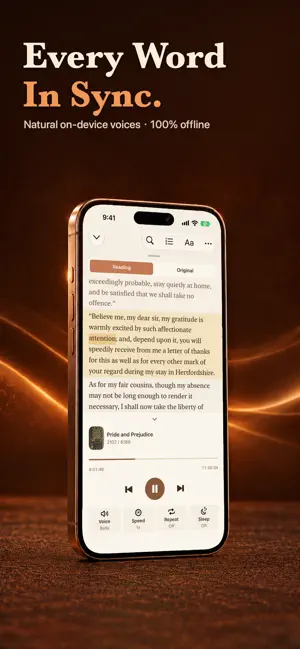


About ReadAloud: Text to Speech PDF
ReadAloud turns any text into natural speech with on-device voices: neural voices for English, Chinese, Japanese, Korean, Spanish, French, German and more, plus Apple's system voices. Listen to PDFs, Word documents, EPUB and Kindle books, articles, photos, and any text in 60+ languages, 100% offline. WHAT YOU CAN DO • LISTEN TO ANYTHING Type or paste text, import a PDF, Word (DOCX), EPUB, or Kindle (MOBI/AZW3, DRM-free) document, scan a photo or a printed page with your camera, or paste a URL to hear the article text. Auto language detection picks the right voice for you. Jump between chapters in EPUB and Word documents, and skip straight to any page in a PDF. Long books, including web novels with thousands of chapters, are supported. • NATURAL VOICES, ON YOUR DEVICE Neural voices run entirely on your iPhone, so there is no internet needed once a voice is downloaded. Japanese and Korean now have four neural voices each. All Apple system voices are included too (Default, Enhanced and Premium), with a voice quality indicator that guides you to the best voice for each language. • LISTEN IN THE CAR WITH CARPLAY Browse your library and folders, pick up where you stopped, see what plays next, and change speed from the Now Playing screen. CarPlay is part of ReadAloud Pro. • PICK UP WHERE YOU LEFT OFF Your place in every document is remembered. Continue from the Lock Screen, AirPods, the widget, Apple Watch or CarPlay. The widget keeps your last document and shows what plays next. Your library syncs between your devices through your own iCloud. • CLEAN, DISTRACTION-FREE READING Reference and footnote numbers are automatically skipped so they never interrupt what you are listening to, and academic two-column PDFs read in the correct order. In any PDF, drag a frame in the Reading Area to choose what is read, so headers, footers and page numbers stay out. • YOUR RULES Teach ReadAloud how to say a word with the Pronunciation Dictionary, and skip anything you do not want read with Skip Rules. • ORGANIZE WITH FOLDERS Sort your Library into folders, so long reading lists stay easy to find. • TAP TO DEFINE Long-press any sentence while listening to look up a word's definition, highlight it, or add a bookmark, without losing your place. • READING THEMES Choose System, Sepia, or Night page themes, adjustable line spacing, and a dyslexia-friendly OpenDyslexic font option. • POWERFUL PLAYBACK Speed control from 0.75x to 2x, drag the progress bar to jump to any point, current sentence highlighted with auto-scroll, skip by sentence, a sleep timer, full Lock Screen and AirPods support, and true background playback so you can listen while doing anything else. While charging, ReadAloud can prepare about an hour of audio ahead for smoother playback. • EXPORT TO MP3 & NOTES Select multiple documents in your Library and export them all to MP3 at once, completely on-device, or export your highlights and bookmarks as a Markdown notes file. Share via AirDrop, Files, or Messages. • SIRI, SHORTCUTS & SHARING Send text, files or web links to ReadAloud from the share sheet in any app, or hand any text to it from Siri and the Shortcuts app. • APPLE WATCH & IPAD See what is reading and control playback from your wrist, and enjoy a layout designed for the bigger iPad screen. PRIVACY FIRST No account, no analytics, no tracking, no third-party SDKs, and we collect no data. Your documents are read and voiced on your device. The network is used only to fetch a web link you paste, to download voices, to sync your library through your own iCloud, and for purchases. Start by importing documents with 10 minutes of real listening included. ReadAloud Pro unlocks unlimited listening, CarPlay, audio export, the Pronunciation Dictionary and Skip Rules. The yearly plan includes an eligible 3-day free trial. Monthly and lifetime options are also available. Terms of Use: https://taxlite.net/read_aloud/terms.html Privacy Policy: https://taxlite.net/read_aloud/pri…
Ratings & reviews
4.5
17 ratings
What’s new
Version 1.9.4 · Updated November 18, 2026
ReadAloud 1.9.4 fixes several problems and makes reading smoother. • Fixed: on an iPad held upright, and on the inner screen of iPhone Duo held upright, the Library showed no books and Settings pages did not open. • Fixed: after the book that was playing was deleted, the app stopped saving your place in other books until it was restarted. • Fixed: a crash that could happen when the book open in the player was deleted. • Fixed: some PDFs with no selectable text were imported as empty books. They are now read with text recognition. • The reading view scrolls more smoothly and opens faster, especially in long books. • If headphones or the car disconnect while a book is still being prepared, it no longer starts playing on the phone’s speaker. • In the car, a book that takes a moment to prepare shows its title and cover right away.
App privacy
The developer, ZHENGQIAO JIANG, reported these privacy practices to Apple.
Data Not Collected
The developer does not collect any data from this app.
Alternatives to ReadAloud: Text to Speech PDF
Looking for apps like ReadAloud: Text to Speech PDF? Here are 6 similar apps on the App Store. The highest rated is Shortboard: Shortcut Widgets (5.0/5), and all 6 are free to download.
-
 FavPicks:bookmarks saver
3.5
-
 Interview: Voice to Transcript
4.8
-
 Shortboard: Shortcut Widgets
5.0
-
 Email Generator - Temp Mail
4.9
-
 Inky Habits: Daily Tracker
-
 HabitWing – Life Tracker
4.6
| App | Rating | Price | Last updated | Compare |
|---|---|---|---|---|
| ReadAloud: Text to Speech PDF | 4.5 / 5 (17 ratings) | Free | November 18, 2026 | |
| FavPicks:bookmarks saver | 3.5 / 5 (8) | Free | Nov 13, 2026 | Compare |
| Interview: Voice to Transcript | 4.8 / 5 (16) | Free | Nov 15, 2026 | Compare |
| Shortboard: Shortcut Widgets | 5.0 / 5 (8) | Free | Oct 22, 2026 | Compare |
| Email Generator - Temp Mail | 4.9 / 5 (10) | Free | Oct 26, 2026 | Compare |
| Inky Habits: Daily Tracker | – | Free | Oct 31, 2026 | Compare |
| HabitWing – Life Tracker | 4.6 / 5 (5) | Free | Nov 1, 2026 | Compare |