

Shortboard: Shortcut Widgets
Mucahit KOKDEMIR Productivity iPhoneiPadiPod touch
Shortboard: Shortcut Widgets is a free Productivity app for iPhone and iPad by Mucahit KOKDEMIR. Rated 5.0/5 from 8 ratings. Requires iOS 27.0.
- Rating
- 5.0
- 8 ratings
- Price
- Free
- on the App Store
- Size
- 22 MB
- Age 4+
- Updated
- Oct 22
- 2026 · v1.0.1
Screenshots


About Shortboard: Shortcut Widgets
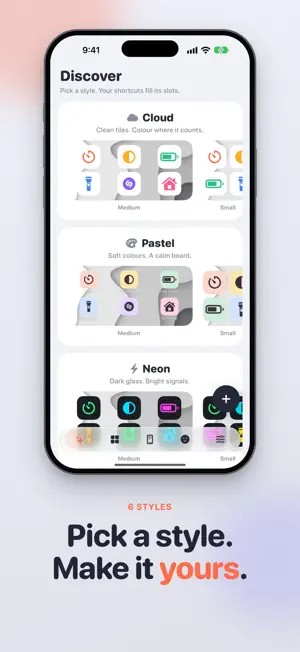
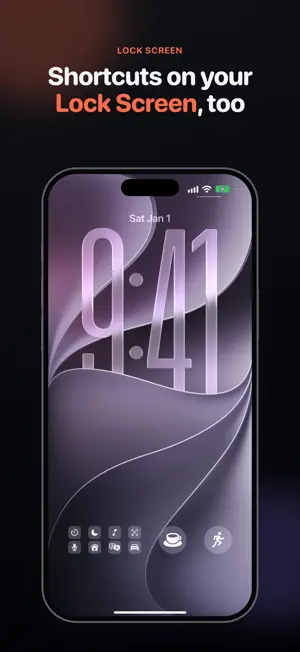
Tap a tile, and it just runs. Shortboard turns your Home Screen and Lock Screen widgets into boards of shortcut buttons. Every tile runs a shortcut, an app or an App Shortcut right in place, and the Shortcuts app never comes forward. Pick a style, choose your shortcuts in Edit Widget, and give each one an icon that makes sense. The things you do every day, one tap each. BOARDS FOR EVERY SIZE • Each board is made for one widget size: Small (up to 20 slots), Medium (40), Large (50) or Extra Large (64). • Add slots and the tiles get smaller. The rows arrange themselves. • Shortcuts, apps and App Shortcuts sit side by side on the same board. • Touch and hold the widget, tap Edit Widget, pick a board and choose your shortcuts. They fill the slots in order. MAKE IT YOURS • Six styles: Cloud, Pastel, Neon, Mono, Candy and Ink. Start from a look in Discover, or from a blank board. • Light, dark, or matching your system. • Go transparent and your wallpaper shows through, or pick a colored background. • Shortboard · Liquid Glass puts any board on a frosted glass widget. • Give any slot its own icon, glyph color and tile color. Fine-tune the font, tile shape, icon size and spacing. • Preview transparent boards on your own wallpaper before they go on your Home Screen. ICONS THAT MAKE SENSE • Shortcuts reach a widget without icons. Give each one a symbol, an emoji, a photo or an app's icon, matched by its name. • Name a shortcut after an app in your library, and it wears that app's icon automatically. • Keep a library of your apps with their real icons, plus dark icons for dark boards. • Bring your apps in fast: import the apps on your iPhone from iOS's app usage log, share an app's App Store page to Shortboard, search the App Store, pick from popular apps, or bring over your apps from WidgetLoft. LOCK SCREEN • A wide board fits up to eight shortcuts, in one or two rows. • A round button holds one shortcut or four. • Lock Screen boards are free and unlimited. SHORTCUTS AUTOMATION • Shortboard adds its own actions to the Shortcuts app: Create Board, Update Board, Find Boards, Delete Board, Set Shortcut Icon and Remove Shortcut Icon. • Run them from an automation, and your boards and widgets update on their own. EASY FROM THE FIRST TAP • An animated welcome and short tours on the real screens show you around. • Step-by-step guides for everything Shortboard can do, in Settings → How it works. • Available in nearly 40 languages. PRIVATE BY DESIGN • No account, no tracking, no ads. • Your boards, icons and settings stay on your device. • Only app names and App Store IDs go to Apple, to fetch icons. • Purchases and Pro screen visits go to our purchase service under a random ID. • The app usage log is read on your iPhone and never uploaded. FREE AND PRO • Free: 2 Home Screen boards with up to 8 slots each. Lock Screen boards and the app library are free and unlimited. • Shortboard Pro unlocks unlimited Home Screen boards and every slot each size allows, up to 64 shortcuts on one board. • Pro is a one-time purchase, not a subscription. Pay once, keep it forever. Questions or ideas? Write to [email protected] Website: https://mucahitk.com/shortboard Terms of Use: https://mucahitk.com/shortboard/terms-of-use Privacy Policy: https://mucahitk.com/shortboard/privacy-policy
Ratings & reviews
5.0
8 ratings
What’s new
Version 1.0.1 · Updated October 22, 2026
• Redeem Code on the Pro screen, for promo and giveaway codes. • Choose Shortboard's language in Settings. • Share Shortboard from Settings. • A cleaner Settings screen.
App privacy
The developer, Mucahit KOKDEMIR, reported these privacy practices to Apple.
Data Linked to You
The following data, which may be collected and linked to your identity, may be used for the following purposes:
- Purchases: Purchase History
- Usage Data: Product Interaction
- Identifiers: User ID, Device ID
Used for: Analytics, App Functionality
Alternatives to Shortboard: Shortcut Widgets
Looking for apps like Shortboard: Shortcut Widgets? Here are 6 similar apps on the App Store. The highest rated is Life Metro: Daily Planner (5.0/5), and all 6 are free to download.
-
 Interview: Voice to Transcript
4.9
-
 FavPicks:bookmarks manager
3.9
-
 Inky Habits: Daily Tracker
-
 Email Generator - Temp Mail
4.9
-
 HabitWing – Life Tracker
4.6
-
 Life Metro: Daily Planner
5.0
| App | Rating | Price | Last updated | Compare |
|---|---|---|---|---|
| Shortboard: Shortcut Widgets | 5.0 / 5 (8 ratings) | Free | October 22, 2026 | |
| Interview: Voice to Transcript | 4.9 / 5 (8) | Free | Oct 29, 2026 | Compare |
| FavPicks:bookmarks manager | 3.9 / 5 (7) | Free | Oct 17, 2026 | Compare |
| Inky Habits: Daily Tracker | – | Free | Oct 31, 2026 | Compare |
| Email Generator - Temp Mail | 4.9 / 5 (10) | Free | Oct 26, 2026 | Compare |
| HabitWing – Life Tracker | 4.6 / 5 (5) | Free | Nov 1, 2026 | Compare |
| Life Metro: Daily Planner | 5.0 / 5 (1) | Free | Oct 29, 2026 | Compare |