

Booklet Maker: PDF Brochures
MOBILE ALCHEMY LTD Productivity iPhoneiPadiPod touchMac
Booklet Maker: PDF Brochures is a free Productivity app for iPhone and iPad by MOBILE ALCHEMY LTD. Rated 3.5/5 from 2 ratings. Requires iOS 17.0.
- Rating
- 3.5
- 2 ratings
- Price
- Free
- on the App Store
- Size
- 15 MB
- Age 4+
- Updated
- Oct 1
- 2026 · v2.3
Screenshots

About Booklet Maker: PDF Brochures
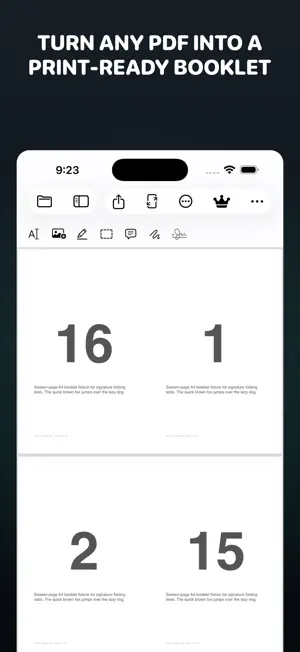
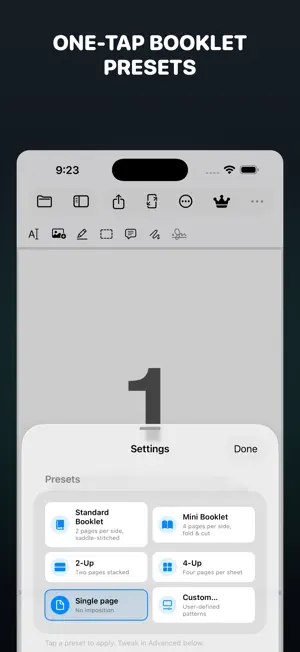
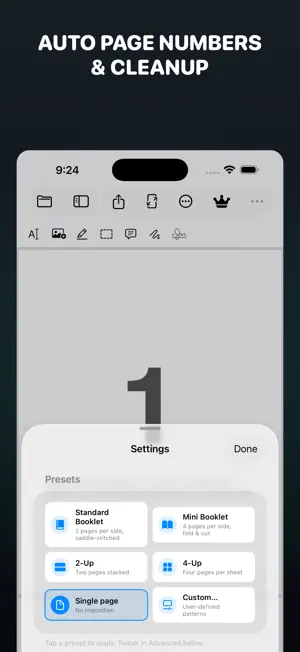
BookletMaker is a PDF imposition app for Mac, iPad and iPhone that turns any PDF into a print-ready, saddle-stitched booklet. Teachers, churches, zine makers and print shops use it for service programs, songbooks, class workbooks, manuals and zines. It runs entirely on your device — no account, no upload — and is localized into 34 languages on macOS 14+, iPadOS 17+ and iOS 17+. COMMON QUESTIONS How do I print a PDF as a booklet? Open the PDF, choose a preset, then print or save — page ordering, rotation and duplex flipping are automatic, including a guided mode for printers without duplex. What is PDF imposition? Arranging pages so folded sheets read in the right order. BookletMaker does saddle-stitched booklets, mini-booklets, 2-up, 4-up and custom n-up grids, with signature folding and creep compensation. Does BookletMaker upload my files? No. Every page is processed on your device; your documents never leave your Mac, iPad or iPhone. Is BookletMaker free? Yes — core booklet printing is free. BookletMaker Pro adds signature folding, creep, punch gutter and batch tools; anyone who bought the app before 2.0 keeps everything unlocked. KEY FEATURES • Imposition: saddle-stitched booklets, mini-booklets (4 pages per side), 2-up, 4-up, or any custom n-up grid — page ordering and rotation handled for you. • Signature folding: single booklet up to 32-page signatures; creep compensation keeps the trim cut straight. • Cleanup: crop margins, remove blank pages, split landscape spreads, rasterize corrupted PDFs, choose the media/crop/trim box as imposition source. • Page numbers: position, size, color, format ({n} or {n} of {total}), starting offset, skip-first for covers. • Hole punch: margins for 2- or 3-hole binders with visual guides, plus a punch gutter for cutting sheets in half. • Watermark + letterhead: adjustable text watermark; any 1-page PDF as letterhead on all, first, odd or even pages. • Color & ink: grayscale conversion and content lightening for draft prints. • Inline editor (Mac): edit text directly in the PDF — original font, size and color preserved, surrounding content reflows. • Find & Replace across the document with proper font matching. • Highlight, redact, sticky notes, ink and signature stamps. • OCR: Apple Vision makes scanned PDFs searchable; export recognized text. • Output: save the imposed PDF, flatten annotations, password-protect, export pages as PNG/JPEG/TIFF, copy as PDF, or print via AirPrint. • Booklet Factory: batch-impose whole folders with your saved presets. • Presets sync across your devices via iCloud. BOOKLETMAKER PRO Core booklet printing is free forever. Pro unlocks the advanced print shop — booklet signatures, creep, punch gutter, hole punch, watermarks, letterhead and batch processing: • Pro Yearly — US$29.99/year • Pro Monthly — US$3.99/month • Pro Lifetime — US$49.99 (one-time) Bought BookletMaker before 2.0? Everything stays unlocked for you at no charge. Subscriptions renew automatically unless cancelled at least 24 hours before the period ends; manage or cancel in your App Store account settings. Prices may vary by region. Terms of Use: https://www.apple.com/legal/internet-services/itunes/dev/stdeula/ Privacy Policy: https://bookletmaker.app/privacy PRIVATE BY DESIGN BookletMaker runs entirely on your device. No accounts, no cloud, no telemetry.
What’s new
Version 2.3 · Updated October 1, 2026
• New in Pro: the Greeting Card layout. Print a 4-page PDF on one side of a single sheet, fold it twice, and you have a card. Made for Christmas cards, invitations and thank-you notes. • Pro trial: from 15 October, new subscribers can try the yearly plan for one week. The upgrade screen explains the trial before you subscribe. • Small fixes. Questions or ideas: [email protected]
App privacy
The developer, MOBILE ALCHEMY LTD, reported these privacy practices to Apple.
Data Linked to You
The following data, which may be collected and linked to your identity, may be used for the following purposes:
- Purchases: Purchase History
Used for: Analytics, App Functionality
Data Not Linked to You
The following data, which may be collected but is not linked to your identity, may be used for the following purposes:
- Usage Data: Product Interaction
- Diagnostics: Other Diagnostic Data
Used for: Analytics
Alternatives to Booklet Maker: PDF Brochures
Looking for apps like Booklet Maker: PDF Brochures? Here are 6 similar apps on the App Store.
-
 Foldly: Booklet PDF
-
 Business Card Cut Planner2026
-
 Crop & Trim PDF Margins
-
 Notedown: Markdown Notes
-
 ExplorePDF: Read, Fill & Sign
-
 Dayfeed: Holiday Calendar
| App | Rating | Price | Last updated | Compare |
|---|---|---|---|---|
| Booklet Maker: PDF Brochures | 3.5 / 5 (2 ratings) | Free | October 1, 2026 | |
| Foldly: Booklet PDF | – | Free | Sep 30, 2026 | Compare |
| Business Card Cut Planner2026 | – | 0.29 USD | Jul 26, 2026 | Compare |
| Crop & Trim PDF Margins | – | Free | Oct 3, 2026 | Compare |
| Notedown: Markdown Notes | – | Free | Jul 19, 2026 | Compare |
| ExplorePDF: Read, Fill & Sign | – | Free | Oct 2, 2026 | Compare |
| Dayfeed: Holiday Calendar | – | Free | Sep 30, 2026 | Compare |