

Crop & Trim PDF Margins
MASATO MIYAZAWA Productivity iPhoneiPadiPod touch
Crop & Trim PDF Margins is a free Productivity app for iPhone and iPad by MASATO MIYAZAWA. Requires iOS 15.1. Updated October 3, 2026.
- Price
- Free
- on the App Store
- Size
- 24 MB
- Age 4+
- Updated
- Oct 3
- 2026 · v1.1.7
Screenshots
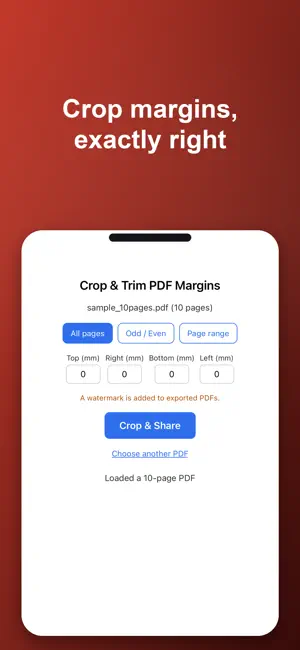


About Crop & Trim PDF Margins
Crop margins, exactly right — top, bottom, left, and right, in millimeters. Crop & Trim PDF Margins is a PDF app built around exactly one thing: cropping margins. When a scanned document has margins that are too wide, or leftover white space from a print layout, this fixes it right there, right now. Pricing (In-App Purchase) - The app is free to download. Cropping margins, saving, and sharing are all free. - PDFs made with the free version include a logo (watermark). - Removing the logo is a one-time purchase (non-consumable). No feature limits, no usage limits. - This is not a subscription — pay once, with no recurring charges. No ads. Three modes - All pages: apply the same margins (top/bottom/left/right, in mm) to every page - Odd/Even: set different margins for odd and even pages — handy for double-sided scans - Page range: specify target pages using a format like "1-3,5,7-9" Simple by design Open the app, pick a PDF, enter your margins. No manual needed. We stripped away the extras and focused on one thing: cropping margins. Text and links stay intact OCR text, hyperlinks, and bookmarks are all preserved. The app only changes each page's visible area (the CropBox) — it does not regenerate the page content itself. It also handles rotated pages (e.g. scanned PDFs) correctly, cropping margins according to the orientation you actually see on screen. Private by design - Fully offline: your files never leave your device. Your privacy stays yours - One-time purchase: buy once, use forever. No subscription - No ads, no account required Great for when you want to: - Trim down oversized margins on a scanned document to make it easier to read - Fix mismatched margins on odd/even pages from a double-sided scan - Crop margins on specific pages to make a document look consistent Password-protected PDFs are not supported.
What’s new
Version 1.1.7 · Updated October 3, 2026
Now available in Korean, Traditional Chinese, German, and French.
App privacy
The developer, MASATO MIYAZAWA, reported these privacy practices to Apple.
Data Not Collected
The developer does not collect any data from this app.
Alternatives to Crop & Trim PDF Margins
Looking for apps like Crop & Trim PDF Margins? Here are 6 similar apps on the App Store. The highest rated is AI Chat - Ask AI Chatbot (1.0/5), and all 6 are free to download.
-
 Listenary: Transcribe & Search
-
 Trimly: PDF Crop
-
 ChatTAP: Chat AI, Assistant
-
 AI Chat - Ask AI Chatbot
1.0
AI Chat - Ask AI Chatbot
1.0
-
 PDF Splitter - Page Extract
-
 Salmon PDF
| App | Rating | Price | Last updated | Compare |
|---|---|---|---|---|
| Crop & Trim PDF Margins | – | Free | October 3, 2026 | |
| Listenary: Transcribe & Search | – | Free | Sep 3, 2026 | Compare |
| Trimly: PDF Crop | – | Free | Sep 28, 2026 | Compare |
| ChatTAP: Chat AI, Assistant | – | Free | Dec 2, 2025 | Compare |
| AI Chat - Ask AI Chatbot | 1.0 / 5 (1) | Free | Aug 11, 2026 | Compare |
| PDF Splitter - Page Extract | – | Free | Sep 26, 2026 | Compare |
| Salmon PDF | – | Free | Sep 25, 2026 | Compare |