

Listenary: Transcribe & Search
Byoungho Kim Productivity iPhoneiPadiPod touch
Listenary: Transcribe & Search is a free Productivity app for iPhone and iPad by Byoungho Kim. Requires iOS 26.0. Updated September 3, 2026.
- Price
- Free
- on the App Store
- Size
- 2 MB
- Age 4+
- Updated
- Sep 3
- 2026 · v1.0.2
Screenshots


About Listenary: Transcribe & Search
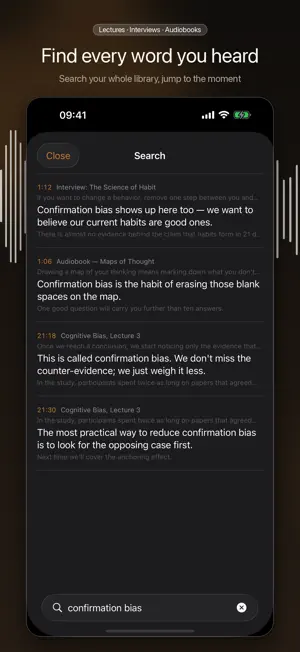
You know you heard it. You just can't find where. Listenary lets you read along with long audio — lectures, interviews, audiobooks — and find the exact moment any phrase was spoken, anywhere in your library. All of it on your device. READ THE SENTENCE YOU'RE HEARING The current sentence highlights and scrolls itself. Keep it to a few subtitle lines, or read the whole thing like a document. TAP A SENTENCE, HEAR IT See something you want to hear again? Tap it and playback jumps right there. No more thumbing the rewind button. SEARCH EVERY RECORDING YOU OWN Search "confirmation bias" and get every moment it was spoken across your whole library, with timestamps. Tap a result and it plays. Substring search works for Korean, Japanese and Chinese, where word spacing isn't reliable. HIGHLIGHT AND ANNOTATE Long-press a sentence to file it under Important, Replay, Unclear, Quote or Idea, and add a note. Review only what you marked. COME BACK THREE DAYS LATER How far it rewinds depends on how long you were away. Resume from your last highlight, a little earlier, or right where you stopped. BUILT FOR LONG FILES A three- to five-hour file is processed in chunks. Start listening as soon as the beginning is ready, and closing the app resumes from the last finished chunk instead of starting over. FULLY ON-DEVICE No account, no uploads, no analytics SDKs. Your audio and transcripts never leave your device. Speech recognition uses Apple's on-device recognition. SUPPORTED FORMATS MP3 · M4A · M4B (DRM-free) Note: protected audiobooks (Audible AAX, Apple Books) are not supported, and the app provides no DRM removal or downloading. It is for files you legally own. LANGUAGES Transcription: Korean, English, Japanese, Simplified Chinese Interface: Korean, English, Japanese, Simplified Chinese FREE · All playback (speed, skip, sleep timer, chapters, lock screen controls) · Transcribe 3 titles, first 60 minutes each · Search within the current title · 20 highlights LISTENARY PRO (one-time purchase, not a subscription) · Unlimited transcription · Search across your whole library · Unlimited highlights, notes and export · Customizable smart rewind
What’s new
Version 1.0.2 · Updated September 3, 2026
• See transcription progress right in your library — a progress ring and percentage appear over the cover while a title is being transcribed. • Fixed speech dropping out for several seconds at a time, and words coming out garbled, in long recordings. This showed up most in audiobooks with chapter changes or background music. • Long-press a title to re-transcribe it from the start. Use this to apply these improvements to books you have already transcribed.
App privacy
The developer, Byoungho Kim, reported these privacy practices to Apple.
Data Not Collected
The developer does not collect any data from this app.
Alternatives to Listenary: Transcribe & Search
Looking for apps like Listenary: Transcribe & Search? Here are 6 similar apps on the App Store. The highest rated is Audiary - Text to Speech (5.0/5), and 5 of the 6 are free to download.
-
 LiveCaptions - See What's Said
-
 Transcribz: AI Transcription
-
 Transcriptinator
-
 Crop & Trim PDF Margins
-
 Nogmi: Record & Transcribe
-
 Audiary - Text to Speech
5.0
Audiary - Text to Speech
5.0
| App | Rating | Price | Last updated | Compare |
|---|---|---|---|---|
| Listenary: Transcribe & Search | – | Free | September 3, 2026 | |
| LiveCaptions - See What's Said | – | Free | Aug 11, 2026 | Compare |
| Transcribz: AI Transcription | – | Free | Oct 5, 2026 | Compare |
| Transcriptinator | – | Free | Sep 12, 2026 | Compare |
| Crop & Trim PDF Margins | – | Free | Oct 3, 2026 | Compare |
| Nogmi: Record & Transcribe | – | 2.99 USD | Oct 18, 2026 | Compare |
| Audiary - Text to Speech | 5.0 / 5 (2) | Free | Sep 14, 2026 | Compare |