

Soft Focus Glow Photo Editor
Yoshinobu Ikeda Photo & Video iPhoneiPadiPod touch
Soft Focus Glow Photo Editor is a free Photo & Video app for iPhone and iPad by Yoshinobu Ikeda. Rated 5.0/5 from 1 ratings. Requires iOS 15.5.
- Rating
- 5.0
- 1 ratings
- Price
- Free
- on the App Store
- Size
- 78 MB
- Age 4+
- Updated
- Apr 29
- 2026 · v1.0
Screenshots
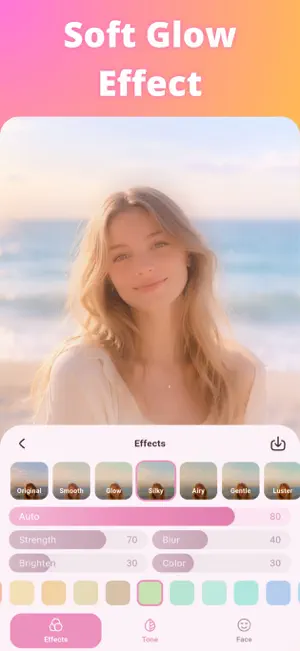


About Soft Focus Glow Photo Editor
This is a photo editing app that lets you create soft, dreamy photos with a gentle soft focus effect. It also supports a natural skin-smoothing effect created by soft focus, skin tone brightening, and face retouching, so you can give selfies and portraits a soft, polished look. It is useful not only when you want to add a light, airy atmosphere to the whole photo, but also when you want to make skin look smoother, subtly adjust facial balance, or fine-tune brightness and saturation to create your preferred look. With soft focus and filters for dreamy effects, along with practical editing tools such as face retouching and color adjustment, you can do everything in one app. The AI-powered face retouching feature lets you finely adjust details such as eye size, nose size, and face line. In addition, the app includes a soft-focus-based skin-smoothing effect, skin tone brightening, color filters, cropping, rotation, and flipping, making it a great choice both for users who want quick and easy photo editing and for those who want more detailed control. You can also save your previous edits and continue later, making it easy to come back and finish a photo you were working on. The app supports saving in JPG and PNG formats, as well as image sharing, with a strong focus on ease of use. Since image processing can be done offline, it is also designed with privacy in mind. Main features - High-quality filters for creating soft, dreamy photos - Natural skin-smoothing effect through soft focus - Skin tone brightening - AI-powered face detection - Face retouching tools (face size, eye size, nose size, V-line, and more) - Color adjustment tools (brightness, contrast, saturation, and more) - Color filters - Crop tool - Rotate and flip tools - Soft focus effect - Save and resume previous edits - Save in JPG or PNG - Image sharing - Simple and intuitive controls - Beautiful, refined design - Privacy-friendly offline image processing
App privacy
The developer, Yoshinobu Ikeda, reported these privacy practices to Apple.
Data Used to Track You
The following data may be used to track you across apps and websites owned by other companies:
- Location: Coarse Location
- Identifiers: Device ID
- Usage Data: Product Interaction, Advertising Data, Other Usage Data
- Diagnostics: Crash Data, Performance Data, Other Diagnostic Data
Data Linked to You
The following data, which may be collected and linked to your identity, may be used for the following purposes:
- Location: Coarse Location
- Identifiers: Device ID
- Usage Data: Product Interaction, Advertising Data, Other Usage Data
- Diagnostics: Crash Data, Performance Data, Other Diagnostic Data
Used for: Third-Party Advertising, Analytics, Product Personalization, App Functionality
Alternatives to Soft Focus Glow Photo Editor
Looking for apps like Soft Focus Glow Photo Editor? Here are 6 similar apps on the App Store. The highest rated is PixHush - Photo Blur Editor (5.0/5), and all 6 are free to download.
-
 Soft Focus - Glowroll
-
 Blur Photo Effect - Pixelate
-
 PixHush - Photo Blur Editor
5.0
PixHush - Photo Blur Editor
5.0
-
 SnapSilk: Dreamy Edits
-
 Tan Filter: Skin Tone Editor
-
 Luma Face: Portrait Retouch
5.0
Luma Face: Portrait Retouch
5.0
| App | Rating | Price | Last updated | Compare |
|---|---|---|---|---|
| Soft Focus Glow Photo Editor | 5.0 / 5 (1 rating) | Free | April 29, 2026 | |
| Soft Focus - Glowroll | – | Free | May 12, 2026 | Compare |
| Blur Photo Effect - Pixelate | – | Free | Aug 23, 2025 | Compare |
| PixHush - Photo Blur Editor | 5.0 / 5 (1) | Free | Sep 7, 2026 | Compare |
| SnapSilk: Dreamy Edits | – | Free | Feb 20, 2024 | Compare |
| Tan Filter: Skin Tone Editor | – | Free | Sep 6, 2026 | Compare |
| Luma Face: Portrait Retouch | 5.0 / 5 (1) | Free | Oct 26, 2026 | Compare |