

Luma Face: Portrait Retouch
伟斌 吴 Photo & Video iPhoneiPadiPod touch
Luma Face: Portrait Retouch is a free Photo & Video app for iPhone and iPad by 伟斌 吴. Rated 5.0/5 from 1 ratings. Requires iOS 18.0. Updated October 26, 2026.
- Rating
- 5.0
- 1 ratings
- Price
- Free
- on the App Store
- Size
- 78 MB
- Age 4+
- Updated
- Oct 26
- 2026 · v1.2.8
Screenshots


About Luma Face: Portrait Retouch
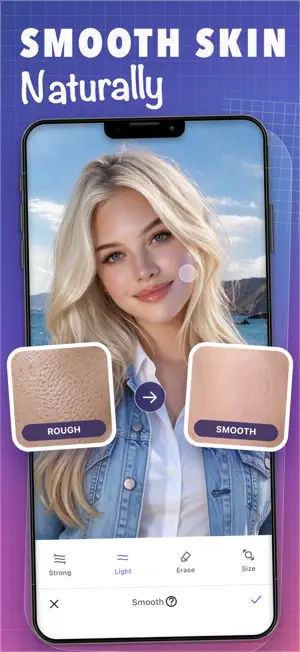
Some photos just feel right the moment you see them. The light was right. The smile was good. But a late night left a hint of dark circles. The camera made a few blemishes stand out. Your skin tone does not look as bright as you remember it. You do not want to delete the photo, and you do not want to edit yourself into someone else. You simply want the photo to feel closer to the moment as it really was. That is what Luma Face is made for. It does not redefine your face. It carefully refines the details. Luma Face focuses on natural, restrained portrait retouching. It is not about dramatic changes. It helps you take care of the small details that actually matter: soften blemishes, even out skin tone, bring clarity back to the eyes, and make facial and body contours look cleaner and more natural. The person in the photo is still you. There is a little less of what the camera exaggerated, and a little more of the good state you remember. Want to keep it simple? Start with Magic: Magic combines acne removal, skin smoothing, skin tone adjustment, dark circle reduction, eye brightening, eye enlargement, and face slimming based on your preferences. Tap once and let different effects work together. No need to keep testing complex parameters, and no single adjustment has to look overdone. Want to retouch a photo carefully? Take your time: Maybe you only want to soften one blemish. Maybe you want the area under your eyes to look more relaxed, your teeth to look naturally brighter, or a certain contour to be adjusted just slightly. In Luma Face, you can use a rich set of manual retouching tools: - Local skin smoothing to soften imperfections while preserving skin texture - Automatic or manual acne removal for distracting spots and small blemishes - Local wrinkle reduction for smoother, more natural details - Skin tone adjustment to better match the mood of the photo - Sculpt to gently refine face and body contours - Teeth whitening, eye brightening, and dark circle reduction to bring back a natural sense of vitality - Resize and Stretch for precise local proportion adjustments Want more control over facial features? Use Reshape: Adjust face width and chin shape. Fine-tune eye size, height, angle, and spacing; nose size, width, bridge, length, and tip; and mouth size, position, upper lip, and lower lip. Work on one detail at a time while checking the portrait as a whole. Adjust selected areas with Resize and Stretch: Resize enlarges or shrinks a selected area. Stretch lengthens or shortens part of a photo. Make small changes, compare with the original, and stop when the proportions feel right. Create your own atmosphere: - 36 filters across 7 collections, with styles ranging from fresh and natural to rich and expressive - Adjustable saturation, brightness, contrast, color temperature, sharpness, fade, and vignette effects - Radial blur and linear blur to help bring the visual focus back to the subject - Crop and rotate tools to complete the composition Try freely without worrying about going too far: Undo or redo at any time, or press and hold the photo to compare before and after. Zoom in to inspect pixel-level details until every change feels just right. Privacy by design: The photos you choose and the generated face analysis data are processed on your own device. Luma Face does not upload your photos or face analysis data to servers. Most features in the app are free, and Magic can help solve most common retouching needs. If you want even more precise adjustments, subscribe to or purchase Luma Face Pro to unlock all advanced manual beauty tools. Terms of Use: https://magvpc4jn5.feishu.cn/wiki/CRdFwz3mGiTo2FkoK8bcFI8FnAh Privacy Policy: https://magvpc4jn5.feishu.cn/wiki/SaaxwWgGUiLpP7kwRsmcSzton9e
What’s new
Version 1.2.8 · Updated October 26, 2026
Performance Optimization and Bug Fixes
App privacy
The developer, 伟斌 吴, reported these privacy practices to Apple.
Data Not Linked to You
The following data, which may be collected but is not linked to your identity, may be used for the following purposes:
- Diagnostics: Crash Data
Used for: Analytics
Alternatives to Luma Face: Portrait Retouch
Looking for apps like Luma Face: Portrait Retouch? Here are 6 similar apps on the App Store. The highest rated is Bodylook-AI Body & Face Editor (5.0/5), and all 6 are free to download.
-
 Face Editor: AI Pimple Remover
4.7
Face Editor: AI Pimple Remover
4.7
-
 Body Shape Editor – ReShape Me
-
 Bodylook-AI Body & Face Editor
5.0
Bodylook-AI Body & Face Editor
5.0
-
 Body・Face Perfect Editor, Tune
3.7
Body・Face Perfect Editor, Tune
3.7
-
 Body Face Tune: Photo
3.2
Body Face Tune: Photo
3.2
-
 AI Face Editor & Face Makeup
1.0
AI Face Editor & Face Makeup
1.0
| App | Rating | Price | Last updated | Compare |
|---|---|---|---|---|
| Luma Face: Portrait Retouch | 5.0 / 5 (1 rating) | Free | October 26, 2026 | |
| Face Editor: AI Pimple Remover | 4.7 / 5 (44) | Free | Sep 28, 2026 | Compare |
| Body Shape Editor – ReShape Me | – | Free | Sep 25, 2026 | Compare |
| Bodylook-AI Body & Face Editor | 5.0 / 5 (1) | Free | Mar 11, 2026 | Compare |
| Body・Face Perfect Editor, Tune | 3.7 / 5 (6) | Free | Jun 1, 2025 | Compare |
| Body Face Tune: Photo | 3.3 / 5 (4) | Free | Jul 8, 2026 | Compare |
| AI Face Editor & Face Makeup | 1.0 / 5 (1) | Free | Aug 1, 2026 | Compare |