

DocSignly: PDF Editor & Sign
Speed AI Labs Productivity iPhoneiPadiPod touch
DocSignly: PDF Editor & Sign is a free Productivity app for iPhone and iPad by Speed AI Labs. Requires iOS 15.1. Updated April 29, 2026.
- Price
- Free
- on the App Store
- Size
- 45 MB
- Age 4+
- Updated
- Apr 29
- 2026 · v1.0
Screenshots


About DocSignly: PDF Editor & Sign
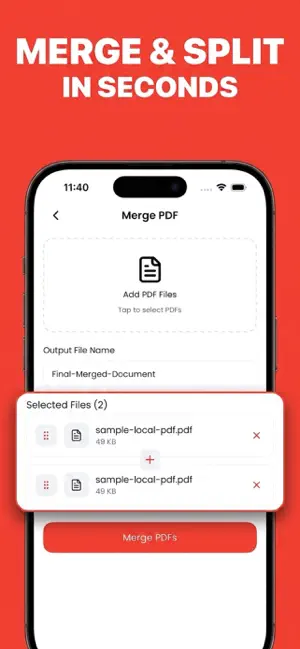
DocSignly is a PDF toolkit for people who work from their phone. Sign contracts, merge documents, turn photos into PDFs, split, reorder, delete pages and shrink large files — all without a laptop, a scanner, or an account. Every tool runs on your device. Your documents are not uploaded to any cloud, are not scanned for advertising, and never leave your phone. ◆ SIGN PDFS ON YOUR PHONE Open any PDF, draw your signature with your finger, drop it where it belongs, and save. Built for contracts, leases, NDAs, waivers and employee forms. The signed PDF is a clean, shareable file — no watermarks, no "signed with" banners. ◆ MERGE & SPLIT Combine multiple PDFs into a single file with drag-to-reorder. Or split a long PDF by page range or extract specific pages. Useful for turning a stack of receipts into one tidy report or pulling a single page out of a long contract. ◆ PHOTOS TO PDF Pick images from your library (or take new ones) and convert them into a single PDF in one tap. Choose page size (A4 / Letter / Auto) and orientation. Great for receipts, whiteboard notes, insurance docs and forms that arrived on paper. ◆ COMPRESS PDFS Shrink large PDFs so they fit under email size limits or send faster over mobile data. The app rebuilds the PDF with compact object streams — no quality loss for typical text and vector content. ◆ REORDER & DELETE PAGES Drag pages into the order you want, or tick pages you don't need and remove them. A live preview shows the result before you save. ◆ PRIVATE BY DESIGN • No sign-up, no email, no cloud account • No analytics SDKs, no third-party trackers, no ads • All processing runs on your iPhone • Works offline on a plane, on the subway, anywhere ◆ WHO DOCSIGNLY IS FOR • Busy professionals signing contracts and sending clean PDFs on the go • Freelancers handling invoices, NDAs and scope docs • Students signing leases, submitting scanned assignments • Anyone who hates the print → sign → scan → email loop ◆ WHAT'S INSIDE • Sign PDF with finger-drawn signature (place anywhere on any page) • Merge multiple PDFs (drag to reorder pages first) • Split PDF by range, extract pages, or split every page • Photo / Image to PDF (A4, Letter or Auto; Portrait or Landscape) • Compress PDF (object-stream rebuild) • Reorder pages (drag and drop) • Delete pages (tick to remove) ◆ FREE + PREMIUM The first 2 tool operations are free — no sign-up, no card required. Upgrade to DocSignly Premium for unlimited access to every tool. Available plans may include weekly, monthly, or yearly subscriptions. Pricing may vary by region and is shown in the app before purchase. Payment will be charged to your Apple ID account at confirmation of purchase. Subscriptions renew automatically unless cancelled at least 24 hours before the end of the current period. Manage subscriptions anytime in Apple ID Settings. ◆ WHAT DOCSIGNLY DOES NOT DO To stay honest: DocSignly does not convert PDFs to Word or Excel, does not run OCR on scanned text, does not provide cloud sync, and is not a replacement for notarised e-signatures. If you need legally notarised signing (eIDAS, DocuSign-style audit trails), use a service built for that. No subscription traps. No forced account. Your files stay yours. Terms of Use: https://www.apple.com/legal/internet-services/itunes/dev/stdeula/ Privacy Policy: https://sites.google.com/view/speedaiapps/docsignly-pdf
App privacy
The developer, Speed AI Labs, reported these privacy practices to Apple.
Data Not Collected
The developer does not collect any data from this app.
Alternatives to DocSignly: PDF Editor & Sign
Looking for apps like DocSignly: PDF Editor & Sign? Here are 6 similar apps on the App Store. The highest rated is PDF Editor and Scanner Pro (5.0/5), and all 6 are free to download.
-
 Real Signature for Jira/JSM
-
 PDF AI: Doc Scan Editor Reader
-
 PDF Editor and Scanner Pro
5.0
PDF Editor and Scanner Pro
5.0
-
 MRS: PDF Editor, Scanner & OCR
5.0
MRS: PDF Editor, Scanner & OCR
5.0
-
 Pagira - HTML & Comic Reader
4.0
Pagira - HTML & Comic Reader
4.0
-
 Symple: Field Force Management
| App | Rating | Price | Last updated | Compare |
|---|---|---|---|---|
| DocSignly: PDF Editor & Sign | – | Free | April 29, 2026 | |
| Real Signature for Jira/JSM | – | Free | Nov 13, 2025 | Compare |
| PDF AI: Doc Scan Editor Reader | – | Free | Aug 15, 2024 | Compare |
| PDF Editor and Scanner Pro | 5.0 / 5 (2) | Free | Jul 25, 2025 | Compare |
| MRS: PDF Editor, Scanner & OCR | 5.0 / 5 (2) | Free | Sep 30, 2026 | Compare |
| Pagira - HTML & Comic Reader | 4.0 / 5 (2) | Free | Oct 19, 2026 | Compare |
| Symple: Field Force Management | – | Free | Mar 12, 2026 | Compare |