

PDF Editor and Scanner Pro
Muhammad Hassan Ali Productivity iPhoneiPadiPod touch
PDF Editor and Scanner Pro is a free Productivity app for iPhone and iPad by Muhammad Hassan Ali. Rated 5.0/5 from 2 ratings. Requires iOS 17.6.
- Rating
- 5.0
- 2 ratings
- Price
- Free
- on the App Store
- Size
- 7 MB
- Age 4+
- Updated
- Jul 25
- 2025 · v1.4
Screenshots
About PDF Editor and Scanner Pro
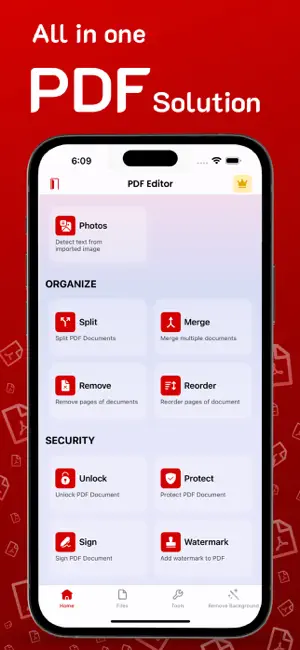
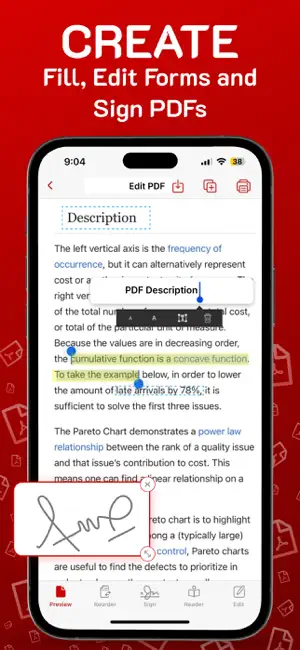
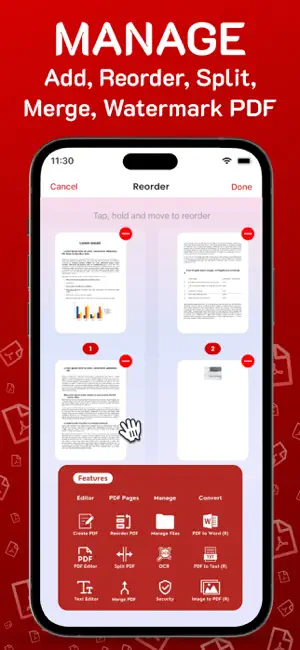
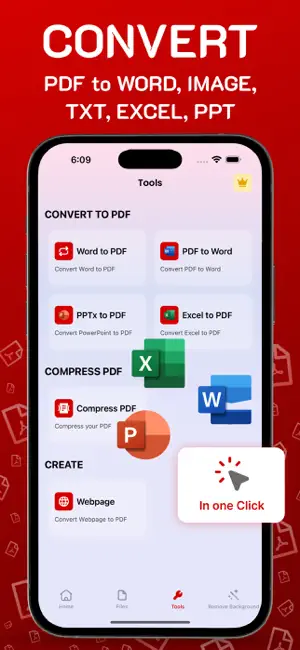
All-in-One PDF Editor & Converter – Edit, Read, Convert, Annotate & More! Unlock the ultimate PDF Experience on your iPhone or iPad with our Powerful and intuitive PDF Editor & Converter. Whether you're a Student, Professional or everyday user, Our app Simplifies how you work with Documents—Anytime, Anywhere. With a sleek interface and lightning-fast Performance, Manage your PDF files Effortlessly. Edit, Convert, Organize, Scan, Annotate and Sign Documents in just a few taps. No desktop Required. POWERFUL PDF FEATURES AT YOUR FINGERTIPS: - Read & View PDFs Smoothly: • Open large files instantly • Enjoy Vertical or Horizontal Scroll Modes • Use Dark or Sepia themes for a Better Reading Experience • Search Text, Zoom and Navigate Pages with Ease - Edit PDFs Like a Pro: • Edit text Directly within PDF files • Modify Fonts, Alignment and Paragraph Structure • Add, Remove, Rotate and Crop Images • Reorder, Rotate or Delete Pages - Convert to and from PDF • Convert Word, Excel, PowerPoint, JPG/PNG or text files into PDF • Export PDFs to DOCX, XLSX, PPTX and image formats • Convert Scanned Documents into Searchable Text with OCR - Scan & Create PDFs: • Turn Paper Documents into Digital PDFs using your Camera • Auto-Detect Edges, Apply filters and Enhance Clarity • Save, edit and share instantly - Annotate & Highlight: • Highlight important text • Add comments, sticky notes, drawings or custom stamps • Collaborate by sharing annotated documents - Fill & Sign Forms Easily: • Fill out Interactive or Static PDF forms • Add your E-Signature using Apple Pencil or finger • Save Reusable Signatures for quick Access - Compress & Organize PDFs: • Reduce file size while preserving quality • Merge multiple PDFs into one • Split files, reorder pages, and manage your document flow Subscription Terms & Details: - Payment will be charged to your iTunes account once the purchase is confirmed. - Your subscription will automatically renew unless auto-renew is turned off at least 24 hours before the end of the current period. - You can manage your subscription and disable auto-renewal at any time via your Account Settings. - Your account will be charged for renewal within 24 hours prior to the end of the current subscription period. Whether you're Reading a Contract, Signing a form, Scanning a Receipt or Converting a Presentation, This App puts the full Power of PDF Editing and Conversion in your Pocket. Download Now! and Experience the Easiest way to work with PDFs on your iOS Device. Privacy Policy: https://sites.google.com/view/pdfscans/privacy-policy Terms of Use: https://sites.google.com/view/pdfscans/terms-of-service For any questions or requests, please contact us at: https://sites.google.com/view/pdfscans/contact
What’s new
Version 1.4 · Updated July 25, 2025
- We hear your feedback and added UI improvements. - Bug fixes and performance improvements.
App privacy
The developer, Muhammad Hassan Ali, reported these privacy practices to Apple.
Data Not Collected
The developer does not collect any data from this app.
Alternatives to PDF Editor and Scanner Pro
Looking for apps like PDF Editor and Scanner Pro? Here are 6 similar apps on the App Store. The highest rated is PDF Editor - Read, Fill & Edit (4.7/5), and all 6 are free to download.
-
 PDF Editor : Editor
4.2
PDF Editor : Editor
4.2
-
 PDF Editor - Read, Fill & Edit
4.7
PDF Editor - Read, Fill & Edit
4.7
-
 PDF Editor - Read, Scan & Sign
-
 PDF Clipper
1.5
PDF Clipper
1.5
-
 Revisit: Save Posts & Links
-
 DocSignly: PDF Editor & Sign
| App | Rating | Price | Last updated | Compare |
|---|---|---|---|---|
| PDF Editor and Scanner Pro | 5.0 / 5 (2 ratings) | Free | July 25, 2025 | |
| PDF Editor : Editor | 4.3 / 5 (4) | Free | Aug 20, 2026 | Compare |
| PDF Editor - Read, Fill & Edit | 4.7 / 5 (6) | Free | Aug 10, 2026 | Compare |
| PDF Editor - Read, Scan & Sign | – | Free | Aug 12, 2026 | Compare |
| PDF Clipper | 1.5 / 5 (2) | Free | Jan 7, 2026 | Compare |
| Revisit: Save Posts & Links | – | Free | Aug 30, 2026 | Compare |
| DocSignly: PDF Editor & Sign | – | Free | Apr 29, 2026 | Compare |