

PDF Editor - Read, Fill & Edit
Asad Ahsan Productivity iPhoneiPadiPod touchMac
PDF Editor - Read, Fill & Edit is a free Productivity app for iPhone and iPad by Asad Ahsan. Rated 4.7/5 from 7 ratings. Requires iOS 15.6.
- Rating
- 4.7
- 7 ratings
- Price
- Free
- on the App Store
- Size
- 40 MB
- Age 4+
- Updated
- Aug 10
- 2026 · v1.0.1
Screenshots

About PDF Editor - Read, Fill & Edit
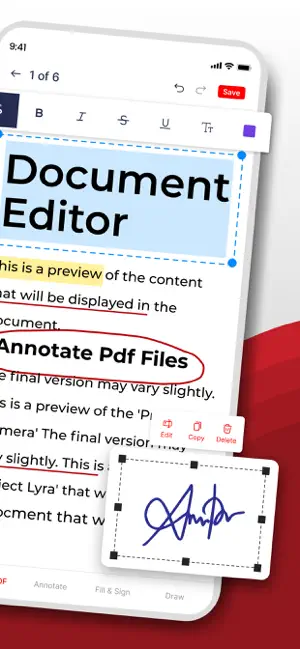
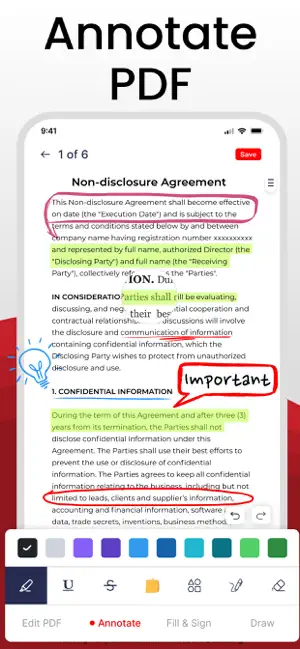
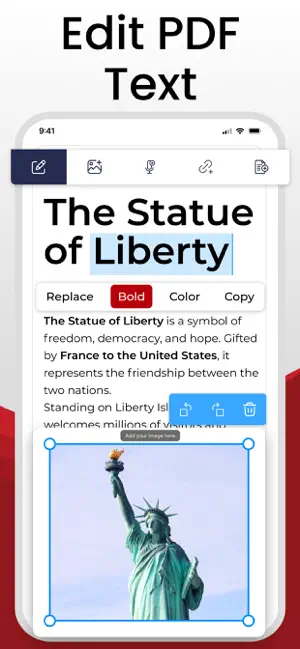
Need a simple way to manage and edit PDF files? PDF Editor app to edit PDF text, sign documents, annotate pages, merge files, and compress your PDFs all in one place. Whether you need to edit documents for work, school, or personal use, this all-in-one file editor gives you everything you need to manage any pdf file editor. With this pdf editor edit everything, you can edit text, insert images, add audio notes, create clickable links, highlight important information, sign pdf forms, and organize pages in seconds. The app is designed with a clean and simple interface, so anyone can edit files, annotate pages, and manage documents without any complexity. All-in-One PDF Editing: • Edit PDF text easily • Add images, stickers and shapes • Insert audio notes and web links • Modify font, color and alignment • Erase unwanted content • Organize pages in any pdf file Annotation Tools: • Highlight text • Underline & strikeout • Add notes & comments • Draw with the freehand pen tool • Add shapes & arrows • Eraser tool for fixes The annotation tools make it simple to read, study, and review any pdf file. Fill & Sign PDF Forms: • Draw signature manually • Add digital signature • Insert stamps • Sign PDF documents Signing forms and contracts becomes easy with the built-in sign pdf tool. Merge & Split PDFs: • Merge multiple files into a single document • Split a pdf file by pages or sections • Extract selected pages For students, office tasks, and business workflows. Compress PDF: • Reduce file size without losing quality • Choose compression levels • Ideal for email, uploading & sharing Why Use This PDF Editor? • Clean and user-friendly interface • Accurate tools to edit files and edit documents • Multiple PDF tools in one lightweight • For students, teachers, office users, freelancers & businesses This PDF editor lets you edit PDF text easily and brings all essential tools together so you can manage any PDF file editor. From simple edits to advanced tasks like annotations, merging, and compression, everything is done in seconds. Who Can Use PDF Editor? Students: Edit assignments, annotate notes, highlight key points, and complete PDF worksheets. Teachers & Educators: Review papers, add comments, fill forms, and sign documents digitally. Office Workers: Merge reports, compress PDFs, sign contracts, and edit text. Lawyers & Professionals: Highlight legal documents, add signatures, and organize multi-page PDFs. Experience the future of PDF text editor. Download PDF Editor now and take full control over every PDF you work with! Disclaimer: Our app is fully original and independently developed. Your privacy is our priority, and we never share your personal data with any third parties. Privacy Policy: https://www.itspdf.com/policy Terms of Service: https://www.itspdf.com/termsandconditions Support Email: [email protected]
Ratings & reviews
4.7
7 ratings
What’s new
Version 1.0.1 · Updated August 10, 2026
- More functionalities added - Support for new devices - User friendly Interface - Performance Enhancement - Bug Fixed
App privacy
The developer, Asad Ahsan, reported these privacy practices to Apple.
Data Used to Track You
The following data may be used to track you across apps and websites owned by other companies:
- Location: Precise Location
Data Linked to You
The following data, which may be collected and linked to your identity, may be used for the following purposes:
- Location: Precise Location
Used for: Third-Party Advertising
Alternatives to PDF Editor - Read, Fill & Edit
Looking for apps like PDF Editor - Read, Fill & Edit? Here are 6 similar apps on the App Store. The highest rated is DocFill – PDF Editor & Merger (5.0/5), and all 6 are free to download.
-
 PDF Text Editor ‑ Edit PDF
4.3
-
 DocFill – PDF Editor & Merger
5.0
-
 PDF Editor: PDF fill and sign
5.0
-
 MRS: PDF Editor, Scanner & OCR
5.0
-
 PDF Editor : Editor
4.2
-
 PDF Manager: Editor & Scanner
5.0
| App | Rating | Price | Last updated | Compare |
|---|---|---|---|---|
| PDF Editor - Read, Fill & Edit | 4.7 / 5 (7 ratings) | Free | August 10, 2026 | |
| PDF Text Editor ‑ Edit PDF | 4.3 / 5 (7) | Free | Aug 13, 2026 | Compare |
| DocFill – PDF Editor & Merger | 5.0 / 5 (1) | Free | Jun 11, 2026 | Compare |
| PDF Editor: PDF fill and sign | 5.0 / 5 (1) | Free | Sep 1, 2026 | Compare |
| MRS: PDF Editor, Scanner & OCR | 5.0 / 5 (2) | Free | Sep 30, 2026 | Compare |
| PDF Editor : Editor | 4.3 / 5 (4) | Free | Aug 20, 2026 | Compare |
| PDF Manager: Editor & Scanner | 5.0 / 5 (3) | Free | Sep 16, 2026 | Compare |