
PDF Manager: Editor & Scanner
LLC Poison Studio Productivity iPhoneiPadiPod touch
PDF Manager: Editor & Scanner is a free Productivity app for iPhone and iPad by LLC Poison Studio. Rated 5.0/5 from 3 ratings. Requires iOS 18.6.
- Rating
- 5.0
- 3 ratings
- Price
- Free
- on the App Store
- Size
- 40 MB
- Age 17+
- Updated
- Sep 16
- 2026 · v16.1
Screenshots


About PDF Manager: Editor & Scanner
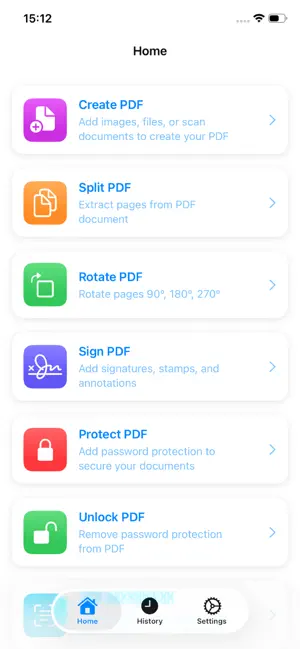
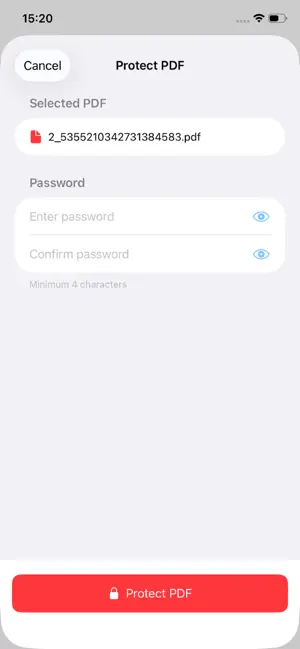
A powerful and easy-to-use application for comprehensive work with PDF files. It combines all the necessary functions in one tool, from creating documents to protecting and editing them. Ideal for students, office staff, and anyone who needs to process PDF files quickly and efficiently. Main functions: Creating a PDF Convert images, text documents, or scans to a high‑quality PDF file in a couple of taps. Popular formats are supported: JPG, PNG, DOCX, TXT, etc. Split PDF Easily select the desired pages and split a large document into several small files for easy sending or storage. Page Rotation Correct the orientation of individual pages or the entire document — you will no longer have to print and scan again. Signature of documents Add an electronic signature directly to the application: draw it by hand, upload an image, or use the text version. PDF Protection Set a password for the document to restrict access or prohibit editing. Set up the viewing and printing rights for maximum security. Removing protection Open protected PDF files if you know the password. Restore access to your documents without unnecessary difficulties. Text Recognition (OCR) Turn scans and images into editable text. Multiple languages are supported — extract information from any documents. Why choose Manager PDF? A simple interface — all the tools are at hand, everyone can figure it out. High speed — processing files without delay, even on weak devices. Security — the data remains on your device, no information is transferred to the cloud. Offline mode — work with PDF without an internet connection. No ads — no annoying banners during operation. Compact size — the application does not take up much space in the smartphone's memory. Download Manager PDF now and manage your documents easily and efficiently! Privacy policy: https://poison-studio.am/index.php/manager-pdf/manager-pdf-privacy-policy/ Terms & Conditions: https://poison-studio.am/index.php/manager-pdf/manager-pdf-terms-conditions/
What’s new
Version 16.1 · Updated September 16, 2026
App improvement. Bug fix
App privacy
The developer, LLC Poison Studio, reported these privacy practices to Apple.
Data Used to Track You
The following data may be used to track you across apps and websites owned by other companies:
- Identifiers: Device ID
- Usage Data: Product Interaction
- Diagnostics: Crash Data
Data Linked to You
The following data, which may be collected and linked to your identity, may be used for the following purposes:
- Identifiers: Device ID
- Usage Data: Product Interaction
- Diagnostics: Crash Data
Used for: Analytics
Alternatives to PDF Manager: Editor & Scanner
Looking for apps like PDF Manager: Editor & Scanner? Here are 6 similar apps on the App Store. The highest rated is MRS: PDF Editor, Scanner & OCR (5.0/5), and all 6 are free to download.
-
 PDF Editor - Edit PDF & Sign
2.2
PDF Editor - Edit PDF & Sign
2.2
-
 PDF Text Editor ‑ Edit PDF
4.3
PDF Text Editor ‑ Edit PDF
4.3
-
 PDF Editor - Read, Fill & Edit
4.8
PDF Editor - Read, Fill & Edit
4.8
-
 PDF Reader: Convert & Edit
4.8
PDF Reader: Convert & Edit
4.8
-
 MRS: PDF Editor, Scanner & OCR
5.0
MRS: PDF Editor, Scanner & OCR
5.0
-
 PDF Editor Scanner: PDFStation
4.3
PDF Editor Scanner: PDFStation
4.3
| App | Rating | Price | Last updated | Compare |
|---|---|---|---|---|
| PDF Manager: Editor & Scanner | 5.0 / 5 (3 ratings) | Free | September 16, 2026 | |
| PDF Editor - Edit PDF & Sign | 2.2 / 5 (12) | Free | Aug 20, 2026 | Compare |
| PDF Text Editor ‑ Edit PDF | 4.3 / 5 (7) | Free | Aug 13, 2026 | Compare |
| PDF Editor - Read, Fill & Edit | 4.8 / 5 (8) | Free | Aug 10, 2026 | Compare |
| PDF Reader: Convert & Edit | 4.8 / 5 (4) | Free | Jan 5, 2026 | Compare |
| MRS: PDF Editor, Scanner & OCR | 5.0 / 5 (2) | Free | Sep 30, 2026 | Compare |
| PDF Editor Scanner: PDFStation | 4.3 / 5 (6) | Free | Sep 8, 2026 | Compare |