

Calendar & Focus - Modo
Ruslan Trischenkov Productivity iPhoneiPadiPod touch
Calendar & Focus - Modo is a free Productivity app for iPhone and iPad by Ruslan Trischenkov. Rated 4.0/5 from 2 ratings. Requires iOS 17.0.
- Rating
- 4.0
- 2 ratings
- Price
- Free
- on the App Store
- Size
- 105 MB
- Age 4+
- Updated
- Sep 11
- 2026 · v1.2.0
Screenshots
About Calendar & Focus - Modo
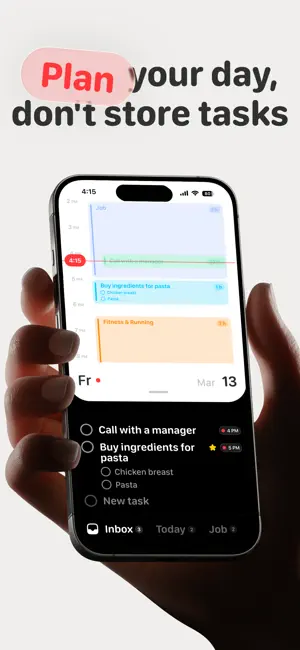
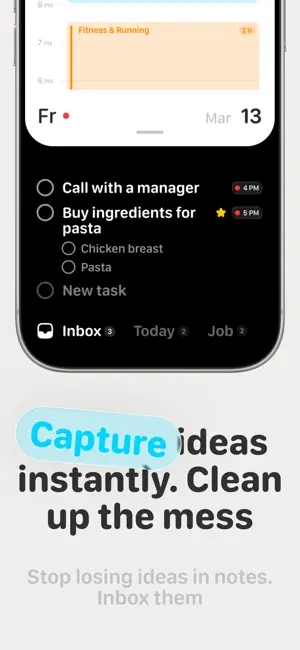
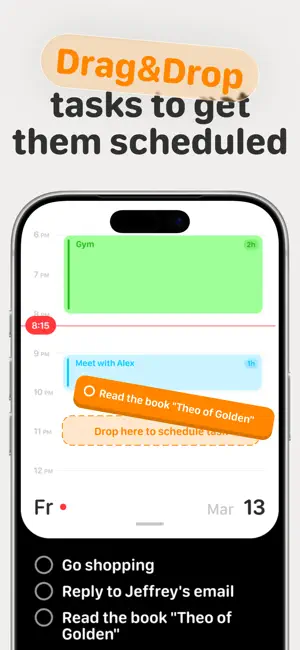
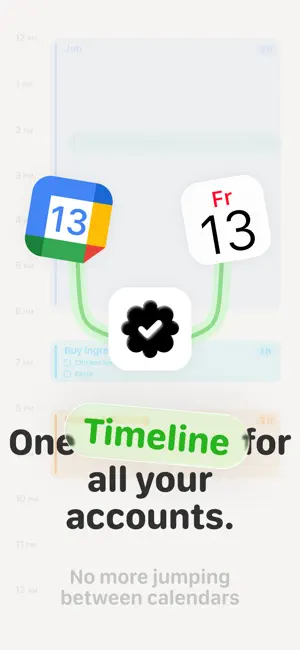
PLAN YOUR TASKS WHERE YOUR TIME ACTUALLY LIVES Most productivity apps force you to choose between a task list and a calendar. You capture tasks in one place, schedule them somewhere else, and spend your day constantly switching between tools. Modo brings tasks and calendar together in a single workspace. A resizable calendar lives at the top. Your tasks stay below. When you're ready to plan your day, simply drag a task onto your calendar and instantly turn it into a scheduled event. No copy-pasting. No duplicate planning. No switching between apps. Whether you're managing work projects, planning your weekly schedule, keeping up with classes and homework, building habits, or staying on top of appointments, Modo keeps everything in one clear plan. WHY PEOPLE USE MODO • Plan your day faster • Turn tasks into calendar events instantly • Stay focused on your priorities • Keep tasks and schedule in one place • Build a realistic plan you can actually follow • Reduce overwhelm and decision fatigue ONE PLAN FOR WORK, SCHOOL, AND LIFE Plan the things that compete for your time in one place. • Work shifts and project tasks • Classes, homework, and study sessions • Events, appointments, and personal routines • Your own calendar and shared calendars DRAG-AND-DROP SCHEDULING Scheduling should be simple. Drag any task directly onto your calendar to create a time block in seconds. Move plans around as priorities change and keep your schedule flexible throughout the day. • Drag tasks onto your calendar • Create time blocks instantly • Reschedule with simple gestures • Keep tasks and events connected GOOGLE & APPLE CALENDAR SYNC Modo works with the calendars you already use. Connect Google Calendar or Apple Calendar to see your own and shared calendars alongside your tasks. Everything stays in sync as your plans change. • Two-way Google Calendar sync • Two-way Apple Calendar sync • Real-time updates • Automatic event import • Recurring events • Custom reminders • Google Meet support • Participants and locations TASKS BUILT FOR REAL PLANNING Tasks are more than simple checklists. Every task can include subtasks, a scheduled date and time, estimated duration, priority status, and project assignment. • Subtasks • Due dates and scheduled times • Estimated duration • Priority stars • Project organization PROJECTS THAT MATCH HOW YOU THINK Capture ideas quickly and organize them later. Modo includes two smart default projects: Inbox — for collecting tasks and ideas quickly. Today — for everything scheduled or due today. You can also create your own projects, customize colors, choose sorting options, and organize them however you like. DESIGNED FOR SPEED Modo is built around gestures and fast interactions. Less tapping. Less friction. More planning. • Drag to schedule • Swipe to organize • Fast navigation • Clean and focused interface STOP MANAGING TASKS AND CALENDARS SEPARATELY Download Modo and plan your day the way it actually works. Terms of Use: https://modoplanner.com//terms
What’s new
Version 1.2.0 · Updated September 11, 2026
Modo just got more you This update makes planning feel lighter, faster, and a little more magical. New & Improved • Start your Modo journey with a playful new interactive onboarding • Shape your day faster with a refreshed task board and smarter task creation • Make events and tasks exactly how you want — more options, less tapping around • See your week in a fresh new timeline view • Bring your day together with Apple Health and Apple Reminders • Add Modo widgets, Lock Screen controls, and Control Center shortcuts • Create tasks with Apple Intelligence when inspiration strikes • Jump straight into action with Quick Actions and smarter notifications Little Things, Better • Added habits to your planning flow • Made calendar, task, and event screens smoother and clearer • Polished the little details all around Modo • Fixed bugs and improved stability — the boring stuff that makes everything feel nicer Have an idea? Settings → Request a Feature Found a bug? Settings → Report a Bug Thanks for using Modo
App privacy
The developer, Ruslan Trischenkov, reported these privacy practices to Apple.
Data Linked to You
The following data, which may be collected and linked to your identity, may be used for the following purposes:
- Purchases: Purchase History
- Contact Info: Email Address, Name
Used for: Developer’s Advertising or Marketing, Analytics, Product Personalization
Data Not Linked to You
The following data, which may be collected but is not linked to your identity, may be used for the following purposes:
- Usage Data: Product Interaction
- Identifiers: User ID, Device ID
- Diagnostics: Crash Data
Used for: Developer’s Advertising or Marketing, Analytics, Product Personalization, App Functionality
Alternatives to Calendar & Focus - Modo
Looking for apps like Calendar & Focus - Modo? Here are 6 similar apps on the App Store. The highest rated is Achiv: Task & Goal Tracker (5.0/5), and all 6 are free to download.
-
 KinesisFlow: ADHD Productivity
-
 Systemize
-
 Inki: Quick Capture for Notion
-
 Catalist: Tame the chaos
-
 Achiv: Task & Goal Tracker
5.0
Achiv: Task & Goal Tracker
5.0
-
 Anchor: Focus & Task Planner
5.0
Anchor: Focus & Task Planner
5.0
| App | Rating | Price | Last updated | Compare |
|---|---|---|---|---|
| Calendar & Focus - Modo | 4.0 / 5 (2 ratings) | Free | September 11, 2026 | |
| KinesisFlow: ADHD Productivity | – | Free | Jun 27, 2026 | Compare |
| Systemize | – | Free | Nov 21, 2025 | Compare |
| Inki: Quick Capture for Notion | – | Free | Sep 16, 2026 | Compare |
| Catalist: Tame the chaos | – | Free | Oct 9, 2026 | Compare |
| Achiv: Task & Goal Tracker | 5.0 / 5 (6) | Free | Mar 9, 2026 | Compare |
| Anchor: Focus & Task Planner | 5.0 / 5 (1) | Free | Oct 29, 2025 | Compare |