

Inki: Quick Capture for Notion
DAVID BENJAMIN PARKER Productivity iPhoneiPadiPod touchMac
Inki: Quick Capture for Notion is a free Productivity app for iPhone and iPad by DAVID BENJAMIN PARKER. Requires iOS 17.0. Updated September 16, 2026.
- Price
- Free
- on the App Store
- Size
- 11 MB
- Age 4+
- Updated
- Sep 16
- 2026 · v1.1.1
Screenshots
About Inki: Quick Capture for Notion
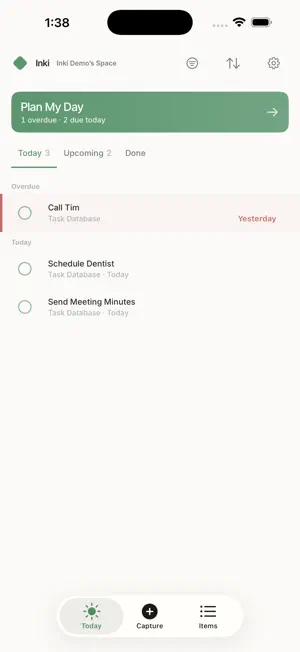
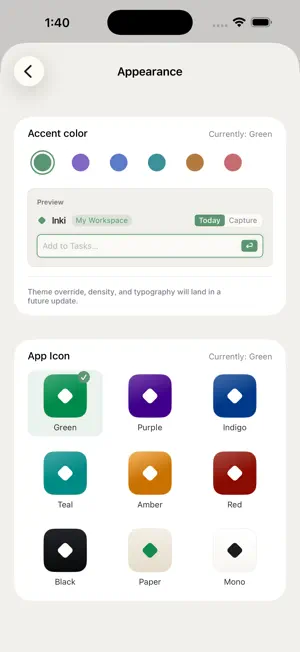
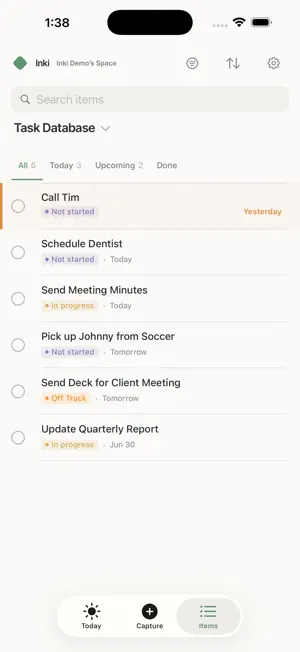
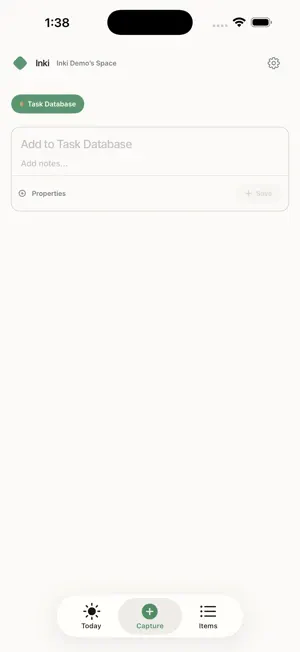
Add items to your Notion databases instantly — without opening Notion or losing your focus. * Independently developed and not affiliated with Notion * Inki lives in your menu bar on Mac and on your home screen on iPhone. Open it with a keyboard shortcut, fill in your properties, and it's in Notion in seconds. Every custom property in your database — select, multi-select, dates, relations, numbers, checkboxes — is right there in the form. New to Inki? Tap "Explore a sample workspace" on the welcome screen to see how it works with sample data, no account needed. Built for people who use Notion to run their work but don't want to break flow every time they need to capture something. WHAT YOU CAN DO • Add entries to any Notion database with full property support • Edit existing pages without leaving the app • Filter and browse your database by any property • Set a global keyboard shortcut for instant capture on Mac • Switch between multiple databases quickly with favorites • See a daily Today view across every database you've added • Plan your day with a guided triage flow • See an item's full page, rendered natively in the app HOW IT WORKS Open Settings and tap "Connect with Notion." A secure Notion sign-in page opens, you pick which workspace to share, and you're back in the app — no token copying, no manual setup. Share any database with the Inki integration inside Notion and it shows up in the app automatically. Inki talks directly to the Notion API once you're connected. Your notes, task titles, properties, and page content flow straight between your device and Notion — no analytics server, no intermediary storing your data. PRIVACY FIRST No analytics. No telemetry. No crash reporters. No ad trackers. Your Notion content stays between your device and Notion's servers. The one-time OAuth sign-in is brokered by a small developer-operated authentication service (required by the OAuth standard to hold the app's client secret). That service exchanges your sign-in code for an access token and forwards only the token back to your device — it does not store your token, your Notion content, or any identifiers about you. INKI PRO Inki is free to download. Inki Pro unlocks adding to Notion and every feature above: • $1.99/month or $19.99/year — new subscribers start with a 7-day free trial • Or pay $59.99 once for lifetime access, with no subscription • One purchase covers both Mac and iPhone (Universal Purchase) A free trial converts to a paid subscription unless you cancel at least 24 hours before it ends. Subscriptions auto-renew until canceled; you can manage or cancel anytime in your Apple ID settings. Payment is charged to your Apple ID at confirmation of purchase. Terms of Use (Apple Standard EULA): https://www.apple.com/legal/internet-services/itunes/dev/stdeula/ Privacy Policy: https://deveropartners.github.io/Add-to-Notion-Support/privacy-policy.html REQUIREMENTS • A Notion account (free tier works) • At least one database you'd like to add to (or the ability to create one) Inki is an independent app and is not created by, affiliated with, endorsed by, or sponsored by Notion Labs, Inc. "Notion" is a trademark of Notion Labs, Inc. Inki connects to your Notion account using Notion's official public API.
What’s new
Version 1.1.1 · Updated September 16, 2026
This update fixes a bug where Inki Pro Lifetime purchases might not unlock Pro. If you bought Lifetime or redeemed a lifetime code, Pro now unlocks automatically when you open Inki. If it doesn't, open Settings, then Inki Pro, and tap Restore Purchases. Sorry for the trouble, and thank you for supporting Inki.
App privacy
The developer, DAVID BENJAMIN PARKER, reported these privacy practices to Apple.
Data Linked to You
The following data, which may be collected and linked to your identity, may be used for the following purposes:
- Other Data: Other Data Types
Used for: App Functionality
Data Not Linked to You
The following data, which may be collected but is not linked to your identity, may be used for the following purposes:
- Diagnostics: Performance Data
Used for: App Functionality
Alternatives to Inki: Quick Capture for Notion
Looking for apps like Inki: Quick Capture for Notion? Here are 6 similar apps on the App Store.
-
 Talktion
-
 Swift Note Lite for Notion
-
 KASANERU: Notion Diary & Notes
-
 Catalist: Tame the chaos
-
 Memo Bridge
-
 TapClip for Notion
| App | Rating | Price | Last updated | Compare |
|---|---|---|---|---|
| Inki: Quick Capture for Notion | – | Free | September 16, 2026 | |
| Talktion | – | Free | Jul 20, 2026 | Compare |
| Swift Note Lite for Notion | – | Free | Oct 23, 2025 | Compare |
| KASANERU: Notion Diary & Notes | – | Free | Aug 17, 2026 | Compare |
| Catalist: Tame the chaos | – | Free | Sep 28, 2026 | Compare |
| Memo Bridge | – | Free | Mar 13, 2026 | Compare |
| TapClip for Notion | – | Free | Sep 13, 2026 | Compare |