

Screenshot Organizer & Finder
TRISIMIO SL Productivity iPhoneiPadiPod touch
Screenshot Organizer & Finder is a free Productivity app for iPhone and iPad by TRISIMIO SL. Requires iOS 17.0. Updated October 7, 2026.
- Price
- Free
- on the App Store
- Size
- 28 MB
- Age 4+
- Updated
- Oct 7
- 2026 · v1.2.1
Screenshots


About Screenshot Organizer & Finder
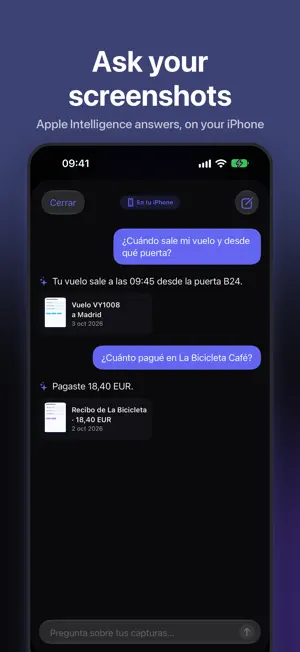
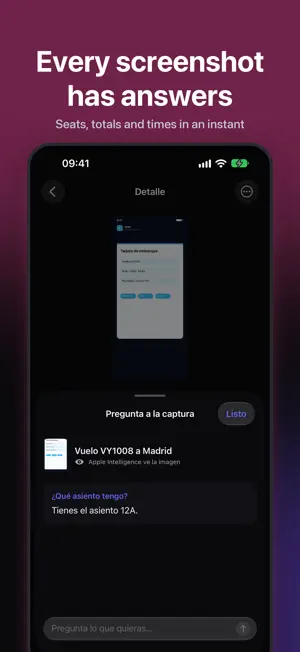
ScreenMind finds and organizes your screenshots with AI: flights, receipts, chats, QR codes, addresses, invoices, bookings and everything you saved "for later". Stop digging through Photos. ScreenMind reads every screenshot, understands what it is and turns your camera roll into a library you can search the way you talk: "the laptop invoice", "the link they sent me", "the Lisbon booking". SORTS ITSELF Groups screenshots into categories like flights, hotels, receipts, messages, articles, addresses, invoices, QR codes, notes and tickets, each with a clear title and description. SEARCH BY MEANING Search by text, person, place, purchase, date or screenshot type. Text is extracted on your iPhone with Vision (OCR) and, on iPhones with Apple Intelligence, the image itself is understood too. FROM SCREENSHOT TO ACTION Detects dates, phone numbers, emails, links and addresses so you can create events, reminders, contacts or notes in one tap. PRIVATE BY DESIGN Analysis runs on your iPhone. Your images never leave the device. No account, no ads and no cross-app tracking. Usage and diagnostic metrics are optional and can be disabled in Privacy. SCREENMIND PRO Free analyzes your 250 most recent screenshots, and you can always search and view what's already analyzed. With Pro: • Unlimited analysis of your whole library • Every new screenshot organizes itself • Optional AI web context: clearer titles, links and sources (only cleaned-up text is sent, never the image) Pro yearly includes a 7-day free trial, and we remind you 2 days before it ends. A monthly plan is also available. Subscriptions renew automatically unless cancelled at least 24 hours before the end of the period, from Settings › Apple ID › Subscriptions. Privacy: https://screenmind.trimonkey.es/privacy Terms: https://www.apple.com/legal/internet-services/itunes/dev/stdeula/
What’s new
Version 1.2.1 · Updated October 7, 2026
• Fixed a crash when starting screenshot analysis. • Stability and performance improvements. • Optional usage, purchase and diagnostic metrics, controlled in Settings → Privacy. Your screenshots and their content are never included in these metrics.
App privacy
The developer, TRISIMIO SL, reported these privacy practices to Apple.
Data Linked to You
The following data, which may be collected and linked to your identity, may be used for the following purposes:
- Purchases: Purchase History
- Identifiers: Device ID
- Usage Data: Product Interaction
- Diagnostics: Crash Data, Performance Data
Used for: Analytics, App Functionality
Alternatives to Screenshot Organizer & Finder
Looking for apps like Screenshot Organizer & Finder? Here are 6 similar apps on the App Store. The highest rated is Nova: AI Planner (5.0/5), and all 6 are free to download.
-
 Kipp AI: Screenshot Organizer
-
 Sifted - Screenshot Reminders
-
 Tray: Screenshots, Sorted.
-
 ABE - Agentic Business Engine
-
 Nova: AI Planner
5.0
Nova: AI Planner
5.0
-
 Hal Universal
| App | Rating | Price | Last updated | Compare |
|---|---|---|---|---|
| Screenshot Organizer & Finder | – | Free | October 7, 2026 | |
| Kipp AI: Screenshot Organizer | – | Free | Oct 21, 2026 | Compare |
| Sifted - Screenshot Reminders | – | Free | Jun 11, 2026 | Compare |
| Tray: Screenshots, Sorted. | – | Free | Aug 20, 2026 | Compare |
| ABE - Agentic Business Engine | – | Free | Sep 18, 2026 | Compare |
| Nova: AI Planner | 5.0 / 5 (2) | Free | Sep 30, 2026 | Compare |
| Hal Universal | – | Free | Aug 10, 2026 | Compare |