

Dual Video Camera: EveryFrame
Dustin Jan Spyra Photo & Video iPhoneiPadiPod touch
Dual Video Camera: EveryFrame is a free Photo & Video app for iPhone and iPad by Dustin Jan Spyra. Requires iOS 17.0. Updated May 14, 2026.
- Price
- Free
- on the App Store
- Size
- 63 MB
- Age 4+
- Updated
- May 14
- 2026 · v1.0.4
Screenshots

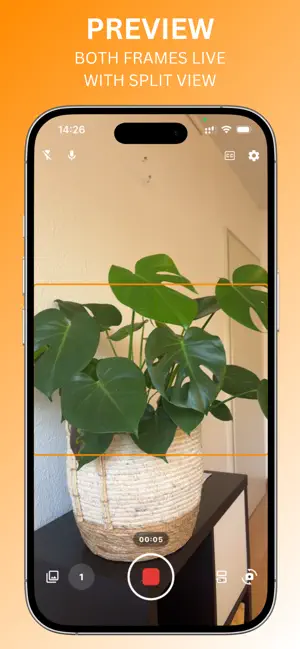


About Dual Video Camera: EveryFrame
Dual Video Camera: EveryFrame is built for creators who want a faster way to film for multiple platforms without repeating the same take. The app records once and creates two aligned outputs at the same time: 9:16 vertical and 16:9 horizontal. Instead of choosing one format and rebuilding the second version later, you get both from a single recording session. The advantage is consistency. Because both versions come from the exact same take, your timing, delivery, and message stay identical across formats. You can stay focused on performance while Dual Video Camera: EveryFrame handles the format split in the background. This is especially useful when you want to publish quickly and keep quality high without adding extra editing steps. Dual Video Camera: EveryFrame is designed to reduce common workflow friction: no duplicate takes for vertical and horizontal versions no manual reframing just to fit another aspect ratio no extra export roundtrips to create a second deliverable You film once, then export both versions ready to publish: 9:16 vertical for short-form channels and 16:9 horizontal for widescreen platforms. The result is a cleaner production flow with less overhead between recording and publishing. Whether you create talking-head videos, lessons, product explainers, ad creatives, social clips, or client content, Dual Video Camera: EveryFrame helps you produce cross-platform video faster. It is useful for solo creators, teams, educators, founders, and marketers who need reliable output in both orientations without slowing down. For advanced setups, Pro unlocks additional tools like teleprompter support, 4K, 60 fps, and higher-quality export options. These features give you more control when needed, while the core workflow stays simple: one take, two formats, ready to ship. If your process regularly requires both vertical and horizontal video, Dual Video Camera: EveryFrame helps you keep production efficient and consistent. Record once, get both 9:16 vertical and 16:9 horizontal, and move from idea to publish-ready footage with less editing friction and fewer retakes. https://www.notion.so/dustinspyra/EveryFrame-Terms-of-use-345f708db4728093a64ccde6bfa98c07?source=copy_link
What’s new
Version 1.0.4 · Updated May 14, 2026
Improvements for Dual Video Camera: EveryFrame
App privacy
The developer, Dustin Jan Spyra, reported these privacy practices to Apple.
Data Linked to You
The following data, which may be collected and linked to your identity, may be used for the following purposes:
- Identifiers: User ID
Used for: App Functionality
Alternatives to Dual Video Camera: EveryFrame
Looking for apps like Dual Video Camera: EveryFrame? Here are 6 similar apps on the App Store. The highest rated is FlipFrame Recorder (5.0/5), and all 6 are free to download.
-
 FlipFrame Recorder
5.0
FlipFrame Recorder
5.0
-
 Dual Shot with Teleprompter
-
 2Frame - Dual Camera Recorder
5.0
2Frame - Dual Camera Recorder
5.0
-
 Reflara: Vertical & Horizontal
-
 OsomeFrame: Video to Photo
-
 MyVideos.uk
| App | Rating | Price | Last updated | Compare |
|---|---|---|---|---|
| Dual Video Camera: EveryFrame | – | Free | May 14, 2026 | |
| FlipFrame Recorder | 5.0 / 5 (1) | Free | Sep 24, 2026 | Compare |
| Dual Shot with Teleprompter | – | Free | Apr 22, 2026 | Compare |
| 2Frame - Dual Camera Recorder | 5.0 / 5 (1) | Free | May 29, 2026 | Compare |
| Reflara: Vertical & Horizontal | – | Free | Oct 18, 2026 | Compare |
| OsomeFrame: Video to Photo | – | Free | Oct 21, 2026 | Compare |
| MyVideos.uk | – | Free | Oct 23, 2026 | Compare |