

FlipFrame Recorder
Pedro Pertile Photo & Video iPhoneiPadiPod touch
FlipFrame Recorder is a free Photo & Video app for iPhone and iPad by Pedro Pertile. Rated 5.0/5 from 1 ratings. Requires iOS 16.0.
- Rating
- 5.0
- 1 ratings
- Price
- Free
- on the App Store
- Size
- 7 MB
- Age 4+
- Updated
- Sep 24
- 2026 · v1.0.3
Screenshots
About FlipFrame Recorder
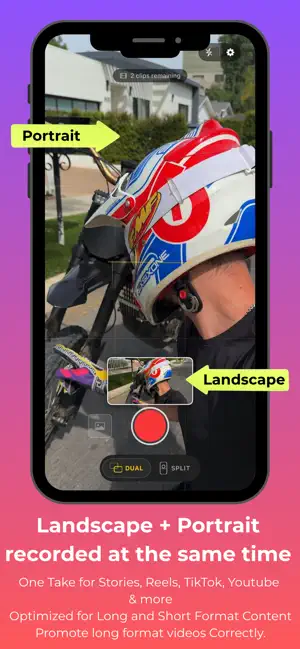
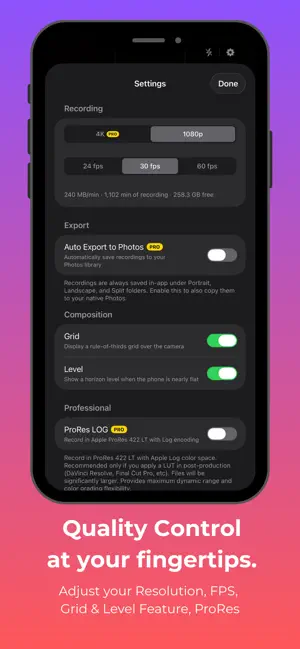
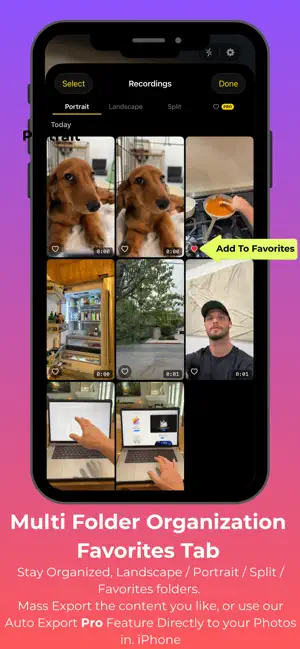
FlipFrame lets you record from two iPhone lenses simultaneously. Vertical Reels / Stories / TikTok, Horizontal for YouTube in a single take. No reshooting. No syncing clips. Just record once and you're done. Built for creators who post everywhere. Hit record and get two studio-ready clips. Need Reaction videos? Watch both angles live while you shoot in Split Screen. Up to 4K HEVC so quality is never the tradeoff. The best take is the one you actually captured. FlipFrame means you're never stuck choosing which format to shoot in, you get both, every time. DUAL-CAM MODES • Split Screen landscape + portrait in one frame • Picture-in-Picture floating inset over your main shot • Quick Swap tap to switch Dual to Split CHOOSE YOUR LENSES Pick the Lens you want (0.5×, 1×, 2×, 5×) for Split Shot. Great for reaction videos, POV, GRWM, Reviews, and more. QUALITY FIRST • Up to 4K resolution • HEVC encoding in highest quality • Audio captured on every clip BUILT FOR CREATORS Vloggers, behind-the-scenes shooters, real-estate walkthroughs, reaction videos. If you need two angles at once, FlipFrame is the fastest way to get them. FREE TO START Record up to 5 clips free, HD, individual export. Unlock unlimited recording with FlipFrame Pro (weekly or yearly subscription). Subscription details: • FlipFrame Pro Weekly — $1.99/week • FlipFrame Pro Yearly — $29.99/year • Payment is charged to your Apple ID account at confirmation of purchase • Subscription automatically renews unless turned off at least 24 hours before the end of the current period • Your account is charged for renewal within 24 hours prior to the end of the current period • You can manage and cancel your subscriptions in your App Store account settings • Privacy Policy: https://flipframe-privacy.carrd.co • Terms of Use: https://flipframe-terms.carrd.co
What’s new
Version 1.0.3 · Updated September 24, 2026
• Fixed an issue where the screen could turn off and stop recording after 30 seconds • New: zoom controls for both cameras in Dual mode — tap presets or pinch to zoom, even while recording • Small improvements to the recordings library
App privacy
The developer, Pedro Pertile, reported these privacy practices to Apple.
Data Not Collected
The developer does not collect any data from this app.
Alternatives to FlipFrame Recorder
Looking for apps like FlipFrame Recorder? Here are 6 similar apps on the App Store. The highest rated is Pano - Capture Everything (5.0/5), and all 6 are free to download.
-
 Pano - Capture Everything
5.0
Pano - Capture Everything
5.0
-
 Dual Video Camera: EveryFrame
-
 Duolix - Dual Camera App
-
 1Take: Multi-Lens Recorder
-
 Super SloMo: Instant Replay
-
 Portrait & Landscape Recorder
5.0
Portrait & Landscape Recorder
5.0
| App | Rating | Price | Last updated | Compare |
|---|---|---|---|---|
| FlipFrame Recorder | 5.0 / 5 (1 rating) | Free | September 24, 2026 | |
| Pano - Capture Everything | 5.0 / 5 (3) | Free | Mar 18, 2026 | Compare |
| Dual Video Camera: EveryFrame | – | Free | May 14, 2026 | Compare |
| Duolix - Dual Camera App | – | Free | Jun 19, 2026 | Compare |
| 1Take: Multi-Lens Recorder | – | Free | Apr 14, 2026 | Compare |
| Super SloMo: Instant Replay | – | Free | Oct 21, 2026 | Compare |
| Portrait & Landscape Recorder | 5.0 / 5 (3) | Free | May 4, 2026 | Compare |
Compare FlipFrame Recorder with the top alternatives: ratings, updates, ASO score and keyword gaps →