

OsomeFrame: Video to Photo
Kirill Glushchenko Photo & Video iPhoneiPadiPod touch
OsomeFrame: Video to Photo is a free Photo & Video app for iPhone and iPad by Kirill Glushchenko. Requires iOS 16.0. Updated October 21, 2026.
- Price
- Free
- on the App Store
- Size
- 15 MB
- Age 4+
- Updated
- Oct 21
- 2026 · v1.2.0
Screenshots
About OsomeFrame: Video to Photo
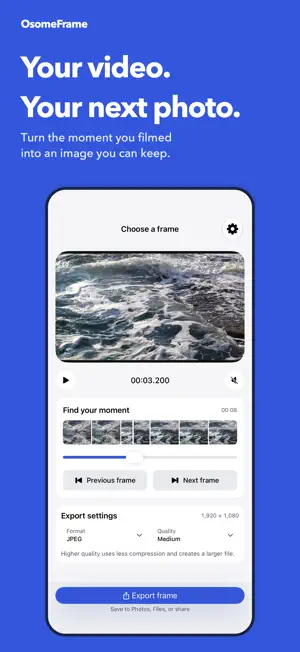
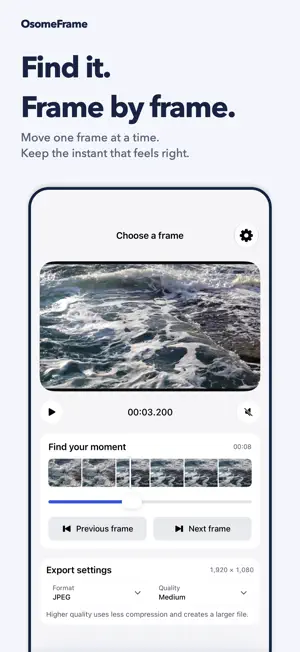
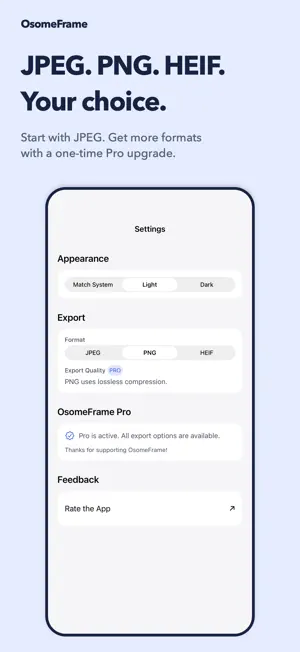
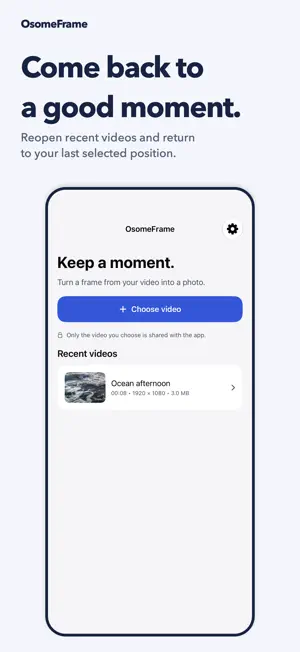
Your best photo might already be in a video. Catch the smile between poses, the splash at its peak, or the perfect cover for your next post. OsomeFrame turns a moment in your video into a photo on iPhone and iPad. FIND THE FRAME YOU WANT Choose a video from Photos, explore the thumbnail timeline, then move one frame at a time to get the moment just right. A precise time display helps you see exactly where you are. SAVE A PHOTO, NOT A SCREENSHOT Export the selected video frame as an image, ready to save to Photos, Files, or share with another app. Your picture comes from the video itself, without player controls or screen borders. Image detail depends on the resolution and quality of your source video. PICK UP WHERE YOU LEFT OFF Reopen a recent video and return to your last selected position. Keep exploring the moments you already filmed without starting over. THREE FREE EXPORTS EVERY DAY Start with three JPEG exports a day at standard quality. The allowance resets daily. Canceled or failed exports do not use it. MORE CHOICE WITH OSOMEFRAME PRO - Unlimited daily exports - PNG and HEIF alongside JPEG - High and maximum-quality settings for JPEG and HEIF - One-time purchase, no subscription YOUR VIDEOS STAY ON YOUR DEVICE No account. No ads. No video uploads to our servers. Choose only the video you want to use through Apple's photo picker. Made for family memories, travel clips, action shots, video covers and thumbnails. Export one selected frame at a time. Video processing works offline once the clip is on your device. Videos stored only in iCloud must download first. Buying or restoring Pro requires an internet connection. iOS may clear cached video copies; keep your originals in Photos.
What’s new
Version 1.2.0 · Updated October 21, 2026
Find your favorite moment more easily in 1.2. - Move one frame at a time with new previous and next frame controls. - Explore your clip with a visual thumbnail timeline and precise time display. - Return to recent videos and continue from your last selected position. - Choose export format and quality together, with source dimensions in view. - Enjoy a refreshed Home, editor, Settings and Pro experience. - Keep your free export allowance when you cancel or an export fails.
App privacy
The developer, Kirill Glushchenko, reported these privacy practices to Apple.
Data Not Collected
The developer does not collect any data from this app.
Alternatives to OsomeFrame: Video to Photo
Looking for apps like OsomeFrame: Video to Photo? Here are 6 similar apps on the App Store. The highest rated is FrameCutter (5.0/5), and all 6 are free to download.
-
 Chill Frame
-
 Orbiar Scan – 3D Capture
-
 FrameCutter
5.0
FrameCutter
5.0
-
 Thumbnail Maker: Smart Grabber
-
 Super SloMo: Instant Replay
-
 Video Snapshot: Frame Grabber
| App | Rating | Price | Last updated | Compare |
|---|---|---|---|---|
| OsomeFrame: Video to Photo | – | Free | October 21, 2026 | |
| Chill Frame | – | Free | May 6, 2026 | Compare |
| Orbiar Scan – 3D Capture | – | Free | Mar 10, 2026 | Compare |
| FrameCutter | 5.0 / 5 (1) | Free | Oct 14, 2026 | Compare |
| Thumbnail Maker: Smart Grabber | – | Free | Dec 17, 2025 | Compare |
| Super SloMo: Instant Replay | – | Free | Oct 21, 2026 | Compare |
| Video Snapshot: Frame Grabber | – | Free | Oct 25, 2026 | Compare |