

FrameCutter
Miguel Lopez Saenz Photo & Video iPhoneiPadiPod touch
FrameCutter is a free Photo & Video app for iPhone and iPad by Miguel Lopez Saenz. Rated 5.0/5 from 1 ratings. Requires iOS 26.0. Updated October 14, 2026.
- Rating
- 5.0
- 1 ratings
- Price
- Free
- on the App Store
- Size
- 9 MB
- Age 4+
- Updated
- Oct 14
- 2026 · v1.1.1
Screenshots


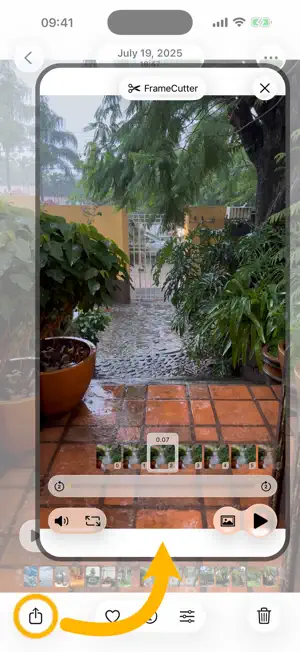
About FrameCutter
Cut any video frame with all its metadata. Frames can be saved back to the Photo Library, to Files, or Shared. All metadata available in the video is saved along the frame: location, camera information, and time of the video. When you add a frame back into photos, it will sit right next to the original video. The time of the frame is even adjusted to the video time plus the time of the frame itself. Open a video using the Share Extension. From Photos or Files, share a video and choose the FrameCutter extension to cut a frame right there. This is a free app, there are no paywall or subscriptions in any manner. If the app is useful, there is an In-App-Purchase to support the development.
What’s new
Version 1.1.1 · Updated October 14, 2026
Frames of videos with HDR are correctly saved with HDR data.
App privacy
The developer, Miguel Lopez Saenz, reported these privacy practices to Apple.
Data Not Collected
The developer does not collect any data from this app.
Alternatives to FrameCutter
Looking for apps like FrameCutter? Here are 6 similar apps on the App Store.
-
 Estrai: Photos from Video
-
 ko Frame Extractor
-
 Video to Photo | Frame Capture
-
 FrameCat
-
 FreeFrame
-
 Video Cutter & Trimmer
| App | Rating | Price | Last updated | Compare |
|---|---|---|---|---|
| FrameCutter | 5.0 / 5 (1 rating) | Free | October 14, 2026 | |
| Estrai: Photos from Video | – | Free | Sep 7, 2026 | Compare |
| ko Frame Extractor | – | Free | Jun 10, 2026 | Compare |
| Video to Photo | Frame Capture | – | Free | Sep 14, 2026 | Compare |
| FrameCat | – | Free | Sep 5, 2026 | Compare |
| FreeFrame | – | Free | Jan 6, 2026 | Compare |
| Video Cutter & Trimmer | – | Free | Aug 6, 2026 | Compare |
Compare FrameCutter with the top alternatives: ratings, updates, ASO score and keyword gaps →