

Cycle Reminder
Yin Ni Productivity iPhoneiPadiPod touch
Cycle Reminder is a free Productivity app for iPhone and iPad by Yin Ni. Rated 5.0/5 from 1 ratings. Requires iOS 13.0. Updated June 5, 2026.
- Rating
- 5.0
- 1 ratings
- Price
- Free
- on the App Store
- Size
- 24 MB
- Age 4+
- Updated
- Jun 5
- 2026 · v1.0.1
Screenshots


About Cycle Reminder
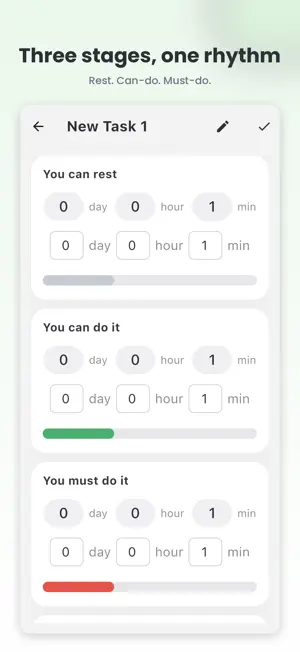
Cycle Reminder turns every recurring task into a visual cycle you can read at a glance. Whether it's watering the plants, taking medication, doing the laundry, stretching at your desk, or reapplying sunscreen — most routines aren't a single beep on a schedule. They have a window: a stretch of time where you don't need to act yet, a stretch where you should, and a stretch where you really must. Cycle Reminder is built around that idea. HOW IT WORKS For each task you set three durations: - Rest — you don't need to think about it yet - Can-Do — a good time to take care of it - Must-Do — it's overdue, handle it now The task appears on your home screen as a smooth progress ring that fills as time passes, color-shifting from rest, to can-do, to must-do. One tap on the reset button and the cycle starts over. WHAT YOU GET - Three-stage progress gauges that make priority obvious without reading text - Local notifications and alarms when a stage ends — even when the app is closed - Pause a task when you're traveling or on a break, resume without losing position - Swipe to delete, long-press to drag and reorder - Pull down on the list to search across all your tasks - Edit any task's title and durations at any time - Everything stored locally on your device — no account, no cloud, no sync setup GREAT FOR - Household routines: watering plants, changing filters, cleaning the litter box, taking out compost - Personal care: medication, supplements, contact lenses, sunscreen, hydration - Wellness: posture breaks, eye breaks, stretching, walking the dog - Work: standups, focus blocks, recurring follow-ups - Hobbies and pets: feeding schedules, fermenting, sourdough starter, aquarium maintenance FREE WITH OPTIONAL UPGRADE Cycle Reminder is free to download and use. A small banner ad appears at the bottom to support development. If you'd rather not see ads, a one-time in-app purchase removes them permanently — no subscription, no recurring charges. PRIVACY Your tasks live only on your iPhone. We don't collect, sync, or upload them. There is no sign-in. Aside from the standard requirements of the ad SDK, no analytics or personal data leave your device. Download Cycle Reminder and replace the mental load of "when did I last do that?" with a quiet, visual answer.
What’s new
Version 1.0.1 · Updated June 5, 2026
Version 1.0.1 — What's New Ready to go out of the box: New users now start with 2 sample items, so you can see how Cycle Reminder works right away. Free plan: Track up to 2 items at a time — great for getting started. Premium: Unlock unlimited items, remove all ads, and support our small team with a single one-time purchase.
App privacy
The developer, Yin Ni, reported these privacy practices to Apple.
Data Not Linked to You
The following data, which may be collected but is not linked to your identity, may be used for the following purposes:
- Identifiers: Device ID
- Diagnostics: Performance Data, Crash Data, Other Diagnostic Data
Used for: Third-Party Advertising, Analytics, App Functionality
Alternatives to Cycle Reminder
Looking for apps like Cycle Reminder? Here are 6 similar apps on the App Store. The highest rated is My Tasks: Lists & Schedules (5.0/5), and all 6 are free to download.
-
 Nura AI – Muslim Planner
-
 My Tasks: Lists & Schedules
5.0
My Tasks: Lists & Schedules
5.0
-
 ColorQueueList
-
 Munazzim: Muslim Daily Planner
-
 First Habbit
-
 Pokus: Structured Timer
5.0
Pokus: Structured Timer
5.0
| App | Rating | Price | Last updated | Compare |
|---|---|---|---|---|
| Cycle Reminder | 5.0 / 5 (1 rating) | Free | June 5, 2026 | |
| Nura AI – Muslim Planner | – | Free | Jul 21, 2026 | Compare |
| My Tasks: Lists & Schedules | 5.0 / 5 (1) | Free | Oct 12, 2026 | Compare |
| ColorQueueList | – | Free | Feb 14, 2026 | Compare |
| Munazzim: Muslim Daily Planner | – | Free | Oct 19, 2026 | Compare |
| First Habbit | – | Free | Oct 23, 2026 | Compare |
| Pokus: Structured Timer | 5.0 / 5 (1) | Free | Sep 29, 2026 | Compare |
Compare Cycle Reminder with the top alternatives: ratings, updates, ASO score and keyword gaps →