

My Tasks: Lists & Schedules
STEFANOS KOUZOUNIS Productivity iPhoneiPadiPod touch
My Tasks: Lists & Schedules is a free Productivity app for iPhone and iPad by STEFANOS KOUZOUNIS. Rated 5.0/5 from 1 ratings. Requires iOS 15.6.
- Rating
- 5.0
- 1 ratings
- Price
- Free
- on the App Store
- Size
- 91 MB
- Age 4+
- Updated
- Oct 24
- 2026 · v9.9.1
Screenshots


About My Tasks: Lists & Schedules
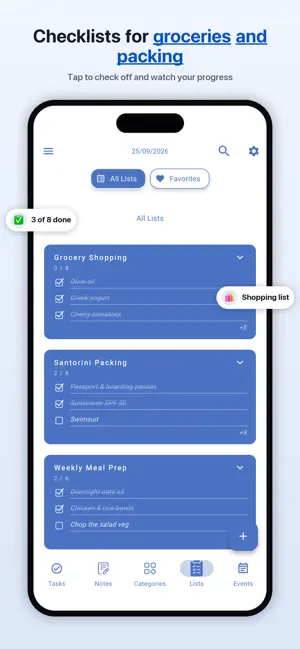
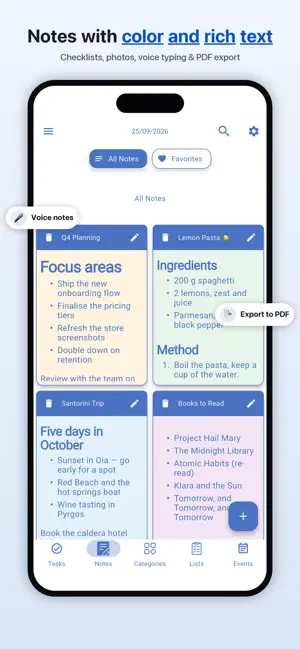
My Tasks is your to-do list, notes, daily planner, calendar and reminders — all in one beautiful app that works completely offline. No account required. No ads. Your data stays on your device. WHY MY TASKS? Most task apps lock basic features behind subscriptions or require an account before you can even start. My Tasks is different: • Works 100% offline — plan anywhere, no internet needed • Privacy-first — your tasks never leave your device • Free core features — tasks, notes, lists, calendar and reminders • Make it yours — custom colors, fonts, themes and layouts • Available in 9 languages: English, Deutsch, Français, Español, Português, Italiano, Ελληνικά, हिंदी, 한국어 EVERYTHING IN ONE PLACE • Tasks & Subtasks — capture, organize and repeat with smart rules • To-Do Lists & Checklists — shopping, packing, projects, groceries • Rich Notes — full text editor with formatting, colors and lists • Daily Planner & Calendar — day, week and month views • Smart Reminders — never miss a deadline, birthday or meeting • Home Screen Widgets — 5 widgets to see your day at a glance • Categories & Tags — organize the way you think • Biometric Lock — protect private tasks with Face ID & Touch ID • Dark Mode — gorgeous themes for day and night GO PREMIUM (optional) • Cloud Sync & Backup — your tasks on every device, never lost • Shared Tasks — plan with family, friends or your team • AI Task Assistant — turn one sentence into tasks, lists and notes • OCR Scanner — turn photos and PDFs into tasks instantly • Drawing Notes — sketch and handwrite your ideas • Unlimited Themes — every customization unlocked PERFECT FOR • Students — homework, exams and study schedules • Professionals — projects, meetings and deadlines • Families — shared shopping lists and weekly plans • Anyone who wants a simple, beautiful daily planner Download My Tasks and get organized in under a minute — no sign-up needed. Terms of Use (EULA): https://www.apple.com/legal/internet-services/itunes/dev/stdeula/
What’s new
Version 9.9.1 · Updated October 24, 2026
- Performance improvements and bug fixes.
App privacy
The developer, STEFANOS KOUZOUNIS, reported these privacy practices to Apple.
Data Not Linked to You
The following data, which may be collected but is not linked to your identity, may be used for the following purposes:
- Diagnostics: Crash Data, Performance Data
- Purchases: Purchase History
- Contact Info: Email Address
Used for: Analytics, App Functionality
Alternatives to My Tasks: Lists & Schedules
Looking for apps like My Tasks: Lists & Schedules? Here are 6 similar apps on the App Store. The highest rated is Cycle Reminder (5.0/5), and all 6 are free to download.
-
 To Track: Todo & Time Tracking
-
 Nucleus - Field Manager
-
 Cycle Reminder
5.0
Cycle Reminder
5.0
-
 Go With The Flow Task Manager
-
 Unlck: Focus Task Manager
-
 Nura AI – Muslim Planner
| App | Rating | Price | Last updated | Compare |
|---|---|---|---|---|
| My Tasks: Lists & Schedules | 5.0 / 5 (1 rating) | Free | October 24, 2026 | |
| To Track: Todo & Time Tracking | – | Free | Jun 22, 2026 | Compare |
| Nucleus - Field Manager | – | Free | Aug 23, 2026 | Compare |
| Cycle Reminder | 5.0 / 5 (1) | Free | Jun 5, 2026 | Compare |
| Go With The Flow Task Manager | – | Free | Jul 29, 2026 | Compare |
| Unlck: Focus Task Manager | – | Free | May 5, 2026 | Compare |
| Nura AI – Muslim Planner | – | Free | Jul 21, 2026 | Compare |