

ColorQueueList
Masayuki Hisada Productivity iPhoneiPadiPod touch
ColorQueueList is a free Productivity app for iPhone and iPad by Masayuki Hisada. Requires iOS 16.0. Updated February 14, 2026.
- Price
- Free
- on the App Store
- Size
- 53 MB
- Age 4+
- Updated
- Feb 14
- 2026 · v2.0.0
Screenshots


About ColorQueueList
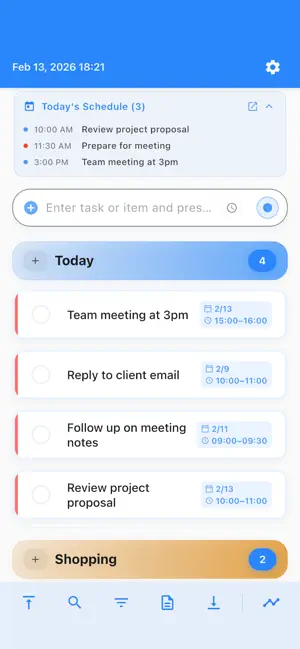
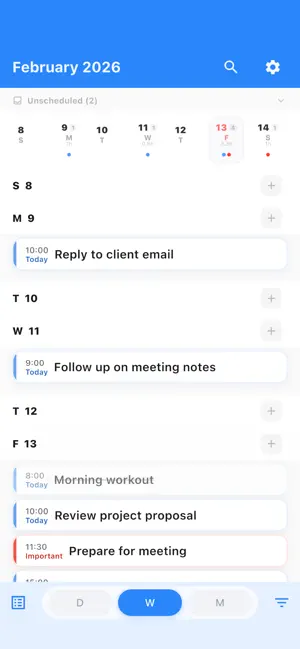
The task app that does both: lightning-fast capture AND visual time planning. ColorQueueList combines a zero-friction todo list with a timeline planner. Type a task in 1 second--then see your entire day, week, or month at a glance in the Flow timeline. -- LIST: CAPTURE AT THE SPEED OF THOUGHT Most todo apps waste your time before you even start. ColorQueueList doesn't. - Type and hit Enter - task added instantly - Color categories for at-a-glance priority - Completed tasks fold away and auto-clean after 7 days - Templates for recurring task lists No signup. No cloud. No friction. Just you and your tasks. -- FLOW: YOUR VISUAL TIME PLANNER Switch to Flow and see your schedule come alive: - Day view - hour-by-hour timeline with drag-and-drop - Week view - spot busy days and open slots at a glance - Month view - calendar overview with task indicators - Overdue tasks highlighted in red so nothing slips through - Time conflict warnings when tasks overlap - Workload hours displayed per day and week -- RECURRING TASKS & REMINDERS Set it once, forget the rest: - Daily, weekly, monthly, or custom repeat patterns - Edit this event only, this and future, or all at once - Reminders at the right time (at start, 5/15/30/60 min before) - Notifications auto-update when you reschedule -- SEAMLESSLY CONNECTED List and Flow work as one: - Today's schedule banner on the home screen - Tap a task's schedule to jump to Flow - "Show in List" button in Flow for quick edits - Unscheduled tasks section in Flow for drag-to-schedule -- WHAT YOU GET FREE - Color categories (fully customizable) - Reusable templates - Search & filter across all tasks - Task scheduling with duration - Recurring tasks & reminders - Day / Week / Month Flow views - Dark mode & 100% offline -- PRO: FOR POWER USERS - Unlimited categories & templates - Data backup & export - 15 premium color themes -- PRIVACY THAT MATTERS Your data never leaves your device. No account. No tracking. No ads. --- Open the app. Type your task. Press Enter. Switch to Flow. See your whole week. Feel the difference.
What’s new
Version 2.0.0 · Updated February 14, 2026
Introducing Flow - your visual time planner! - Day / Week / Month timeline views - Recurring tasks (daily, weekly, monthly, custom) - Reminders & notifications - Today's schedule banner on home screen - Overdue highlighting & time conflict warnings - Cross-view navigation between List and Flow
App privacy
The developer, Masayuki Hisada, reported these privacy practices to Apple.
Data Not Linked to You
The following data, which may be collected but is not linked to your identity, may be used for the following purposes:
- Usage Data: Product Interaction
- Diagnostics: Crash Data, Performance Data
Used for: Analytics, App Functionality
Alternatives to ColorQueueList
Looking for apps like ColorQueueList? Here are 6 similar apps on the App Store. The highest rated is Cycle Reminder (5.0/5), and all 6 are free to download.
-
 Cycle Reminder
5.0
Cycle Reminder
5.0
-
 Nura AI – Muslim Planner
-
 ReMinder: Repeat Tasks
1.0
ReMinder: Repeat Tasks
1.0
-
 My Tasks: To Do List & Planner
3.0
My Tasks: To Do List & Planner
3.0
-
 Simple Task - Daily Planner
5.0
Simple Task - Daily Planner
5.0
-
 Munazzim: Muslim Daily Planner
| App | Rating | Price | Last updated | Compare |
|---|---|---|---|---|
| ColorQueueList | – | Free | February 14, 2026 | |
| Cycle Reminder | 5.0 / 5 (1) | Free | Jun 5, 2026 | Compare |
| Nura AI – Muslim Planner | – | Free | Jul 21, 2026 | Compare |
| ReMinder: Repeat Tasks | 1.0 / 5 (1) | Free | Jun 29, 2026 | Compare |
| My Tasks: To Do List & Planner | 3.0 / 5 (2) | Free | Nov 1, 2026 | Compare |
| Simple Task - Daily Planner | 5.0 / 5 (1) | Free | Aug 11, 2026 | Compare |
| Munazzim: Muslim Daily Planner | – | Free | Nov 2, 2026 | Compare |
Compare ColorQueueList with the top alternatives: ratings, updates, ASO score and keyword gaps →