

PureDocu: PDF Scanner
Philip Tarimo Productivity iPhoneiPadiPod touch
PureDocu: PDF Scanner is a free Productivity app for iPhone and iPad by Philip Tarimo. Rated 5.0/5 from 1 ratings. Requires iOS 18.4.
- Rating
- 5.0
- 1 ratings
- Price
- Free
- on the App Store
- Size
- 3 MB
- Age 4+
- Updated
- Sep 11
- 2026 · v3.1
Screenshots


About PureDocu: PDF Scanner
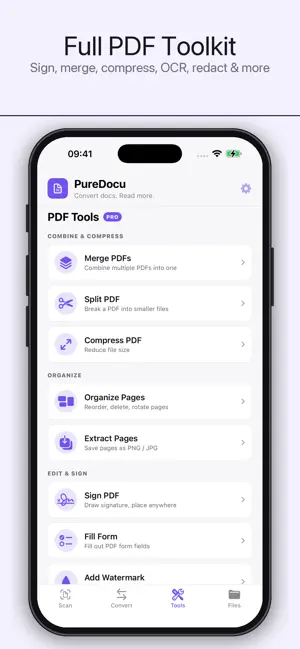
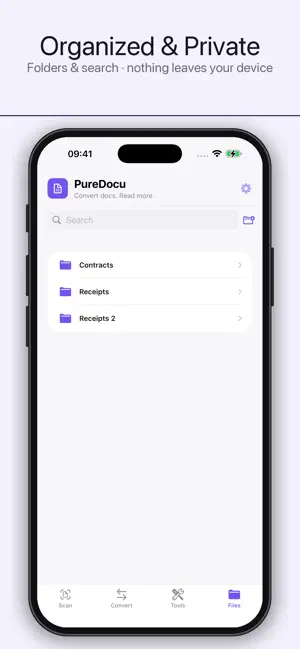
PureDocu — Scanner, Converter & PDF Toolkit Scan, convert, and read documents — all on your device, nothing uploaded. PureDocu turns your iPhone and iPad into a powerful, private document workspace. Scan paper with your camera, convert files between formats, edit PDFs, and read it all in a built-in reader — without an account, without the cloud, and without anyone ever seeing your files. SCAN ANYTHING • Documents — auto edge-detection, multi-page, crisp enhancement • ID cards — front and back combined onto a single page • Passports — reads the details automatically • Books — facing pages split into two • QR codes & barcodes — scan and open in a tap • Import photos from your library and turn them into a document ENHANCE & PERFECT • Color, grayscale, and crisp black & white filters • Re-crop and straighten edges after capture • Rotate, reorder, and delete pages • OCR — extract text or create searchable PDFs EXPORT YOUR WAY • Save scans as PDF, Word, Excel, TXT, or JPG • Choose the page size — A4, A3, Letter, and more • Protect with a password or add a watermark • Print with AirPrint or share anywhere CONVERT & READ • Convert between PDF, EPUB, DOCX, HTML, TXT, and Markdown • Preserves images and formatting • Read the result in the built-in reader with dark mode A COMPLETE PDF TOOLKIT • Sign, merge, split, and compress • Lock, watermark, redact, and annotate • Organize, extract, and reorder pages • Make scanned PDFs searchable with OCR ORGANIZED & PRIVATE • Folders and search keep everything tidy • Optional iCloud sync across your own devices • 100% on-device — no uploads, no servers, no account, no tracking Your documents are yours. PureDocu processes everything on your device, so your scans, IDs, and files never leave your iPhone or iPad. Privacy Policy: https://sites.google.com/view/puredocu Terms of Use: https://www.apple.com/legal/internet-services/itunes/dev/stdeula/
What’s new
Version 3.1 · Updated September 11, 2026
Meet the new PureDocu — now a full document scanner, plus everything you already love. SCAN • Scan documents, ID cards, passports, books, and QR codes with your camera • Auto edge-detection, multi-page capture, and crisp enhancement filters • Re-crop and straighten edges after capture • Import photos from your library and turn them into documents EXPORT & OCR • Save as PDF, Word, Excel, TXT, or JPG — pages fit your scan, no extra borders • Create searchable PDFs with an on-device OCR text layer • Faster, multi-language text recognition • Add a password, choose a page size, or print with AirPrint ORGANIZE • Folders and search in Files keep everything tidy CONVERT & EDIT • Convert PDF, EPUB, DOCX, HTML, TXT & Markdown, then read in the built-in reader • Full PDF toolkit — sign, merge, split, compress, lock, redact, annotate & more Everything still happens 100% on your device. Your files never leave your phone.
App privacy
The developer, Philip Tarimo, reported these privacy practices to Apple.
Data Not Collected
The developer does not collect any data from this app.
Alternatives to PureDocu: PDF Scanner
Looking for apps like PureDocu: PDF Scanner? Here are 6 similar apps on the App Store. The highest rated is Paperlane: Scan to PDF (5.0/5), and all 6 are free to download.
-
 EyeScan Pro OCR & PDF Scanner
-
 Paperlane: Scan to PDF
5.0
Paperlane: Scan to PDF
5.0
-
 Scan Cam PDF: Document Scanner
5.0
Scan Cam PDF: Document Scanner
5.0
-
 ScanLite: Scanner and OCR
-
 Convert Image to PDF +
-
 Picture to PDF: Document Scan
| App | Rating | Price | Last updated | Compare |
|---|---|---|---|---|
| PureDocu: PDF Scanner | 5.0 / 5 (1 rating) | Free | September 11, 2026 | |
| EyeScan Pro OCR & PDF Scanner | – | Free | Sep 8, 2026 | Compare |
| Paperlane: Scan to PDF | 5.0 / 5 (2) | Free | Oct 12, 2026 | Compare |
| Scan Cam PDF: Document Scanner | 5.0 / 5 (3) | Free | Sep 28, 2026 | Compare |
| ScanLite: Scanner and OCR | – | Free | Sep 17, 2026 | Compare |
| Convert Image to PDF + | – | Free | Apr 10, 2026 | Compare |
| Picture to PDF: Document Scan | – | Free | Jan 9, 2025 | Compare |