

VoxelVision AR Medical Imaging
Mingwei Cui Medical iPhoneiPadiPod touch
VoxelVision AR Medical Imaging is a free Medical app for iPhone and iPad by Mingwei Cui. Requires iOS 26.0. Updated October 12, 2026.
- Price
- Free
- on the App Store
- Size
- 30 MB
- Age 17+
- Updated
- Oct 12
- 2026 · v2.0.0
Screenshots

About VoxelVision AR Medical Imaging
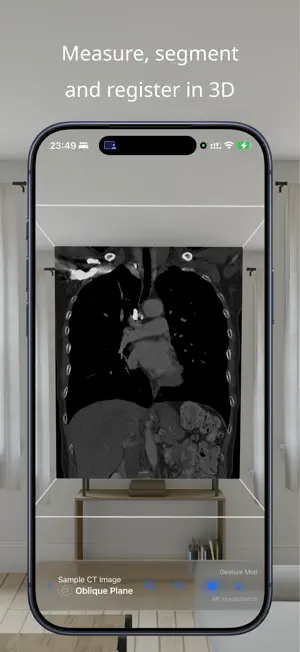
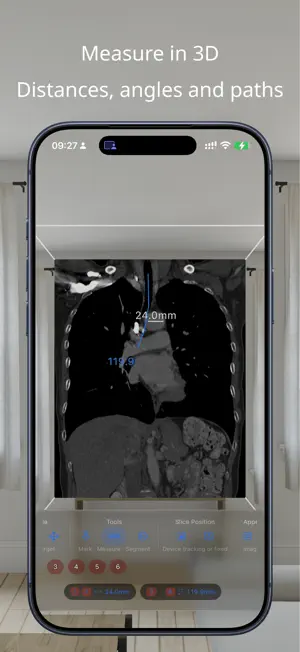
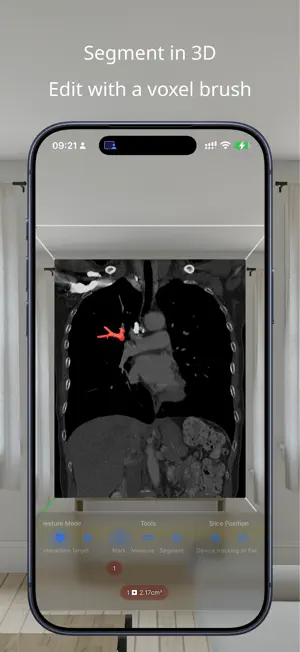
VoxelVision is intended for research and teaching. It is not a medical device and is not intended for clinical diagnosis or treatment. Measure, segment and register medical images in 3D on Apple Vision Pro, iPad and iPhone. Import DICOM, NIfTI and NRRD volumes, browse linked orthogonal slices, and explore a freely positioned double-oblique plane in space. MEASUREMENT Place markers and measure distances, angles and paths directly in 3D. Unfold a curved planar reformation along a path, plot intensity profiles, and export measurements and profiles as CSV. SEGMENTATION Grow a connected region from seeds or select an intensity range. Add or erase voxels with the brush. See colored segmentation overlays on the slices and export label maps as NIfTI or NRRD, surface meshes as STL, and per-segment statistics as CSV. REGISTRATION Place matching anchor pairs and compare rigid, similarity and affine alignments. Inspect aligned volumes with Blend, Alternate, Checkerboard, Split or Difference. Refine an alignment using image intensities, inspect the candidate, and choose whether to adopt it. Save registrations with the case, import or export ITK transform files, and export reports with a record of the session. VIEW IN SPACE Move around your imaging volume, scale and rotate it, and position a slice at any angle. Keep the plane fixed or let it follow your viewpoint. Use MIP, MinIP or Mean slab projection to explore a thicker section. COLLABORATE WITH SHAREPLAY Start a collaboration from a FaceTime call. Each participant imports their own copy of the same case. Choose an editable session to collaborate or a read-only session to present. The presenter's unlocked tools are available to participants during the session. MOVE BETWEEN TOOLS Import DICOM folders, NIfTI and NRRD through Files. DICOM SEG and RTSTRUCT objects found alongside a series can become segmentation layers. Export a complete VoxelVision case package or standard files for 3D Slicer and ITK-SNAP workflows, including NIfTI volumes, Markups JSON annotations and label maps. DISPLAY YOUR DATA Navigate linked axial, coronal and sagittal planes with voxel and intensity readouts. Control layers and overlays, choose window presets, and use PET color maps. Calibrated PET studies provide SUV readouts. TRY THE TOOLS Try every tool free on the sample images, including a matched CT/PET pair for registration. Sample images are installed with the app. You can delete them and restore them at any time from Settings. Measurement, Segmentation and Registration each have their own in-app purchase to unlock use on your own cases, with bundle options also available. ON-DEVICE PROCESSING Your images are processed and stored on your device. No analytics, tracking or ads. Only sample downloads, feature purchases and user-initiated SharePlay collaboration use network services. Image, result and log exports are entirely under your control.
What’s new
Version 2.0.0 · Updated October 12, 2026
Import and export: redesigned for 3D Slicer and ITK-SNAP workflows. 3D segmentation: grow from seeds or a threshold, then edit with a voxel brush. Registration: align two volumes with anchor pairs, then refine from the images themselves. Collaboration with SharePlay: work on the same case together in real time. Imaging tools: curved planar reformation, slab projection, and intensity profiles. Slice overlays: segmentations and layer controls now appear on the 2D slices. Display: color maps for PET, SUV readouts, and series window presets. New purchases: Segmentation and Registration, separately or bundled with Measurement, with every tool free to try on the sample images. Sample images: downloaded from Apple's servers, restorable from Settings.
App privacy
The developer, Mingwei Cui, reported these privacy practices to Apple.
Data Not Collected
The developer does not collect any data from this app.
Alternatives to VoxelVision AR Medical Imaging
Looking for apps like VoxelVision AR Medical Imaging? Here are 6 similar apps on the App Store. The highest rated is LumaDICOM: CT & MRI Viewer (5.0/5), and all 6 are free to download.
-
 LumaDICOM: CT & MRI Viewer
5.0
LumaDICOM: CT & MRI Viewer
5.0
-
 DICOM Viewer: MRI CT Studio
5.0
DICOM Viewer: MRI CT Studio
5.0
-
 Falcon MD - DICOM Viewer
4.3
Falcon MD - DICOM Viewer
4.3
-
 mRay
3.8
mRay
3.8
-
 DICOM Viewer : MRI CT XRAY & +
5.0
DICOM Viewer : MRI CT XRAY & +
5.0
-
 Falcon Mx - DICOM Viewer
4.5
Falcon Mx - DICOM Viewer
4.5
| App | Rating | Price | Last updated | Compare |
|---|---|---|---|---|
| VoxelVision AR Medical Imaging | – | Free | October 12, 2026 | |
| LumaDICOM: CT & MRI Viewer | 5.0 / 5 (2) | Free | Oct 17, 2026 | Compare |
| DICOM Viewer: MRI CT Studio | 5.0 / 5 (3) | Free | Oct 22, 2026 | Compare |
| Falcon MD - DICOM Viewer | 4.3 / 5 (9) | Free | Oct 21, 2026 | Compare |
| mRay | 3.8 / 5 (4) | Free | Aug 28, 2026 | Compare |
| DICOM Viewer : MRI CT XRAY & + | 5.0 / 5 (18) | Free | May 29, 2026 | Compare |
| Falcon Mx - DICOM Viewer | 4.5 / 5 (282) | Free | Oct 21, 2026 | Compare |