

Text Preset: Keyboard Phrases
Renat Tlebaldiev Productivity iPhoneiPadiPod touch
Text Preset: Keyboard Phrases is a free Productivity app for iPhone and iPad by Renat Tlebaldiev. Rated 5.0/5 from 1 ratings. Requires iOS 17.0.
- Rating
- 5.0
- 1 ratings
- Price
- Free
- on the App Store
- Size
- 57 MB
- Age 4+
- Updated
- Oct 5
- 2026 · v1.17
Screenshots

About Text Preset: Keyboard Phrases
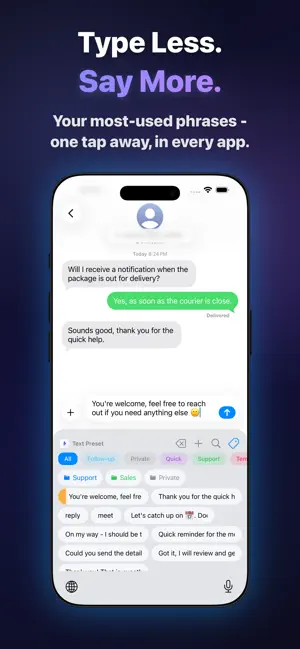
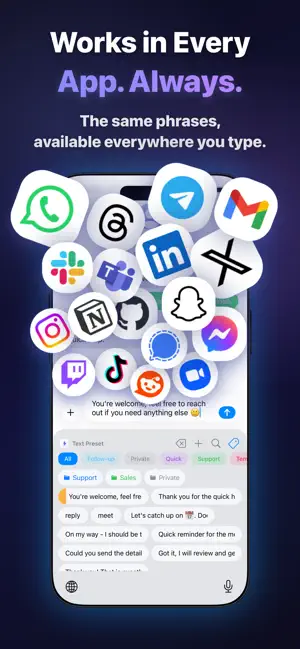
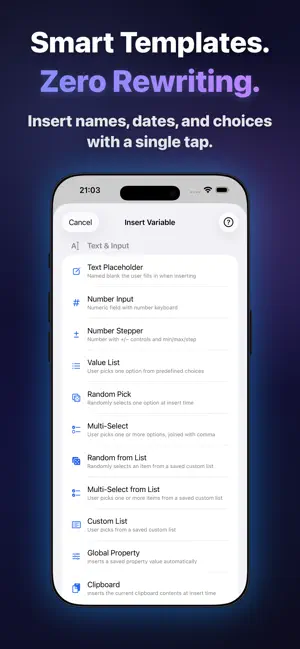
You type the same things. Every. Single. Day. "Thanks for reaching out" "Let me check and get back to you." "Here's my availability for next week:" Text Preset stores every phrase you repeat and inserts any of them in one tap - right from the keyboard, in every app. ONE TAP. ANY APP. EVERY TIME. Switch to Text Preset in WhatsApp, Gmail, Slack, LinkedIn, iMessage, Notion, Zendesk - anywhere you can type. Your full phrase library is always one tap away. No copy-paste. No app switching. No retyping. PHRASES THAT FILL THEMSELVES IN Not just saved text - smart templates that do the work for you: {{name}} - prompts you to fill in a value before sending {{yes; no; maybe}} - tap to pick from your own options {{@date}} - inserts today's date automatically {{@date +7}} - any date offset, calculated on the fly {{@date=month}} - inserts month, year, weekday, and more {{@select_date}} - interactive date picker, right in the keyboard {{@time}} - inserts current time automatically {{@time +7}} - any time offset, calculated on the fly {{@select_time}} - interactive time picker, right in the keyboard {{@select_number=qty; 1; 100; 1}} - spin a wheel to pick any number {{@daysleft=2026-12-31}} - days remaining until any date {{@list=Cities}} - pull from your own named value lists {{@phrase=intro}} - nest one phrase inside another A guided sheet walks you through every variable before inserting. You'll never accidentally send "Hi {{name}}" again. FORMAT & TRANSLATE ON THE FLY Insert any phrase in UPPERCASE, Title Case, or lowercase - no editing needed. Or translate it instantly with AI, right at insertion time. 75+ TEMPLATES. READY THE MOMENT YOU OPEN THE APP. 8 professionally written packs, import in one tap: → Customer Support - acknowledgements, escalations, resolutions → Sales & Outreach - follow-ups, intros, proposals → Email Signatures - sign-offs, out-of-office, introductions → Developer - Git commits, PR descriptions, code review → Social Media - captions, DM openers, engagement replies → Meetings - scheduling, rescheduling, confirmations → HR & Recruiting - offers, rejections, interview coordination → Greetings - casual messages, well-wishes, farewells Duplicate phrases are skipped automatically. Your library stays clean. ORGANIZED THE WAY YOUR BRAIN WORKS Color-coded tags with AND/OR filtering - find exactly what you need Pin your most critical phrases to the top of every list Drag to reorder, or auto-sort by usage Alias names for cross-phrase templates Save text from any app as a phrase with the Share Extension SEE THE TIME YOU'RE GETTING BACK The Statistics dashboard shows: total insertions, characters saved, and estimated minutes recovered - based on real typing speed. Earn Achievements as you build your library and hit new milestones. You'll be surprised how fast it adds up. iCLOUD SYNC. INSTANT. SILENT. AUTOMATIC. Add a phrase on your iPhone. It's on your iPad before you put the phone down. SHARE YOUR LIBRARY WITH YOUR TEAM Send a phrase as a deep link - your teammate taps once to import. Export your full library as JSON or CSV. Restore it in seconds. Perfect for onboarding new team members or syncing standards across a support team. PAYS FOR ITSELF IN AN AFTERNOON. Pro is a one-time purchase. No subscription. No annual renewal. No "your plan has expired." Just your phrases, forever. FREE includes: Up to 20 phrases Up to 3 tags Full keyboard in every app All 8 template packs iCloud sync PRO (one-time - yours forever): Unlimited phrases & tags Custom Lists for dynamic variables Full Statistics dashboard & Achievements JSON & CSV export and import If you're in customer support, sales, recruiting, healthcare, education, or just someone who types the same things too many times a day - Text Preset was built for you. Download free. Be faster today.
What’s new
Version 1.17 · Updated October 5, 2026
Shared folders — when Text Preset has to rebuild its local copy of your shared folders, their change history now starts cleanly, so updates from teammates keep syncing afterwards. Sharper keyboard — on iOS 26 the top row of the keyboard (tags, or folders when tags are hidden) no longer looks blurry or slightly shifted. A lot got fixed, even more got better. Enjoy.
App privacy
The developer, Renat Tlebaldiev, reported these privacy practices to Apple.
Data Not Collected
The developer does not collect any data from this app.
Alternatives to Text Preset: Keyboard Phrases
Looking for apps like Text Preset: Keyboard Phrases? Here are 6 similar apps on the App Store. The highest rated is BlinkPaste: Snippet Keyboard (5.0/5), and all 6 are free to download.
-
 Habit Craft Master - Atom
-
 SweetCue: Couples Keyboard
-
 Snippet Keyboard - Quick Paste
-
 BlinkPaste: Snippet Keyboard
5.0
BlinkPaste: Snippet Keyboard
5.0
-
 KeepText: Snippet Keyboard
-
 Sniplet – Quick Reply Keyboard
5.0
Sniplet – Quick Reply Keyboard
5.0
| App | Rating | Price | Last updated | Compare |
|---|---|---|---|---|
| Text Preset: Keyboard Phrases | 5.0 / 5 (1 rating) | Free | October 5, 2026 | |
| Habit Craft Master - Atom | – | Free | Oct 6, 2026 | Compare |
| SweetCue: Couples Keyboard | – | Free | Oct 26, 2026 | Compare |
| Snippet Keyboard - Quick Paste | – | Free | Oct 1, 2026 | Compare |
| BlinkPaste: Snippet Keyboard | 5.0 / 5 (1) | Free | Oct 22, 2026 | Compare |
| KeepText: Snippet Keyboard | – | Free | Jul 30, 2026 | Compare |
| Sniplet – Quick Reply Keyboard | 5.0 / 5 (1) | Free | Oct 23, 2026 | Compare |