

KeepText: Snippet Keyboard
Yeong Bing Ong Productivity iPhoneiPadiPod touchMac
KeepText: Snippet Keyboard is a free Productivity app for iPhone and iPad by Yeong Bing Ong. Requires iOS 17.0. Updated July 30, 2026.
- Price
- Free
- on the App Store
- Size
- 8 MB
- Age 4+
- Updated
- Jul 30
- 2026 · v2.0
Screenshots


About KeepText: Snippet Keyboard
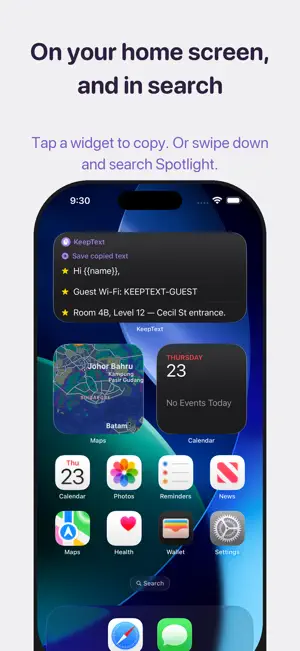
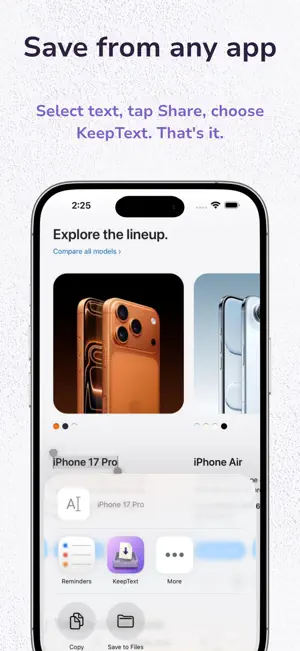
Anything you type twice belongs in KeepText. Addresses. Bank details. The reply you send five times a week. Prompts, code, links, your kid's allergy list. Save it once — then paste it anywhere, without leaving the app you're in. THE KEEPTEXT KEYBOARD This is the one that changes the day-to-day. Switch to the KeepText keyboard inside Mail, Messages, WhatsApp, Safari, Slack — anywhere you can type. Your snippets are right there, ordered by what you actually use, so the one you want is usually the first one. Tap it and the text lands at your cursor. No app switching. No back-and-forth copy and paste. No losing your place. SAVE IT IN UNDER A SECOND - Share sheet — select text in any app, tap Share, choose KeepText. Done. - Clipboard — copy something, open KeepText, and it offers to save it. One tap to keep, one tap to dismiss. It never reads your clipboard until you say yes. - Type it — one field does both jobs. Search your library, and if nothing matches, that same field creates the snippet on the spot. ONE TAP AWAY, EVERYWHERE ELSE TOO - Widgets — home screen and lock screen. Tap to copy. - Spotlight — swipe down anywhere and search your snippets by name. - Shortcuts and Siri — "Save clipboard to KeepText," or add it to your Action button for one-press capture. SEARCH THAT TELLS YOU THE TRUTH Most apps guess. KeepText matches exactly — the word you typed, or the start of it, and nothing looser. That sounds like a limitation until you use it: when KeepText says nothing matched, it genuinely isn't saved yet, so you can create it right there instead of wondering whether you're about to make a duplicate. TEMPLATES Put {{name}} or {{date}} anywhere in a snippet. When you use it, KeepText asks you for the values and fills them in. Good for the email you send constantly with one line that changes. SYNCS EVERYWHERE. NO ACCOUNT. EVER. Your snippets sync across your devices through your own iCloud account. There is no KeepText account, no sign-up, no password, no server of ours in the middle. Nothing to breach, because there's nowhere for your text to go. The keyboard asks for Full Access because that is the only way iOS lets a keyboard read the snippets stored on your own device. KeepText uses it for exactly that. Nothing is collected, nothing is transmitted, there's no analytics — the app has no account system to send anything to in the first place. You can export everything you've saved to a plain JSON file whenever you like. FREE, THEN ONE SMALL PURCHASE Keep up to 20 snippets free for as long as you want. One small purchase unlocks unlimited snippets, forever. No subscription. No trial that quietly starts charging. No ads. NO FOLDERS You'll notice there's no filing system. That's deliberate. Search and frequency do the organizing, so saving something costs you one tap instead of one decision — which is the whole reason your snippets actually get saved
What’s new
Version 2.0 · Updated July 30, 2026
KeepText 2.0 — save it once, paste it anywhere. This is the biggest update since launch, and it's mostly about one thing: getting your snippets out of the app and into the places you actually type. THE KEEPTEXT KEYBOARD A real keyboard you can switch to inside any app. Your snippets, ranked by what you use most, one tap from your cursor. Filter to favourites, use templates, and get back to what you were writing. WIDGETS Home screen widgets in three sizes and a lock screen widget. Tap to copy. SPOTLIGHT Your snippets are now indexed in iOS search. Swipe down from the home screen and find any snippet by name. SHORTCUTS AND SIRI Save clipboard, copy a snippet, create a snippet — all available to Shortcuts, Siri, and the Action button. ICLOUD SYNC Snippets now sync across your devices through your own iCloud. There's still no KeepText account and never will be. A REBUILT APP SCREEN Search is now the first thing on the screen, not an afterthought. Type to filter instantly; if nothing matches, the same field creates the snippet. SMARTER SAVING Copy something, open KeepText, and it offers to save it — without reading your clipboard until you tap Save. TEMPLATES Snippets can now contain {{placeholders}}. KeepText asks for the values and fills them in as you copy. LONG-PRESS ANYTHING Press and hold a snippet to preview it and jump straight to copy, share, favourite, edit, or fill. EXPORT Settings now includes a one-tap JSON export of everything you've saved. Thanks for using KeepText. If it saves you time, a review genuinely helps a small app like this one.
App privacy
The developer, Yeong Bing Ong, reported these privacy practices to Apple.
Data Not Collected
The developer does not collect any data from this app.
Alternatives to KeepText: Snippet Keyboard
Looking for apps like KeepText: Snippet Keyboard? Here are 6 similar apps on the App Store.
-
 Snippet Keyboard - Quick Paste
-
 Clipboard Keyboard Snippets
-
 ClipNote - Notes & Keyboard
-
 TapCopy: Text Snippets
-
 QuikSnippet
-
 Stash | Snippet Manager
| App | Rating | Price | Last updated | Compare |
|---|---|---|---|---|
| KeepText: Snippet Keyboard | – | Free | July 30, 2026 | |
| Snippet Keyboard - Quick Paste | – | Free | Oct 1, 2026 | Compare |
| Clipboard Keyboard Snippets | – | Free | Aug 19, 2026 | Compare |
| ClipNote - Notes & Keyboard | – | Free | Jul 18, 2026 | Compare |
| TapCopy: Text Snippets | – | Free | Oct 17, 2026 | Compare |
| QuikSnippet | – | Free | Jul 16, 2026 | Compare |
| Stash | Snippet Manager | – | Free | Aug 22, 2026 | Compare |