

TapCopy: Text Snippets
atsuko imai Productivity iPhoneiPadiPod touch
TapCopy: Text Snippets is a free Productivity app for iPhone and iPad by atsuko imai. Requires iOS 17.0. Updated October 17, 2026.
- Price
- Free
- on the App Store
- Size
- 12 MB
- Age 4+
- Updated
- Oct 17
- 2026 · v1.4.0
Screenshots


About TapCopy: Text Snippets
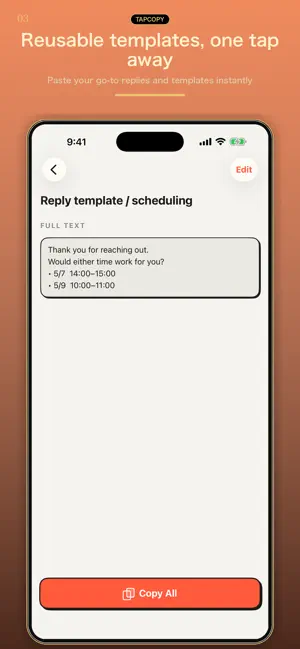
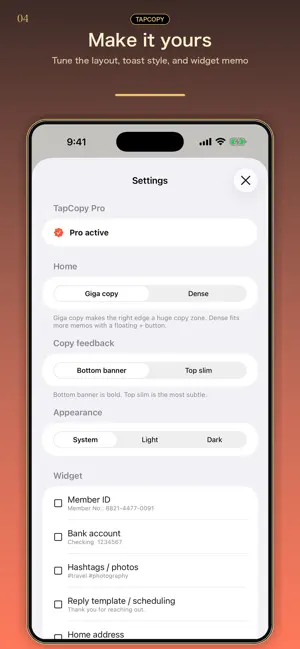
TapCopy saves the text you keep typing again: replies, addresses, email signatures, links and hashtags. Add your own text once, then tap Copy on its card when you need it. COPY FROM YOUR LIST Each note has a copy button. Use the large-button layout or switch to a compact list to see more notes. Give notes a title and arrange them in the order that suits you. USE A WHOLE NOTE OR A BLOCK Copy all of a note, or choose a text block in its detail view. Blank lines separate automatic blocks; you can also define blocks from selected lines. Keep an address and a message together, then copy only the part you need. COPY, THEN PASTE TapCopy puts the selected text on the clipboard. Switch to your message, email or form and paste it there. You save the text you want to reuse; TapCopy does not automatically collect your clipboard history. A Home Screen widget is also available for saved notes. FREE AND PRO Save up to 20 notes for free with ads. Text blocks do not have a separate count limit. An optional one-time TapCopy Pro purchase removes ads and the note limit. Check the purchase screen for your local price. Start with a reply or an address you often send. Save it, copy it, and paste it when you need it. Privacy Policy: https://kazusa703.github.io/privacy.html Terms of Use: https://kazusa703.github.io/terms.html Support: https://kazusa703.github.io/support.html
What’s new
Version 1.4.0 · Updated October 17, 2026
• Your memos now sync with TapCopy on Mac via iCloud. • New setting to turn vibration on or off (off by default).
App privacy
The developer, atsuko imai, reported these privacy practices to Apple.
Data Used to Track You
The following data may be used to track you across apps and websites owned by other companies:
- Location: Coarse Location
- Identifiers: Device ID
- Usage Data: Product Interaction
Data Not Linked to You
The following data, which may be collected but is not linked to your identity, may be used for the following purposes:
- Location: Coarse Location
- Identifiers: Device ID
- Usage Data: Product Interaction
Used for: Third-Party Advertising
Alternatives to TapCopy: Text Snippets
Looking for apps like TapCopy: Text Snippets? Here are 6 similar apps on the App Store.
-
 Kopipe : Copier Coller
-
 N| - Notes & Voice Memos
-
 Paste Keyboard: Quick Content
-
 TRAIL - Climb Your Goals
-
 Scan Copy Text
-
 CopyAgain: Copy/Paste Library
| App | Rating | Price | Last updated | Compare |
|---|---|---|---|---|
| TapCopy: Text Snippets | – | Free | October 17, 2026 | |
| Kopipe : Copier Coller | – | Free | Aug 25, 2026 | Compare |
| N| - Notes & Voice Memos | – | Free | Aug 19, 2026 | Compare |
| Paste Keyboard: Quick Content | – | Free | Oct 31, 2026 | Compare |
| TRAIL - Climb Your Goals | – | Free | Aug 10, 2026 | Compare |
| Scan Copy Text | – | Free | Jun 12, 2026 | Compare |
| CopyAgain: Copy/Paste Library | – | Free | Sep 10, 2026 | Compare |