

SweetCue: Couples Keyboard
Hangzhou Shengli Technology Co., Ltd. Productivity iPhoneiPadiPod touch
SweetCue: Couples Keyboard is a free Productivity app for iPhone and iPad by Hangzhou Shengli Technology Co., Ltd. Requires iOS 18.6.
- Price
- Free
- on the App Store
- Size
- 6 MB
- Age 4+
- Updated
- Oct 26
- 2026 · v1.2.2
Screenshots


About SweetCue: Couples Keyboard
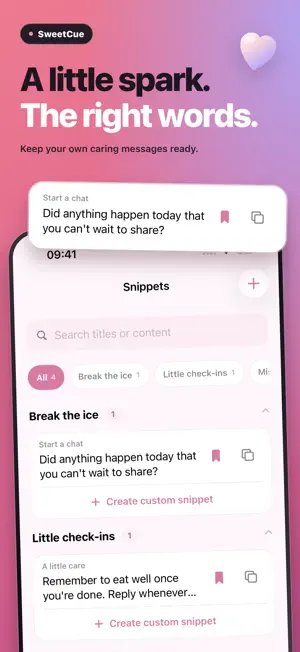
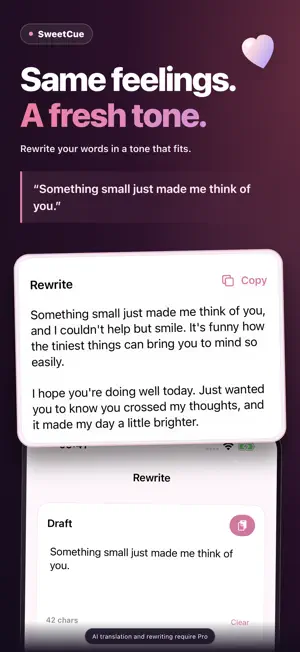
A little care can be hard to put into words. SweetCue helps you keep thoughtful phrases ready and shape the tone of messages to your partner or someone you like. YOUR WORDS, READY WHEN YOU NEED THEM • Save your own greetings, caring messages, miss-you notes and invitations. • Organize phrases into categories, search your library and keep favorites close. • Start with four conversation scenarios, then edit the phrases to make them yours. AI: REWRITE AND TRANSLATE • Rewrite text you provide with a selected or custom tone. Review the result before using it. • Detect the source language automatically or choose it yourself, then select a target language. • Use AI tools in the app or keyboard and choose when to copy or insert the result. TAP TO INSERT Keyboard setup is optional. Add SweetCue in iOS Settings to insert saved phrases in compatible text fields. Allow Full Access to sync the main app’s phrase library and settings and use the keyboard’s online features. You can use the main app before setting up the keyboard. FREE AND PRO Your four oldest phrases, ordered by creation time, are available for free. Additional saved phrases are kept and unlock with a subscription. Without a subscription, you get a total of 3 successful AI uses, shared across translation and rewriting in the app and keyboard. Failed requests do not count toward this total. After these uses are exhausted, continuing to use AI requires a subscription. An active Pro subscription enables unlimited phrase creation and use, plus ongoing AI translation and tone rewriting. Weekly and yearly plans are available; the purchase screen shows the price and billing period. Subscriptions renew automatically and can be managed or canceled in your Apple Account subscription settings. AI AND YOUR PERMISSION AI features require an internet connection. Only after you agree to the data-sharing notice are the relevant text and language or tone options sent to DeepSeek or PoYo for processing. You can withdraw permission in Settings and keep using regular phrases within your current free or subscription access. Support: [email protected] Terms of Use (EULA): https://sunnycreate.com/autokeyboard/terms/ Privacy Policy: https://sunnycreate.com/autokeyboard/privacy/
What’s new
Version 1.2.2 · Updated October 26, 2026
Bug fixes.
App privacy
The developer, Hangzhou Shengli Technology Co., Ltd., reported these privacy practices to Apple.
Data Linked to You
The following data, which may be collected and linked to your identity, may be used for the following purposes:
- Purchases: Purchase History
- User Content: Other User Content
- Identifiers: Device ID
- Diagnostics: Performance Data
Used for: App Functionality
Alternatives to SweetCue: Couples Keyboard
Looking for apps like SweetCue: Couples Keyboard? Here are 6 similar apps on the App Store. The highest rated is Echo: Semantic Voice Keyboard (5.0/5), and all 6 are free to download.
-
 RefundTrack – Return Deadline
-
 AI Rewrite: On-Device
-
 fix me - AI keyboard
-
 DXY AI Keyboard
-
 Echo: Semantic Voice Keyboard
5.0
Echo: Semantic Voice Keyboard
5.0
-
 AI Keyboard & Writer: TypeAI
5.0
AI Keyboard & Writer: TypeAI
5.0
| App | Rating | Price | Last updated | Compare |
|---|---|---|---|---|
| SweetCue: Couples Keyboard | – | Free | October 26, 2026 | |
| RefundTrack – Return Deadline | – | Free | Mar 14, 2026 | Compare |
| AI Rewrite: On-Device | – | Free | Jul 1, 2026 | Compare |
| fix me - AI keyboard | – | Free | Jul 5, 2026 | Compare |
| DXY AI Keyboard | – | Free | Oct 27, 2026 | Compare |
| Echo: Semantic Voice Keyboard | 5.0 / 5 (7) | Free | May 27, 2026 | Compare |
| AI Keyboard & Writer: TypeAI | 5.0 / 5 (3) | Free | Jul 22, 2026 | Compare |