

BlackRAW Studio: Color Grading
TRISIMIO SL Photo & Video iPhoneiPadiPod touch
BlackRAW Studio: Color Grading is a free Photo & Video app for iPhone and iPad by TRISIMIO SL. Rated 5.0/5 from 1 ratings. Requires iOS 17.0.
- Rating
- 5.0
- 1 ratings
- Price
- Free
- on the App Store
- Size
- 278 MB
- Age 4+
- Updated
- Oct 13
- 2026 · v3.0.15
Screenshots

About BlackRAW Studio: Color Grading
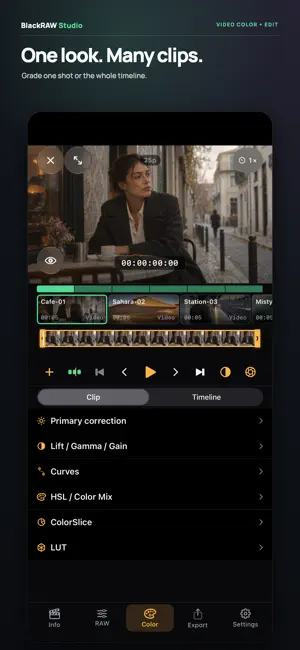
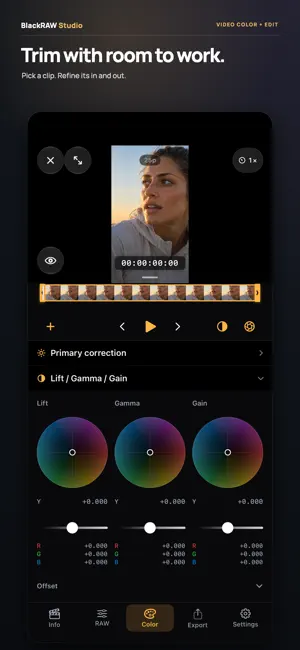
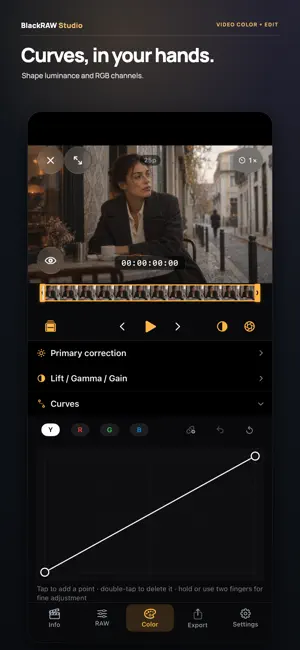
Try all Pro features for 7 days with your own clips, including RAW, color, LUTs, projects and export. Available with monthly or annual subscriptions for eligible Apple Accounts after confirming in the App Store. Renews at the displayed price unless canceled. Included sample clips also let you try color and export without subscribing. Color grading for every video. RAW when you need it. BlackRAW Studio is your pocket color studio for iPhone and iPad. Refine everyday video, develop Blackmagic RAW and Apple ProRes RAW, and give multiple clips a consistent look before delivery. COLOR FOR EVERY SHOT Refine your image with primary adjustments, color wheels, curves, HSL and ColorSlice. Grade an individual clip or create a shared finish for the timeline. Import your LUTs and export a static look as a .cube file. MORE ROOM TO TRIM Open multiple clips from Files or Photos. Select a shot in the timeline and set its in and out points with a larger trim bar. Review each shot's duration as you prepare a simple sequence. CHOOSE YOUR DELIVERY Export separate graded, trimmed clips or the timeline as one continuous video. Choose options supported by the export mode and your device, including H.264, HEVC or ProRes 422. Save videos to Files or Photos when the format allows it. Follow progress, cancel when needed and check the delivery summary. A WORKFLOW FOR RAW Open Blackmagic RAW and decode and develop supported Apple ProRes RAW footage with the RAW controls available for each source. With BRAW, you can also export trimmed originals to Files without re-encoding or baking in the grade. Original RAW trimming does not apply to ProRes RAW. A LOOK YOU CAN REUSE Export color adjustments that can be represented by a .cube LUT for use with a compatible color input. A LUT does not contain trims, edits or RAW decoding parameters. BEFORE YOU EXPORT Export of your own clips requires Pro. Check available plans and prices in the app. Compatibility and options depend on the codec, file, system version and device. The Studio deliveries described here are SDR. BlackRAW Studio is an independent app and is not affiliated with Apple or Blackmagic Design. Format names identify compatibility. Open your clips, find your look and prepare your next delivery. Terms of Use: https://blackrawvisor.com/terms
What’s new
Version 3.0.15 · Updated October 13, 2026
A more flexible color studio for iPhone Duo. The workspace adapts as you unfold the device, with improved landscape controls, clearer clip information and a more comfortable welcome experience. This update also improves access to Pro and purchase restoration, with fixes for RAW controls and session continuity.
App privacy
The developer, TRISIMIO SL, reported these privacy practices to Apple.
Data Used to Track You
The following data may be used to track you across apps and websites owned by other companies:
- Purchases: Purchase History
- Identifiers: Device ID
- Usage Data: Product Interaction
Data Linked to You
The following data, which may be collected and linked to your identity, may be used for the following purposes:
- Identifiers: Device ID
- Purchases: Purchase History
- Usage Data: Product Interaction
- Diagnostics: Performance Data, Crash Data, Other Diagnostic Data
Used for: Third-Party Advertising, Developer’s Advertising or Marketing, Analytics, App Functionality
Data Not Linked to You
The following data, which may be collected but is not linked to your identity, may be used for the following purposes:
- Other Data: Other Data Types
- Purchases: Purchase History
Used for: Analytics, App Functionality
Alternatives to BlackRAW Studio: Color Grading
Looking for apps like BlackRAW Studio: Color Grading? Here are 6 similar apps on the App Store. The highest rated is Lutter: Video Color Grading (5.0/5), and all 6 are free to download.
-
 Lutter: Video Color Grading
5.0
Lutter: Video Color Grading
5.0
-
 Camera HD & Pro Raw Photo HDR
-
 LogLab
3.3
LogLab
3.3
-
 LUT Designer: Color Grading
4.8
LUT Designer: Color Grading
4.8
-
 Second View - viewfinder
4.0
Second View - viewfinder
4.0
-
 Better Camera: Point & Shoot
4.5
Better Camera: Point & Shoot
4.5
| App | Rating | Price | Last updated | Compare |
|---|---|---|---|---|
| BlackRAW Studio: Color Grading | 5.0 / 5 (1 rating) | Free | October 13, 2026 | |
| Lutter: Video Color Grading | 5.0 / 5 (4) | Free | Oct 12, 2026 | Compare |
| Camera HD & Pro Raw Photo HDR | – | Free | Oct 10, 2026 | Compare |
| LogLab | 3.3 / 5 (3) | Free | Oct 7, 2026 | Compare |
| LUT Designer: Color Grading | 4.8 / 5 (5) | Free | Oct 12, 2026 | Compare |
| Second View - viewfinder | 4.0 / 5 (5) | Free | Oct 9, 2026 | Compare |
| Better Camera: Point & Shoot | 4.5 / 5 (8) | Free | Oct 7, 2026 | Compare |