

Total Calories - Daily Tracker
Jack Wallner Health & Fitness iPhoneiPod touchApple Watch
Total Calories - Daily Tracker is a free Health & Fitness app for iPhone and iPod touch by Jack Wallner. Rated 5.0/5 from 11 ratings. Requires iOS 17.0.
- Rating
- 5.0
- 11 ratings
- Price
- Free
- on the App Store
- Size
- 52 MB
- Age 4+
- Updated
- Oct 10
- 2026 · v1.8.8
Screenshots

About Total Calories - Daily Tracker
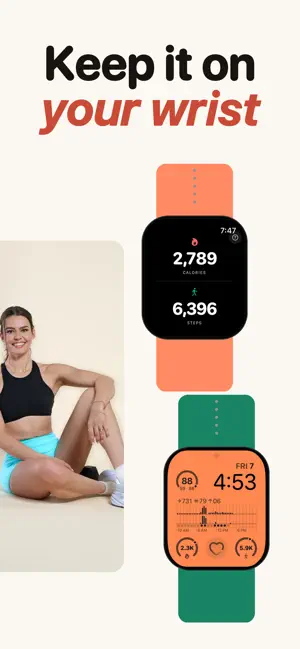
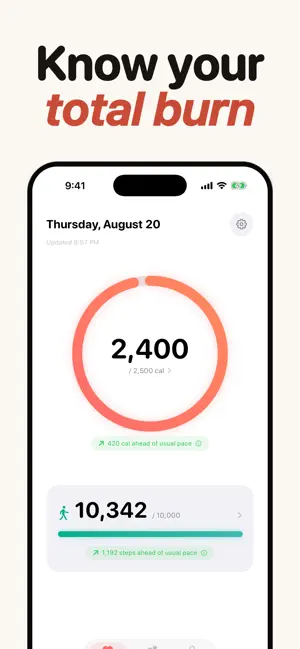
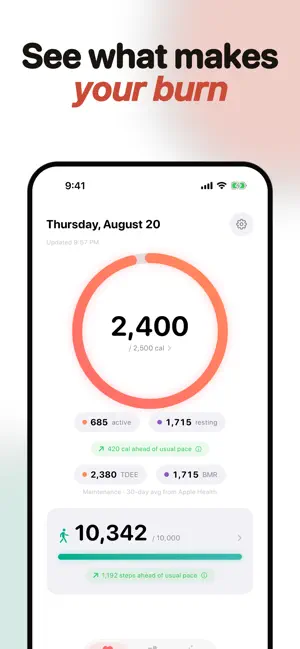
Total Calories shows your daily burn and total calories burned (active + resting) plus step count on your Apple Watch face, Home Screen widgets, and Lock Screen for free. No subscription needed for the basics. No account. Your health data never leaves your phone. If you've ever wished your Apple Watch face just showed your total calories burned for the day, this is that app. ON YOUR APPLE WATCH (FREE) - Total calories burned complications for every watch face style: circular, rectangular, inline, and corner. - Live step count complication too. - Watch app shows today at a glance plus 30-day trends. - Goals you set on iPhone sync straight to the watch. ON YOUR HOME SCREEN & LOCK SCREEN (FREE) - Home Screen widgets in small and medium sizes. - Lock Screen widgets in circular and rectangular layouts. - Widgets respect the metrics you've turned on and the goals you've set. - Full daily totals visible without opening the app. THE DASHBOARD (FREE) - Total daily calories burned on one clean ring. - Daily steps with progress bar and goal. - Pacing indicator: are you ahead or behind your usual day at this time? - Pull to refresh. Tap the gear for settings. BODY PROFILE & BMI (FREE) - Your BMI, calculated from the height and weight already in Apple Health. - No Health data? Enter height and weight by hand instead. - BMI category reference, with a plain-English note on what the number does and doesn't mean. - Body fat percentage and calorie context are part of Vitals+. MACROS (VITALS+) - Protein, carbs, and fat beside your calories, read from the app that already logs your food to Apple Health. - Nothing to log twice. If it is in Health, it is here. - Track all three, or only the macro you actually count. - Optional gram goals, plus macro averages, charts, CSV columns, and PDF reports. HISTORY (FREE) - 7 / 30 / 90 / 365-day views and any custom date range. - Trend arrows, peak days, and clean bar charts. - CSV data export. GOALS THAT WORK FOR YOU - Optional daily calorie and step goals. - Or skip goals and use it as a clean counter — your call. - Pacing comparison: same weekday vs. all days, configurable lookback (14 / 30 / 90 days / 1 year). VITALS+ (OPTIONAL) A small monthly, yearly, or lifetime upgrade unlocks: - Macros: protein, carbs, and fat from the food you already log to Apple Health - TDEE and BMR reference figures: your 30-day maintenance and resting energy averages, straight from Apple Health - Body fat percentage alongside your BMI - Active vs. resting calorie breakdown - Net Deficit: calories burned minus food energy from Apple Health - Monthly Summary PDFs ready to share - Custom date-range PDF reports - Deep Trends: period-over-period comparison cards A free trial is offered to new subscribers. PRIVATE BY DESIGN - Read-only Apple Health access. The app never writes to your health records. - Your health data is stored on your device and is never uploaded. - Reports are generated on-device. - No ads. No tracking. No accounts. - Purchases are processed by Apple and RevenueCat, which never receive your health data. Total Calories is not a medical device and is not intended to diagnose, treat, or prevent any medical condition. Always consult a healthcare professional for medical advice. Subscription Details Vitals+ is available as an auto-renewing subscription (Monthly or Yearly, both with a 7-day free trial) or as a one-time Lifetime purchase. Prices are shown in the app before you buy and vary by region. Payment is charged to your Apple ID at confirmation. Subscriptions renew automatically unless canceled at least 24 hours before the end of the current period. Manage or cancel anytime in Settings → Apple ID → Subscriptions. Privacy Policy: https://jackwallner.github.io/vitals/privacy-policy.html Terms of Use (EULA): https://www.apple.com/legal/internet-services/itunes/dev/stdeula/
Ratings & reviews
5.0
11 ratings
What’s new
Version 1.8.8 · Updated October 10, 2026
History loads faster on a cold start. A failed food read now says so instead of showing "No food logged". The Excluded Days screen and the Pause Averages switch describe a paused state accurately, and the paused banner leaves room for larger text sizes. Behind-the-scenes improvements and fixes to keep Total Calories running smoothly. Thank you for being here.
App privacy
The developer, Jack Wallner, reported these privacy practices to Apple.
Data Not Collected
The developer does not collect any data from this app.
Alternatives to Total Calories - Daily Tracker
Looking for apps like Total Calories - Daily Tracker? Here are 6 similar apps on the App Store. The highest rated is HealthFace (4.5/5), and 5 of the 6 are free to download.
-
 Calicalo: CICO Calories, IIFYM
4.1
-
 Calorie Widget
-
 The Deficit
-
 Intake & Burn
-
 Calorimeter
3.9
-
 HealthFace
4.5
| App | Rating | Price | Last updated | Compare |
|---|---|---|---|---|
| Total Calories - Daily Tracker | 5.0 / 5 (11 ratings) | Free | October 10, 2026 | |
| Calicalo: CICO Calories, IIFYM | 4.1 / 5 (93) | Free | Jul 7, 2026 | Compare |
| Calorie Widget | – | Free | May 18, 2026 | Compare |
| The Deficit | – | Free | Oct 15, 2026 | Compare |
| Intake & Burn | – | Free | Oct 15, 2026 | Compare |
| Calorimeter | 3.9 / 5 (10) | Free | Nov 28, 2024 | Compare |
| HealthFace | 4.5 / 5 (549) | 1.99 USD | Oct 9, 2026 | Compare |