

Change Order Pro Contractor
Mustafa Gokalp Business iPhoneiPadiPod touch
Change Order Pro Contractor is a free Business app for iPhone and iPad by Mustafa Gokalp. Requires iOS 15.0. Updated October 9, 2026.
- Price
- Free
- on the App Store
- Size
- 30 MB
- Age 4+
- Updated
- Oct 9
- 2026 · v1.4.1
Screenshots

About Change Order Pro Contractor
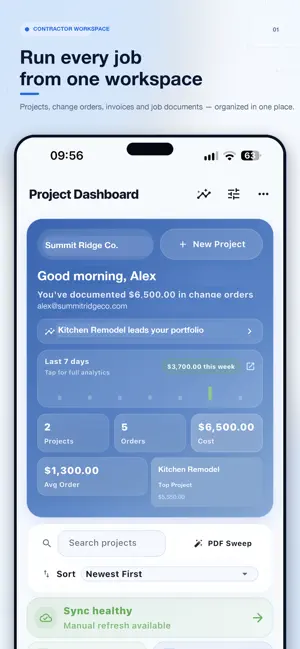
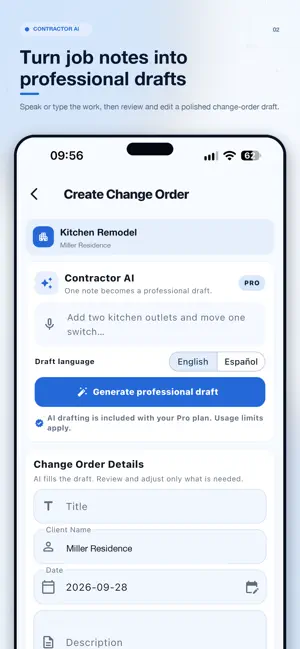
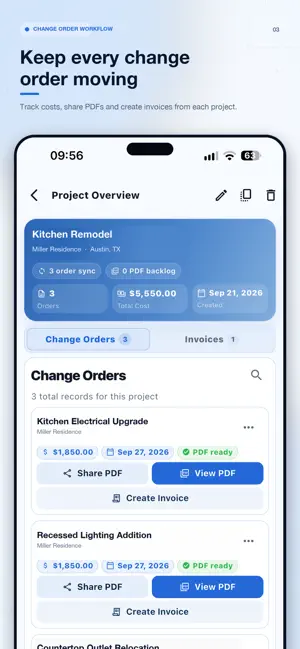
Create professional change orders before extra work becomes a paperwork problem. Change Order Pro gives contractors one organized workspace for projects, change orders, invoices, signatures, jobsite photos, and professional PDFs. Capture the details in the field, keep customers informed, and move approved work from change order to final invoice. NOW IN ENGLISH & SPANISH Use the app interface in English or Spanish while keeping your AI draft and document language separate. Choose the language that works best for your workflow, customers, and documents. CONTRACTOR AI Speak or type your job notes and turn them into a structured, editable draft. Contractor AI helps prepare: • Professional titles • Detailed scope descriptions • Cost explanations • Schedule impact notes • Customer review notes • English or Spanish drafts Every AI-generated draft remains fully editable, so you stay in control before saving, signing, or sharing. VOICE OR TEXT INPUT Describe the work, materials, labor, cost, and timeline using your voice or keyboard. Contractor AI organizes the information into a clear draft that you can review and revise. CHANGE ORDERS • Organize change orders by project and customer • Add scope, pricing, dates, notes, and jobsite photos • Capture customer and contractor signatures • Generate professional PDFs • Create documents in English or Spanish • Preview, duplicate, update, and share records • Turn approved change orders into invoices AI INVOICE ASSISTANT Create organized invoice line items from job details or approved change orders. Review and edit descriptions, quantities, unit prices, dates, payment terms, and customer notes before saving. INVOICES • Create invoices from scratch or from change orders • Add quantities, unit prices, tax, and discounts • Set issue dates, due dates, and invoice status • Include payment terms and customer notes • Generate polished invoice PDFs • Keep invoices connected to their source projects ONE CONTRACTOR WORKSPACE • Manage projects, change orders, and invoices • Add your company name, logo, and business details • Search customer and project records • Review dashboard activity and job totals • Use Light or Dark Mode • Sync your workspace across supported devices • Restore eligible App Store Pro purchases BUILT FOR THE FIELD Designed for general contractors, remodelers, builders, subcontractors, renovation teams, and service professionals who need a faster way to document additional work and maintain professional customer records. FREE PLAN • 2 projects • 10 change orders • 2 invoices • A one-time allowance of 20 AI drafts shared across Contractor AI and Invoice Assistant UPGRADE TO PRO Choose Monthly or Yearly Pro to unlock: • Unlimited projects • Unlimited change orders • Unlimited invoices • Contractor AI and Invoice Assistant • Professional PDF workflows • English and Spanish AI drafting • English and Spanish PDFs • Cloud synchronization • Advanced analytics and workspace features Monthly and Yearly Pro are auto-renewable subscriptions billed through your Apple ID. Subscriptions renew automatically unless canceled at least 24 hours before the end of the current billing period. You can manage or cancel your subscription in your Apple ID account settings. Terms of Use: https://www.apple.com/legal/internet-services/itunes/dev/stdeula/
What’s new
Version 1.4.1 · Updated October 9, 2026
What's New in Version 1.4.1 • Enhanced Analytics with date, project, and status filters. • A cleaner Dashboard with streamlined shortcuts. • Improved project navigation and list organization. • Refined notifications and account menu. • Better layouts and readability in English and Spanish. • Additional interface improvements and bug fixes.
App privacy
The developer, Mustafa Gokalp, reported these privacy practices to Apple.
Data Linked to You
The following data, which may be collected and linked to your identity, may be used for the following purposes:
- Contact Info: Email Address
- User Content: Photos or Videos, Other User Content
- Identifiers: User ID
Used for: App Functionality
Alternatives to Change Order Pro Contractor
Looking for apps like Change Order Pro Contractor? Here are 6 similar apps on the App Store. The highest rated is TriggerFlo: Focus Timer (5.0/5), and all 6 are free to download.
-
 Proposal CRM
-
 TriggerFlo: Focus Timer
5.0
TriggerFlo: Focus Timer
5.0
-
 Construction Change Order App
-
 SiteTicket: Change Order App
5.0
SiteTicket: Change Order App
5.0
-
 Site Field Log: DailyReportr+
5.0
Site Field Log: DailyReportr+
5.0
-
 PlanSnap
5.0
PlanSnap
5.0
| App | Rating | Price | Last updated | Compare |
|---|---|---|---|---|
| Change Order Pro Contractor | – | Free | October 9, 2026 | |
| Proposal CRM | – | Free | Jul 1, 2026 | Compare |
| TriggerFlo: Focus Timer | 5.0 / 5 (1) | Free | Oct 30, 2026 | Compare |
| Construction Change Order App | – | Free | May 12, 2026 | Compare |
| SiteTicket: Change Order App | 5.0 / 5 (1) | Free | Jul 29, 2026 | Compare |
| Site Field Log: DailyReportr+ | 5.0 / 5 (1) | Free | Sep 22, 2026 | Compare |
| PlanSnap | 5.0 / 5 (2) | Free | Dec 22, 2023 | Compare |