

PlanSnap
Vihanti Digital Services Private Limited Productivity iPhoneiPadiPod touch
PlanSnap is a free Productivity app for iPhone and iPad by Vihanti Digital Services Private Limited. Rated 5.0/5 from 2 ratings. Requires iOS 13.0.
- Rating
- 5.0
- 2 ratings
- Price
- Free
- on the App Store
- Size
- 47 MB
- Age 4+
- Updated
- Dec 22
- 2023 · v1.0.17
Screenshots

About PlanSnap
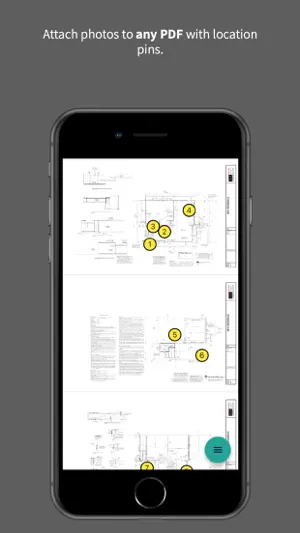
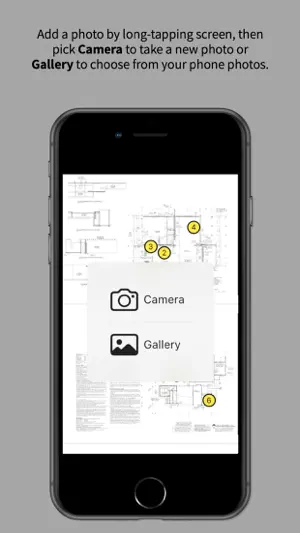
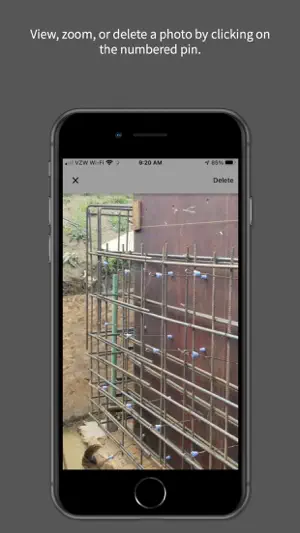
PlanSnap is an easy way to add photos to PDF plans. The app organizes construction pictures by pinning them to specific locations on a plan. Then you can download or share the set of PDF + photos with other team members. Created by structural design firm DLK Engineering LLC, PlanSnap is designed to help contractors, engineers, and architects share project photos and minimize the need for on-site meetings. For architects and engineers, upload your PDF set and share the link with a contractor. When the someone adds pictures to the PDF, anyone with the link can view, download, or share them with others. Note that you can also add photos of your hand sketches, screenshots, etc. For contractors, upload a new PDF by choosing a file from you phone (or open a previous PlanSnap link), and then start adding photos by long-tapping any spot on the PDF. Then a link can be shared to give other team members access to the PDF with the photos. If there is no reception at the jobsite, leave PlanSnap open so it can upload your photos when you are reconnected. Or, you can just add photos to the PDF from your phone gallery at anytime. Tip for locating photos: For maximum clarity, pin the photo to the location on the PDF that represents *where you were standing* when you took it, rather than pinning it to the element you photographed. Tip for sharing links: Save your PlanSnap links (in a shared Note, for instance) so you find them later as needed. And then download your photos to keep a backup copy. NOTE: Photos are not stored by PlanSnap forever, so make sure to download and keep your photo sets for your own records!
What’s new
Version 1.0.17 · Updated December 22, 2023
- Show recent documents on the main app screen. - Fix uploading images in poor network conditions.
App privacy
The developer, Vihanti Digital Services Private Limited, reported these privacy practices to Apple.
Data Not Linked to You
The following data, which may be collected but is not linked to your identity, may be used for the following purposes:
- User Content: Photos or Videos
Used for: App Functionality
Alternatives to PlanSnap
Looking for apps like PlanSnap? Here are 6 similar apps on the App Store. The highest rated is Drawboard PDF Annotate, Markup (4.8/5), and all 6 are free to download.
-
 ConDoc Mobile App
4.2
ConDoc Mobile App
4.2
-
 JobWalk Construction Tracking
4.7
JobWalk Construction Tracking
4.7
-
 Drawboard PDF Annotate, Markup
4.8
Drawboard PDF Annotate, Markup
4.8
-
 RenoPlan - Floor Plan Creator
4.5
RenoPlan - Floor Plan Creator
4.5
-
 BIM 360
1.8
BIM 360
1.8
-
 Bluebeam
1.5
Bluebeam
1.5
| App | Rating | Price | Last updated | Compare |
|---|---|---|---|---|
| PlanSnap | 5.0 / 5 (2 ratings) | Free | December 22, 2023 | |
| ConDoc Mobile App | 4.2 / 5 (11) | Free | Aug 7, 2026 | Compare |
| JobWalk Construction Tracking | 4.7 / 5 (318) | Free | Aug 31, 2026 | Compare |
| Drawboard PDF Annotate, Markup | 4.8 / 5 (1,933) | Free | Sep 17, 2026 | Compare |
| RenoPlan - Floor Plan Creator | 4.5 / 5 (745) | Free | Feb 13, 2025 | Compare |
| BIM 360 | 1.8 / 5 (148) | Free | Jul 2, 2026 | Compare |
| Bluebeam | 1.5 / 5 (397) | Free | Sep 23, 2026 | Compare |
Compare PlanSnap with the top alternatives: ratings, updates, ASO score and keyword gaps →