

Site Field Log: DailyReportr+
Lab Architect Business iPhoneiPadiPod touch
Site Field Log: DailyReportr+ is a free Business app for iPhone and iPad by Lab Architect. Rated 5.0/5 from 1 ratings. Requires iOS 15.0.
- Rating
- 5.0
- 1 ratings
- Price
- Free
- on the App Store
- Size
- 52 MB
- Age 4+
- Updated
- Sep 22
- 2026 · v3.8.1
Screenshots

About Site Field Log: DailyReportr+
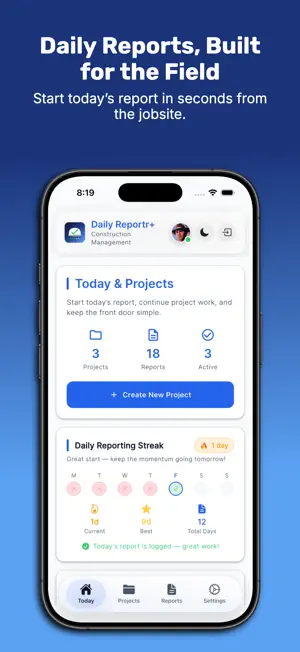
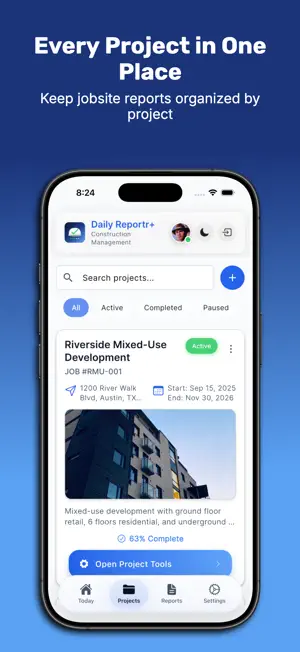
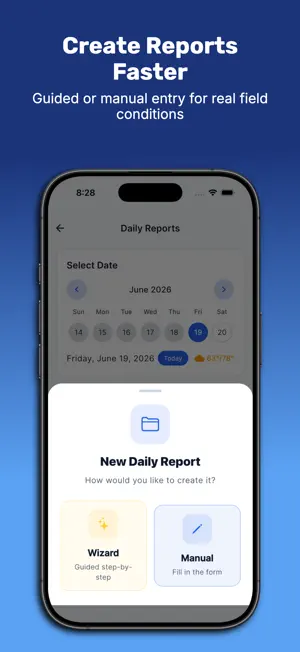
DailyReportr+ is built for construction professionals who need fast, reliable daily reports from the field. Organize reports by project, capture work activities, track crews and hours, document weather and delays, attach jobsite photos, record safety and site observations, collect signatures, and export professional PDF reports ready to share with the team or owner. DailyReportr+ keeps reporting simple at the jobsite and organized back at the office. COMPREHENSIVE PROJECT MANAGEMENT: Create and organize construction projects with job numbers, locations, dates, and status tracking. Monitor progress with duration and timeline visibility. Filter and search projects instantly. EASY PROJECT SETUP: Get started quickly with our step-by-step project wizard. Enter project details, set locations, configure settings, and start documenting in minutes—no training required. POWERFUL DAILY REPORTING: Generate detailed reports using our step-by-step wizard. Capture work activities, hours logged, quantities completed, and descriptions. Associate contractors with activities and track contributions. EQUIPMENT TRACKING: Manage your fleet with 14 equipment types: excavators, bulldozers, cranes, forklifts, drills, generators, compressors, saws, mixers, trucks, trailers, scaffolding, and tools. Track serial numbers, make, model, year. MATERIALS MANAGEMENT: Maintain detailed material inventory with costs, units, and descriptions. Document usage for accurate cost tracking and procurement planning. TASK MANAGEMENT: Complete task system with five priority levels. Categorize as general, safety, quality, maintenance, inspection, or documentation. Assign to team members, set due dates, track estimated vs actual hours. CHECKLIST SYSTEM: Create checklists across eight categories: safety, quality, inspection, maintenance, equipment, environmental, compliance, and general. Track completion, assign to team members, attach notes. SAFETY DOCUMENTATION: Daily safety surveys covering six areas: injuries/hazards, timeline issues, weather stoppages, site visitors, restricted zones, and equipment deliveries. Add descriptions and photos to observations. WEATHER INTEGRATION: Capture weather conditions automatically. View morning, midday, and afternoon forecasts with temperature, conditions, humidity, and wind speed preserved in reports. PHOTO DOCUMENTATION: Attach photos to work activities and safety observations. Photos organized by context with timestamps for accurate record-keeping. PROFESSIONAL PDF REPORTS: Generate polished PDFs with cover page, project header, weather summary, work log tables, notes, safety survey documentation, quality control, and photo gallery with clickable links. Add digital signatures to authenticate reports. DASHBOARD INTELLIGENCE Your reporting health at a glance. Daily Reporting Streak tracks your consistency with current streak, best streak, and total days. Last Report widget shows your most recent entry. Weekly Summary gives a quick view of reports filed this week. Report Coverage Radar flags projects that are falling behind on documentation. OFFLINE-FIRST DESIGN: Work without internet. Data stores locally and syncs automatically when connected. Perfect for remote jobsites with unreliable connectivity. SECURE CLOUD SYNC: Sign in with Apple or Google. Data syncs automatically across all your devices. EASY SIGN-IN: Sign in with Apple or Google—no passwords needed or if you prefer email and password can also work! DESKTOP ACCESS: Access your projects from any computer through our web portal at https://app.dailyreportrplus.com/. Manage reports, review documentation, and collaborate with your team from the office or home. PROJECT NOTES: Document important information, issues, and observations organized by project for easy reference during reviews and audits. Terms of Use: https://dailyreportrplus.com/terms Privacy Policy: https://dailyreportrplus.com/privacy
What’s new
Version 3.8.1 · Updated September 22, 2026
DailyReportr+ 3.8.1 adds company-wide crew payroll, Wi-Fi-only photo uploads, and account deletion. CREW PAYROLL ACROSS EVERY PROJECT • A new Payroll tab totals each crew member across all of your projects at once, so someone who worked two jobs in one pay period is paid from one figure instead of being added up by hand. • Step through pay periods, see which projects each person worked, and export one combined sheet for the whole company as PDF or Excel. • If a project's payroll cannot be read, the screen says so rather than quietly leaving it out of the total. PAY PERIOD SHEETS THAT FIT A PHONE • The per-project pay period sheet now lays out as a card per sub on phone screens, with the amount owed and the days worked at the top and each day listed underneath. Tablets and desktop keep the day-column table. No figure changed. PHOTO UPLOADS ON YOUR TERMS • A new Wi-Fi-Only Photo Upload setting holds jobsite photos until you are on Wi-Fi, while report details keep syncing over any connection. Photos that are waiting show a "waiting for Wi-Fi" state, with an Upload Now button when you need one sent straight away. DELETE YOUR ACCOUNT FROM THE APP • Settings can now permanently delete your account and its data, confirmed with your password. If you have an active subscription, the app names the store billing you, reminds you that deleting the account does not cancel it, and takes you where you can manage it. ALSO FIXED • Tapping back into the work performed or description box on a daily report no longer leaves the keyboard hidden for the rest of the session. • Crew payroll that fails to sync now appears in the outbox count, the dashboard banner, and Retry All Failed, instead of being missing from all three. • Exactly one whole day now reads "1 day" rather than "1 days". • A monthly subscription now shows as Monthly Plan in Settings instead of reading as the free plan. This update preserves existing projects, reports, photos, attachments, and offline data.
App privacy
The developer, Lab Architect, reported these privacy practices to Apple.
Data Linked to You
The following data, which may be collected and linked to your identity, may be used for the following purposes:
- Purchases: Purchase History
- Location: Coarse Location
- Contact Info: Email Address
- User Content: Photos or Videos, Other User Content
- Identifiers: User ID
- Usage Data: Product Interaction
- Diagnostics: Crash Data, Performance Data
Used for: App Functionality
Alternatives to Site Field Log: DailyReportr+
Looking for apps like Site Field Log: DailyReportr+? Here are 6 similar apps on the App Store. The highest rated is Daily Report: Construction AI (5.0/5), and all 6 are free to download.
-
 Daily Report: Construction AI
5.0
Daily Report: Construction AI
5.0
-
 CEM Daily Log 3.0
-
 Construction To Do
5.0
Construction To Do
5.0
-
 Construction Daily Reports App
4.6
Construction Daily Reports App
4.6
-
 DailyBuild: Daily Site Reports
5.0
DailyBuild: Daily Site Reports
5.0
-
 Daily Construction Report
| App | Rating | Price | Last updated | Compare |
|---|---|---|---|---|
| Site Field Log: DailyReportr+ | 5.0 / 5 (1 rating) | Free | September 22, 2026 | |
| Daily Report: Construction AI | 5.0 / 5 (9) | Free | Sep 26, 2026 | Compare |
| CEM Daily Log 3.0 | – | Free | Feb 12, 2026 | Compare |
| Construction To Do | 5.0 / 5 (3) | Free | Aug 11, 2026 | Compare |
| Construction Daily Reports App | 4.6 / 5 (23) | Free | Oct 10, 2026 | Compare |
| DailyBuild: Daily Site Reports | 5.0 / 5 (6) | Free | Oct 17, 2026 | Compare |
| Daily Construction Report | – | Free | Dec 17, 2025 | Compare |