

ProgressCam: Progress Photos
Kerem Uslular Photo & Video iPhoneiPadiPod touch
ProgressCam: Progress Photos is a free Photo & Video app for iPhone and iPad by Kerem Uslular. Requires iOS 17.0. Updated October 12, 2026.
- Price
- Free
- on the App Store
- Size
- 34 MB
- Age 4+
- Updated
- Oct 12
- 2026 · v1.3
Screenshots


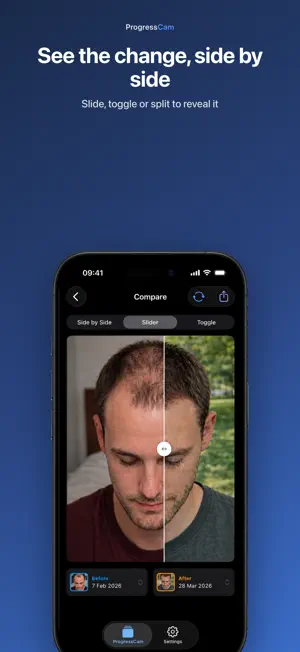

About ProgressCam: Progress Photos
See your progress clearly. ProgressCam lines up every new photo with your starting photo, so your before-and-after photos actually match — same angle, same framing, real change you can see. Most progress photos drift: a little closer, a little higher, a slightly different angle — and suddenly you can't tell what really changed. ProgressCam fixes that at capture time. A ghost of your starting photo sits right in the camera, so you can stand in exactly the same spot and shoot a frame that matches it. CAPTURE THAT LINES UP • Ghost overlay of your starting photo, right in the viewfinder • Zoom and manual fine-tuning when you want full control • Smart alignment that registers each new shot against your starting photo IMPORT THE PHOTOS YOU ALREADY HAVE • Bring in older photos from your library and align them with the rest • Fix each photo's date right in the import grid • Reorder, choose your starting photo, and align the whole batch in one step COMPARE THE CHANGE • Side by side, slide to reveal, or tap to toggle between two moments SHARE IT BEAUTIFULLY • Six export formats: side-by-side, split, story, panoramic strip, grid collage, and slideshow • Add date, day-count, or label overlays • Save or share to anywhere KEEP THE HABIT • A reminder for each project: daily, weekly, on the weekdays you choose, every few days, or monthly • See all your reminders in one place in Settings → Capture Reminders YOUR PHOTOS, ALWAYS YOURS • "Save a copy of my photos" in Settings, or "Save a copy of this project" from a project's menu • Every photo, its aligned version and its details in one ZIP file that opens on any computer, without the app • It's free and doesn't use your exports FACE ID PROTECTION • Require Face ID, Touch ID or your passcode to open a project • Or protect the whole app APPLE HEALTH (OPTIONAL) • Turn on "Show weight alongside my photos" in Settings to see your weight from Apple Health in Progress Recap, on the same timeline as your photos • Read-only: ProgressCam never writes to Apple Health • Your weight stays on your iPhone and is never shared or exported YOUR PROJECTS, BACKED UP • Organize photos into projects, one per thing you're tracking • Sign in with Apple or Google, or use the app without an account • Optional cloud backup keeps your projects safe and synced across your devices • Delete your account and your cloud backup any time, right in Settings PROGRESSCAM PRO • Pro unlocks more projects and photos, multiple sides per project, unlimited exports, HD export with no watermark, and expanded cloud backup • Choose ProgressCam Pro Yearly, ProgressCam Pro Monthly, or a one-time Lifetime purchase • Yearly starts with a 1-week free trial for eligible new subscribers • If a subscription ends, you keep everything you made Start free and upgrade any time. Whether you're tracking a home renovation, a garden or plant, a skincare or hair routine, a pet, a creative build, or anything else you're working on — ProgressCam makes the change impossible to miss. ABOUT SUBSCRIPTIONS ProgressCam Pro Yearly and ProgressCam Pro Monthly are auto-renewable subscriptions. Payment is charged to your Apple Account when you confirm the purchase, or when the free trial ends. A subscription renews automatically unless you cancel it at least 24 hours before the end of the current period. Manage or cancel it in Settings → [your name] → Subscriptions. Lifetime is a one-time purchase, not a subscription. Terms of Use (EULA): https://www.apple.com/legal/internet-services/itunes/dev/stdeula/ Privacy Policy: https://progresscam.app/privacy/
What’s new
Version 1.3 · Updated October 12, 2026
ACCESSIBILITY • Clearer VoiceOver labels and actions across capture, import, compare, share, recap and reminders. • Improved VoiceOver support for sign-in. • VoiceOver actions for manual alignment: move, zoom, rotate, reset. • Layouts adapt at the largest Dynamic Type sizes. • Better contrast, with camera controls readable over bright scenes. ALSO NEW • A refreshed six-page introduction: a before/after slider you can drag, a clearer progress indicator and "Skip". • Settings › About: "Share ProgressCam", "Help & tips" (seven short how-tos) and "Send feedback". • Clearer wording: "starting photo" for your first photo.
App privacy
The developer, Kerem Uslular, reported these privacy practices to Apple.
Data Linked to You
The following data, which may be collected and linked to your identity, may be used for the following purposes:
- Location: Coarse Location
- Contact Info: Email Address, Name, Phone Number
- Identifiers: User ID, Device ID
- Usage Data: Product Interaction, Other Usage Data
- Diagnostics: Other Diagnostic Data
- Other Data: Other Data Types
- User Content: Photos or Videos, Other User Content
Used for: Analytics, App Functionality
Data Not Linked to You
The following data, which may be collected but is not linked to your identity, may be used for the following purposes:
- Diagnostics: Crash Data, Performance Data
Used for: Analytics, App Functionality
Alternatives to ProgressCam: Progress Photos
Looking for apps like ProgressCam: Progress Photos? Here are 6 similar apps on the App Store. The highest rated is SideLens Before & After Photos (5.0/5), and all 6 are free to download.
-
 Progress Timelapse Photos
-
 SideLens Before & After Photos
5.0
SideLens Before & After Photos
5.0
-
 Motion Stitch: Align Photos
5.0
Motion Stitch: Align Photos
5.0
-
 DoppleCam
5.0
DoppleCam
5.0
-
 Autoframe: Progress Pics
5.0
Autoframe: Progress Pics
5.0
-
 Lapse: Face Timelapse
5.0
Lapse: Face Timelapse
5.0
| App | Rating | Price | Last updated | Compare |
|---|---|---|---|---|
| ProgressCam: Progress Photos | – | Free | October 12, 2026 | |
| Progress Timelapse Photos | – | Free | May 5, 2026 | Compare |
| SideLens Before & After Photos | 5.0 / 5 (4) | Free | Jul 22, 2026 | Compare |
| Motion Stitch: Align Photos | 5.0 / 5 (1) | Free | Oct 14, 2026 | Compare |
| DoppleCam | 5.0 / 5 (1) | Free | Feb 10, 2026 | Compare |
| Autoframe: Progress Pics | 5.0 / 5 (4) | Free | Aug 27, 2026 | Compare |
| Lapse: Face Timelapse | 5.0 / 5 (3) | Free | Oct 15, 2026 | Compare |