

Lapse: Face Timelapse
Perry Nelson Photo & Video iPhoneiPadiPod touch
Lapse: Face Timelapse is a free Photo & Video app for iPhone and iPad by Perry Nelson. Rated 5.0/5 from 3 ratings. Requires iOS 15.5.
- Rating
- 5.0
- 3 ratings
- Price
- Free
- on the App Store
- Size
- 255 MB
- Age 12+
- Updated
- Oct 8
- 2026 · v4.76.2
Screenshots

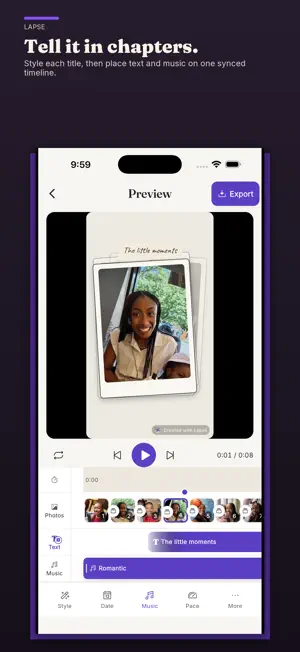


About Lapse: Face Timelapse
Your camera roll already holds a life in fragments: the people you love, the trips you still talk about, and all the versions of you that got you here. Lapse turns those separate photos — or one favorite video — into a beautiful little film, made privately on your phone and ready to replay or share. ▸ MAKE SOMETHING THAT MATTERS • Watch your child grow up, month by month or year by year • See yourself through a glow-up, fitness journey, new look, or changing season • Relive a favorite trip from everyone’s photos • Pull the moments that matter from a favorite video • Follow a pregnancy, braces, hair growth, skincare, or any transformation • Gather years of birthdays and ordinary days into one living story Almost everyone already has enough photos to begin. Lapse makes the rest easy and fun. ▸ BEAUTIFUL WITHOUT THE BUSYWORK Choose photos through your device’s picker, choose only the photos you want from Google Photos, take a new picture, or start with one favorite video. Pick the person your story follows and Lapse uses on-device AI to create steadier, face-aligned framing across the film. Review the chosen subject and any uncertain frames, drag to reorder a moment, then press play. Side profiles, occlusions, and extreme angles can still need a quick check, so you always have the final say. ▸ TURN ONE VIDEO INTO A LAPSE Choose one video from 2 seconds to 10 minutes, up to 750 MB and 4K. Pick the 2–60 second part you love and Lapse samples up to 60 useful moments, keeping the person you choose in the story. Sound is not imported, so add the music you want when you finish. ▸ MAKE IT YOURS Choose Photo Stack for a tactile pile of prints or Film Roll for a moving strip with capture dates, flicker, soft edges, and vignette. Edit photos, chapter titles, music, dates, pace, and style on one synchronized timeline. Preview and export use the same timing. Choose 480p, 720p, or 1080p. Export 1:1 for Instagram, 9:16 for Reels and TikTok, or 16:9 for YouTube, then share straight from the app. ▸ MADE PRIVATELY ON YOUR PHONE Lapse processes selected photos and video on your device and does not upload that media to its servers. Face detection, sampling, matching, framing, and rendering run on your device. No Lapse account is required. ▸ LAPSE PRO New installs include a starter balance of export tokens. Free exports use tokens and include a Lapse watermark by default. Go Pro for unlimited projects, photos, and exports, finished Lapse films longer than 60 seconds without the previous three-minute cap, five additional on-device soundtracks, plus the option to switch the watermark off without tokens — monthly, yearly, or with a one-time lifetime purchase. Prefer pay-as-you-go? Add export tokens whenever you need them. Built by an indie dev. No bloat, no ads. Turn your life into a work of art. Terms of Use: https://mylapse.app/terms
What’s new
Version 4.76.2 · Updated October 8, 2026
v4.76.2 - Improved automatic face sizing and framing for angled photos in Solo and Together films. - Reduced repeated work when validating reopened photo projects. - Fixed an issue affecting Photo Stack film rendering. - Fixed unnecessary Together preview reloads while editing.
App privacy
The developer, Perry Nelson, reported these privacy practices to Apple.
Data Not Linked to You
The following data, which may be collected but is not linked to your identity, may be used for the following purposes:
- Purchases: Purchase History
- Location: Coarse Location
- Identifiers: Device ID
- Usage Data: Product Interaction
- Diagnostics: Other Diagnostic Data, Crash Data, Performance Data
Used for: Analytics, App Functionality
Alternatives to Lapse: Face Timelapse
Looking for apps like Lapse: Face Timelapse? Here are 6 similar apps on the App Store. The highest rated is Motion Stitch: Align Photos (5.0/5), and all 6 are free to download.
-
 Motion Stitch: Align Photos
5.0
Motion Stitch: Align Photos
5.0
-
 Years Ago: On This Day Photos
-
 AI Photo Text Editor- Pixazo
4.0
AI Photo Text Editor- Pixazo
4.0
-
 Generator Photo AI
-
 AI Couple Photo: Video Rizz AI
4.3
AI Couple Photo: Video Rizz AI
4.3
-
 freebeat|AI Music Video Maker
4.2
freebeat|AI Music Video Maker
4.2
| App | Rating | Price | Last updated | Compare |
|---|---|---|---|---|
| Lapse: Face Timelapse | 5.0 / 5 (3 ratings) | Free | October 8, 2026 | |
| Motion Stitch: Align Photos | 5.0 / 5 (1) | Free | Aug 26, 2026 | Compare |
| Years Ago: On This Day Photos | – | Free | Oct 8, 2026 | Compare |
| AI Photo Text Editor- Pixazo | 4.0 / 5 (4) | Free | Sep 29, 2026 | Compare |
| Generator Photo AI | – | Free | Aug 27, 2026 | Compare |
| AI Couple Photo: Video Rizz AI | 4.3 / 5 (32) | Free | Sep 14, 2026 | Compare |
| freebeat|AI Music Video Maker | 4.2 / 5 (32) | Free | Oct 8, 2026 | Compare |