

Autoframe: Progress Pics
BiBi Builds LLC Photo & Video iPhoneiPadiPod touch
Autoframe: Progress Pics is a free Photo & Video app for iPhone and iPad by BiBi Builds LLC. Rated 5.0/5 from 4 ratings. Requires iOS 15.5.
- Rating
- 5.0
- 4 ratings
- Price
- Free
- on the App Store
- Size
- 64 MB
- Age 4+
- Updated
- Aug 27
- 2026 · v1.0.3
Screenshots
About Autoframe: Progress Pics
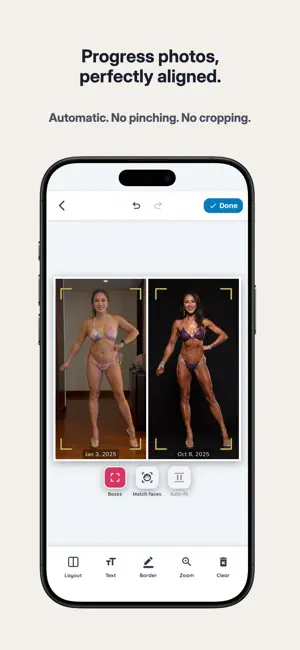
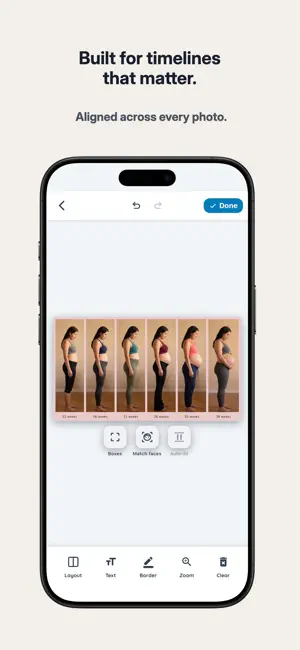
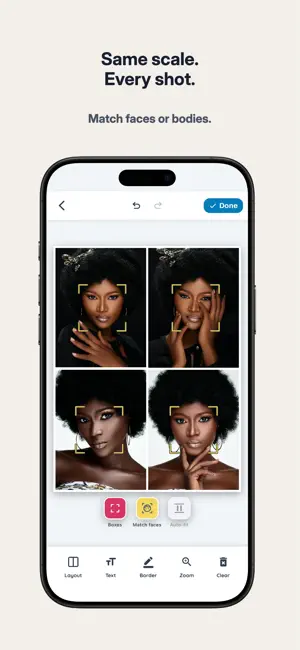
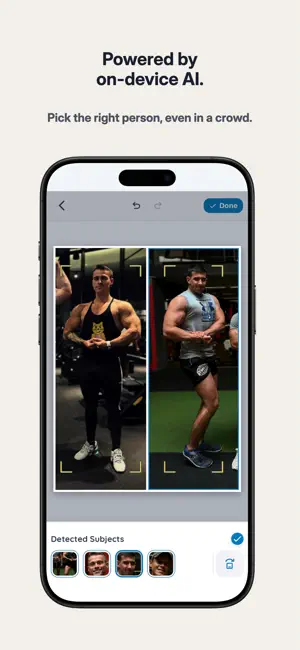
Autoframe uses Apple Vision to automatically detect and align human subjects across your photos, so faces and bodies appear at the same scale for true side-by-side comparison. No more pinching, cropping, or manual fiddling. Unlike general collage apps, Autoframe doesn't require manual positioning. Alignment is computed automatically from detected body landmarks and face geometry. Whether you're comparing fitness transformations, pregnancy week by week, outfit options, headshots, hair changes, or any photos where scale matters, Autoframe produces professionally aligned collages in seconds. VISION-POWERED ALIGNMENT - Automatic body alignment — sizes everyone to the same full-body height - Face alignment mode — matches detected faces to identical sizes for portraits - Smart subject detection — handles multi-person photos with one-tap subject switching - Manual fine-tuning — pinch and pan controls to adjust alignments yourself - Privacy mode — auto-blur all detected faces for safe public sharing COLLAGE CUSTOMIZATION - Canvas sizes for square, portrait, landscape, Stories, and 16:9 - Multiple grid layouts per photo count - Adjustable border width and color - Customizable date or text overlays - Save directly to your photo library PRIVACY FIRST All processing happens on your device using Apple Vision framework. Your photos never leave your phone. PREMIUM FEATURES - 4K exports - Watermark free collages - Custom color picker - Full color and font palettes PERFECT FOR - Fitness and bodybuilding transformations - Pregnancy timelines - Outfit comparisons and fit checks - Hair growth or styling changes - Headshot or portrait comparisons - Before-and-after of any kind - Any side-by-side comparison where scale matters Unlock premium with a one-time purchase Privacy Policy: https://www.themeaneileen.com/bibi-builds/privacy-policy Terms of Use: https://www.themeaneileen.com/bibi-builds/terms
What’s new
Version 1.0.3 · Updated August 27, 2026
- One time unlock: Premium is now a single purchase - Show or hide dates: A new toggle turns date overlays on or off with a tap - Faster sharing - share your finished collage the moment you save it - Polish and fixes throughout Thank you for using Autoframe!
App privacy
The developer, BiBi Builds LLC, reported these privacy practices to Apple.
Data Linked to You
The following data, which may be collected and linked to your identity, may be used for the following purposes:
- Identifiers: User ID
Used for: App Functionality
Data Not Linked to You
The following data, which may be collected but is not linked to your identity, may be used for the following purposes:
- Purchases: Purchase History
- User Content: Other User Content
- Usage Data: Product Interaction
- Diagnostics: Other Diagnostic Data
Used for: Analytics, App Functionality
Alternatives to Autoframe: Progress Pics
Looking for apps like Autoframe: Progress Pics? Here are 6 similar apps on the App Store. The highest rated is SameShot (5.0/5), and all 6 are free to download.
-
 Auto Before & After
-
 Janus - Face Before & After
-
 ProgressShot - Before & After
-
 SameShot
5.0
SameShot
5.0
-
 Overlay Camera - MatchShot
-
 ProgressCam: Progress Photos
| App | Rating | Price | Last updated | Compare |
|---|---|---|---|---|
| Autoframe: Progress Pics | 5.0 / 5 (4 ratings) | Free | August 27, 2026 | |
| Auto Before & After | – | Free | Jun 24, 2026 | Compare |
| Janus - Face Before & After | – | Free | Aug 26, 2026 | Compare |
| ProgressShot - Before & After | – | Free | Oct 6, 2026 | Compare |
| SameShot | 5.0 / 5 (2) | Free | Oct 1, 2026 | Compare |
| Overlay Camera - MatchShot | – | Free | Sep 27, 2026 | Compare |
| ProgressCam: Progress Photos | – | Free | Oct 12, 2026 | Compare |