

Heart Track Pro
Recognica, LLC Health & Fitness iPhoneiPadiPod touch
Heart Track Pro is a free Health & Fitness app for iPhone and iPad by Recognica, LLC. Requires iOS 26.2. Updated November 2, 2026.
- Price
- Free
- on the App Store
- Size
- 19 MB
- Age 4+
- Updated
- Nov 2
- 2026 · v2.0.1
Screenshots


About Heart Track Pro
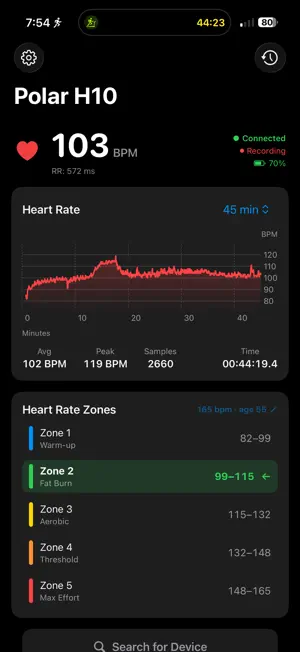
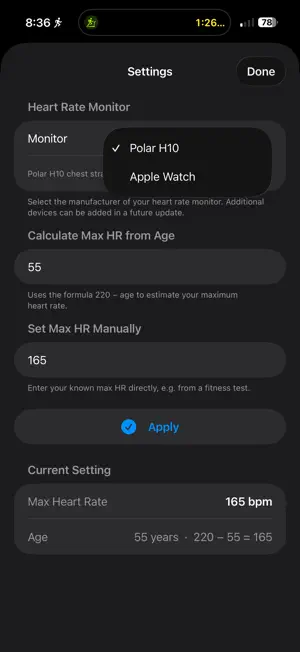
HeartTrackPro — Real-Time Heart Rate Monitor This app is intended for use in regions where the connected Polar hardware has received regulatory clearance, including the United States, European Union, and Canada. This app is not a medical device. Always consult a qualified physician before making any health or medical decisions. HeartTrackPro turns your iPhone into a professional heart rate monitoring station. Whether you're a serious athlete chasing peak performance or a fitness enthusiast tracking your training zones, HeartTrackPro gives you the live data, visual feedback, and session history you need — all in one clean, focused app. Polar H10 & Apple Watch Support Connect to a Polar H10 chest strap over Bluetooth for clinical-grade accuracy and real-time RR interval data, or use your paired Apple Watch via HealthKit for effortless, cable-free monitoring. Switch between devices in Settings at any time. Live Heart Rate Display See your current BPM in large, easy-to-read numerals the moment your device connects. A live connection status badge keeps you informed at a glance, and a sensor battery indicator means you're never caught off guard mid-session. RR Interval Tracking For Polar H10 users, HeartTrackPro captures RR interval data (the time between individual heartbeats in milliseconds) alongside BPM — ideal for heart rate variability analysis and deeper physiological insight. Live Chart with Adjustable Time Window Watch your heart rate trend unfold in a smooth, real-time line chart. Choose from seven time windows — 1, 5, 10, 20, 30, 45, or 60 minutes — to zoom in on an interval or review the full arc of a long workout. Average BPM, peak BPM, sample count, and a running session timer update live alongside the chart. 5 Training Zones HeartTrackPro automatically calculates your five training zones based on your maximum heart rate and highlights which zone you're currently in: • Zone 1 (50–60%) — Warm-up • Zone 2 (60–70%) — Fat Burn • Zone 3 (70–80%) — Aerobic • Zone 4 (80–90%) — Threshold • Zone 5 (90–100%) — Max Effort Set your max HR by entering your age (using the standard 220 − age formula) or enter a known value manually from a lab or field test. Pause & Resume Recording Life happens mid-workout. Pause a session without losing your data, then resume exactly where you left off. Full Session History Every completed session is saved locally on your device. Browse past recordings with session date, duration, device type, and a per-session HR zone breakdown so you can track how your training load changes over time. CSV Export (Pro) Export any session as a comma-separated values file to share with a coach, import into Excel or Numbers, or feed into your own analysis pipeline. Simple, Honest Pricing HeartTrackPro is free to try with up to 5 recorded sessions per device. After that, a single one-time purchase unlocks unlimited recordings, CSV export, and every feature added to the app in the future — no subscription, no renewal, no expiry. Privacy First All session data stays on your device. HeartTrackPro does not collect, transmit, or share any personal health information.
What’s new
Version 2.0.1 · Updated November 2, 2026
NEW - iPhone Duo support HeartTrack Pro now fits the folded outer display of the new iPhone Duo. On the Duo, iOS places the status bar and the navigation buttons in a vertical strip along one edge of the screen, so the app now shows icons there instead of word buttons that would float over your content: - Done is a checkmark - Cancel and Not Now are an X - Select is a checklist and Edit is a pencil In Settings, a hide keyboard button now appears right under Done while you type your age or max heart rate, in place of the bar above the keyboard. Other iPhones and iPads look and work exactly as before. FIXED - Dynamic Island for everyone Your heart rate in the Dynamic Island and on the Lock Screen now works on the free version too, with Polar and Coospo monitors. FIXED - Chart out of date after leaving the app If you recorded for a long time and came back to the app after a while away, the chart could show the wrong stretch of time. It now catches up to your latest reading as soon as you return. FIXED - Heart rate cut off in the Dynamic Island When other apps shared the Dynamic Island, your heart rate could be squeezed down to its first digit and an ellipsis. The heart rate and your zone now shrink to fit instead of being cut off. Nothing changes when there is plenty of room. FIXED - Bluetooth alert on first launch If Bluetooth was off the first time you opened the app, the Bluetooth Is Off alert could collide with the welcome notice and leave Settings and Unlock Pro stuck until you restarted the app. The alert now waits until you have accepted the notice. IMPROVED - Session history In narrow spaces, such as the Duo or when you tap Edit, each session now keeps its duration, average and peak heart rate readable instead of breaking a label in the middle. The export bar also lines up with your list of sessions. Thank you for using HeartTrack Pro. If you have an iPhone Duo and notice anything that looks off, please send us a note through the Support link so we can fix it quickly.
App privacy
The developer, Recognica, LLC, reported these privacy practices to Apple.
Data Not Collected
The developer does not collect any data from this app.
Alternatives to Heart Track Pro
Looking for apps like Heart Track Pro? Here are 6 similar apps on the App Store. The highest rated is BPM: Heart Rate Monitor (5.0/5), and all 6 are free to download.
-
 BPM: Heart Rate Monitor
5.0
-
 Heart Plot
-
 Zonas: Heart Rate Zone Tracker
-
 Heart Rate Zones: WristPing
-
 ECG Suite
4.7
-
 Beatcast: Heart Rate Monitor
| App | Rating | Price | Last updated | Compare |
|---|---|---|---|---|
| Heart Track Pro | – | Free | November 2, 2026 | |
| BPM: Heart Rate Monitor | 5.0 / 5 (1) | Free | Oct 30, 2026 | Compare |
| Heart Plot | – | Free | Oct 23, 2026 | Compare |
| Zonas: Heart Rate Zone Tracker | – | Free | Oct 30, 2026 | Compare |
| Heart Rate Zones: WristPing | – | Free | Jul 10, 2026 | Compare |
| ECG Suite | 4.7 / 5 (6) | Free | May 25, 2026 | Compare |
| Beatcast: Heart Rate Monitor | – | Free | Nov 2, 2026 | Compare |
Compare Heart Track Pro with the top alternatives: ratings, updates, ASO score and keyword gaps →