

Beatcast: Heart Rate Monitor
Andreas Diendorfer Health & Fitness iPhoneiPadiPod touch
Beatcast: Heart Rate Monitor is a free Health & Fitness app for iPhone and iPad by Andreas Diendorfer. Requires iOS 26.0. Updated October 22, 2026.
- Price
- Free
- on the App Store
- Size
- 8 MB
- Age 4+
- Updated
- Oct 22
- 2026 · v1.12.1
Screenshots


About Beatcast: Heart Rate Monitor
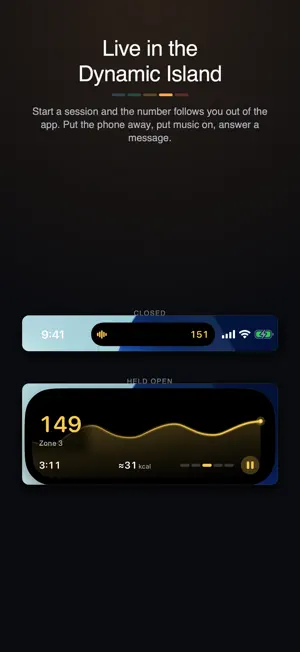
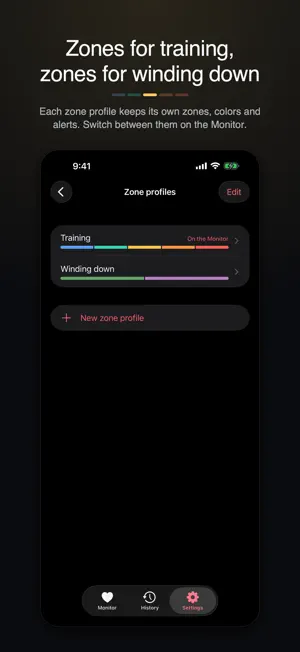
Start a session and your heart rate moves into the Dynamic Island and onto the Lock Screen. It stays there while you are in another app, and while the phone is locked in a pocket. Connect a Bluetooth heart rate sensor. ONE PRICE, ONCE Beatcast is free to try for 14 days with the full app unlocked. After that, a single purchase keeps it yours. No subscription, no renewals. Three things need that purchase once the trial is over: - Live heart rate from a sensor, or a fingertip reading - Recording a session, with its zones, alerts and calories - Sharing your heart rate with other apps and equipment Sessions you already recorded stay yours. Export keeps working. LIVE HEART RATE, EVERYWHERE - The number, your zone, and a curve of up to an hour - Full screen for a phone propped up, readable across a room - Home screen widgets for your last reading and session - On iPad: the same session on a bigger screen, with a Bluetooth sensor - On iPhone Duo: half-folded on a table, the number sits on top and big controls below. In a tent pose on a charger, the session shows in StandBy - Start, pause and resume a session with Siri, Spotlight, the Shortcuts app, or the Action button on iPhone 15 Pro and later, once your sensor is sending - Ask "What's my heart rate in Beatcast?" with Siri - While Beatcast is on screen, supported apps and equipment can pair with it as a Bluetooth heart rate monitor WORKS WITH YOUR SENSORS - Straps and bands from Polar, Garmin, Wahoo, Coospo, Magene, Decathlon and Scosche, worn wherever you prefer - Screenless broadcasters such as the Garmin Cirqa - Sports watches and bands with broadcast mode on: Garmin, COROS, Amazfit, Whoop - Also on iPhone: AirPods Pro 3, through the Health app - A fingertip on the camera for a spot check, kept out of your history (on iPad, only with a torch) ALERTS THAT REACH YOU - A ceiling alert when you go too hard, a floor alert when you have settled, each with an optional wait so a brief spike stays quiet - Zone alerts: a cue when your heart rate enters a zone you picked - A rest coach that times each rest down to your floor - Sound, a spoken value, haptic taps or a notification, with music on and the phone in a pocket - On a paired Apple Watch, with no app to install: the session in the Smart Stack, and notifications while your iPhone is locked ZONES THAT FIT YOU Five effort zones are no help on the sofa at the end of a long day. Keep a zone profile for each use, such as Strength, Zone 2 or Winding down, and switch between them on the Monitor. Each has its own zones, colors, target zone, alerts and rest coach. - From maximum heart rate, heart rate reserve or threshold - Two, three or five zones, renamed as you like, or your own boundaries - Three color palettes, one of them color-blind safe, or a color per zone - Time in zone, kept with each session CALORIES, IF YOU WANT THEM Off by default. Enter your weight and sex, and sessions show calories, live and in your history and exports. The estimate uses your heart rate and a published equation (Keytel et al. 2005), and counts what you burn above resting. Averaged over many people on a steady effort, it lands within about a fifth. Yours can be off by more, most of all in strength sets, intervals or a hot room. Weight and sex are used for nothing else. YOUR DATA STAYS YOURS - No account, no Beatcast server, no analytics, no tracking, no advertising - Sessions are kept on your device, and export as CSV or TCX - "Share as image" leaves out the time of day, sensor, tags and notes - Optional, off by default: save finished sessions to Apple Health Beatcast is not a medical device. It is made for training and general wellbeing, and it cannot diagnose, treat or monitor any medical condition. Readings from a fingertip on the camera are an estimate and are less accurate than a dedicated sensor. The calorie figure is calculated from your heart rate and is an estimate, not a measurement.
What’s new
Version 1.12.1 · Updated October 22, 2026
End a session and the time in its summary on the Lock Screen stops right where you did. Sharing your heart rate with equipment? The tips in the broadcast sheet now say it too: while a session runs, you can lock the screen or switch apps.
App privacy
The developer, Andreas Diendorfer, reported these privacy practices to Apple.
Data Not Collected
The developer does not collect any data from this app.
Alternatives to Beatcast: Heart Rate Monitor
Looking for apps like Beatcast: Heart Rate Monitor? Here are 6 similar apps on the App Store. The highest rated is BPM: Heart Rate Monitor (5.0/5), and all 6 are free to download.
-
 Heart Rate BLE
4.0
Heart Rate BLE
4.0
-
 BPM: Heart Rate Monitor
5.0
BPM: Heart Rate Monitor
5.0
-
 HeartCast: Heart Rate Monitor
4.5
HeartCast: Heart Rate Monitor
4.5
-
 Heart Graph
4.5
Heart Graph
4.5
-
 Intervals Pro: HIIT Timer
4.8
Intervals Pro: HIIT Timer
4.8
-
 Wahoo
4.7
Wahoo
4.7
| App | Rating | Price | Last updated | Compare |
|---|---|---|---|---|
| Beatcast: Heart Rate Monitor | – | Free | October 22, 2026 | |
| Heart Rate BLE | 4.0 / 5 (1) | Free | Aug 11, 2026 | Compare |
| BPM: Heart Rate Monitor | 5.0 / 5 (1) | Free | Oct 9, 2026 | Compare |
| HeartCast: Heart Rate Monitor | 4.5 / 5 (52) | Free | Oct 6, 2026 | Compare |
| Heart Graph | 4.5 / 5 (1,203) | Free | Sep 25, 2026 | Compare |
| Intervals Pro: HIIT Timer | 4.8 / 5 (13,699) | Free | Sep 17, 2026 | Compare |
| Wahoo | 4.7 / 5 (43,474) | Free | Oct 20, 2026 | Compare |