

Adobe Editor AI: Edit PDF Text
Sonal Pandey Productivity iPhoneiPadiPod touch
Adobe Editor AI: Edit PDF Text is a free Productivity app for iPhone and iPad by Sonal Pandey. Requires iOS 17.0. Updated October 14, 2026.
- Price
- Free
- on the App Store
- Size
- 13 MB
- Age 4+
- Updated
- Oct 14
- 2026 · v6.6
Screenshots
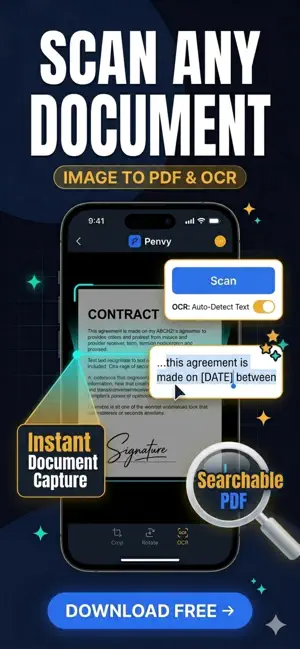

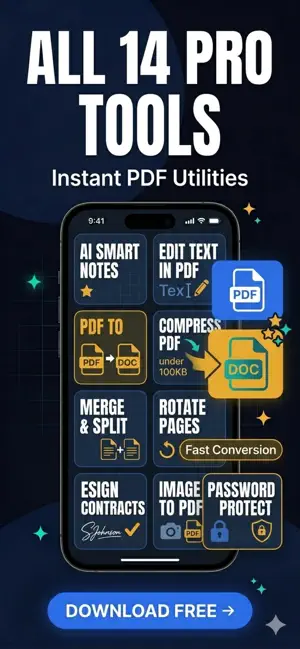
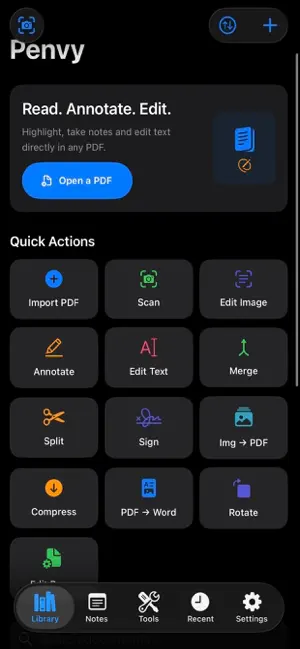
About Adobe Editor AI: Edit PDF Text
Give Your Pen Power. Penvy is the ultimate all-in-one PDF editor, AI smart notes canvas, and document utility toolkit built for seamless daily workflows. Read, annotate, edit text, fill forms, scan, compress, and sign—all in one premium app, no desktop needed. Trusted by students, lawyers, doctors, and business professionals. No account required. No mandatory sign-ups. Your files stay securely on your device. — EDIT TEXT DIRECTLY IN ANY PDF — · Real Text Editing: Edit text inside PDFs like a word processor—no messy Word conversions. · Image Text & OCR: Edit text inside images or scanned documents. Correct, replace, or remove text instantly. · Find & Replace: Search and update text across the entire document in seconds. · Full Control: Adjust font size, colors, bold, and italics natively. — FILL FORMS & ESIGN CONTRACTS — · Form Filler: Easily fill out PDF contracts, invoices, agreements, and tax forms. · Secure E-Signature: Draw your signature or initials once, and stamp it anywhere on the page. · Professional Stamps: Use built-in stamps like APPROVED, DRAFT, CONFIDENTIAL, and more. — NOTES THAT THINK LIKE YOU — · Infinite Canvas: Tap anywhere to type—the smart keyboard opens instantly. · Zoom & Resize: Pinch two fingers to resize text overlays or images freely. · Pro Templates: Access blank, lined, grid, Cornell, and dotted page templates. · Smart Export: Create multi-page notes with quick undo/redo, and export to PDF. — POWERFUL ADOBE-LEVEL PDF TOOLS — · Visual PDF Builder: Drag, drop, and reorder pages from multiple PDFs effortlessly. · Content-Level Split: Split between pages or draw a line inside a page to cut content exactly where you want. · Unlimited Merge: Combine multiple documents into a single, organized PDF file. · Extreme Compression: Shrink PDFs to under 100 KB with an auto-reducing algorithm that hits your target size. · PDF Converter: Turn images to PDF, PDF to Word, and extract text instantly. — READ & ANNOTATE SMOOTHLY — · Distraction-Free: Full-screen reading mode with night mode and sepia adjustments. · Apple Pencil Optimization: Precise pen and highlighter tools with pressure sensitivity. · Pro Annotation: Shape recognition, straight arrows, and 6 vibrant highlight colors. — ORGANIZED & SYSTEM INTEGRATED — · Smart Folders: Separate files by Work, Study, Law, or Medical. · iCloud Sync: Access your secure local files across all your Apple iOS devices. · System Extensions: Open, edit, or save any PDF directly from Safari, Mail, or Files. — WHY PENVY IS BETTER — · Replaces 4 separate apps (PDF Editor + OCR Scanner + Form Filler + Notes Canvas). · Desktop-grade text editing features at a fraction of the cost. · 100% Private: Local storage ensures your sensitive data never leaves your device. — FREE TIER — · Read all PDFs & Create notes — always free. · Includes limited free merges, scans, and compressions daily. — PENVY PRO — Unlock unlimited access to every premium feature with a 3-day free trial. Cancel anytime in your App Store settings. · Monthly: $4.99/month · Annual: $29.99/year (Save 50%) Perfect for students studying for exams, lawyers reviewing contracts, executives signing deals, and anyone who wants desktop-class document power on iPhone and iPad. Privacy Policy: https://penvy.cc/penvy-pdf-editor-ai-notes/privacy-policy/ Terms of Use: https://penvy.cc/penvy-pdf-editor-ai-notes/terms/ Support: https://penvy.cc/penvy-pdf-editor-ai-notes/support/
What’s new
Version 6.6 · Updated October 14, 2026
Bug Fixes & Global Support. Stop switching between 4 apps. Penvy combines PDF editing, OCR scanning, form filling, eSign & notes in one workspace. No account needed. Try Pro
App privacy
The developer, Sonal Pandey, reported these privacy practices to Apple.
Data Used to Track You
The following data may be used to track you across apps and websites owned by other companies:
- Identifiers: Device ID
Data Not Linked to You
The following data, which may be collected but is not linked to your identity, may be used for the following purposes:
- Identifiers: Device ID
Used for: Third-Party Advertising
Alternatives to Adobe Editor AI: Edit PDF Text
Looking for apps like Adobe Editor AI: Edit PDF Text? Here are 6 similar apps on the App Store. The highest rated is PDF Genius: AI PDF Text Editor (5.0/5), and all 6 are free to download.
-
 PDF Genius: AI PDF Text Editor
5.0
PDF Genius: AI PDF Text Editor
5.0
-
 PDF Studio: Editor & Reader
-
 Glazr PDF File Editor
-
 Indigo PDF
-
 pdf: converter, scanner Scanny
-
 Split & Merge PDF
5.0
Split & Merge PDF
5.0
| App | Rating | Price | Last updated | Compare |
|---|---|---|---|---|
| Adobe Editor AI: Edit PDF Text | – | Free | October 14, 2026 | |
| PDF Genius: AI PDF Text Editor | 5.0 / 5 (1) | Free | Oct 14, 2026 | Compare |
| PDF Studio: Editor & Reader | – | Free | Aug 25, 2026 | Compare |
| Glazr PDF File Editor | – | Free | Oct 5, 2026 | Compare |
| Indigo PDF | – | Free | Jun 23, 2026 | Compare |
| pdf: converter, scanner Scanny | – | Free | Dec 15, 2025 | Compare |
| Split & Merge PDF | 5.0 / 5 (4) | Free | Jun 16, 2026 | Compare |