

Loop: Screen Time & Focus
Joseph Green Health & Fitness iPhoneiPadiPod touch
Loop: Screen Time & Focus is a free Health & Fitness app for iPhone and iPad by Joseph Green. Requires iOS 26.5. Updated October 5, 2026.
- Price
- Free
- on the App Store
- Size
- 43 MB
- Age 4+
- Updated
- Oct 5
- 2026 · v2.2.1
Screenshots


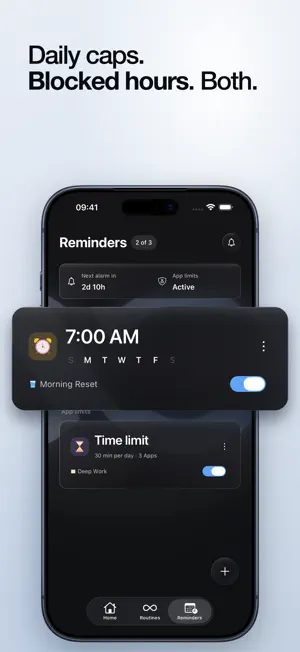
About Loop: Screen Time & Focus
You'll spend more than four hours on your phone today. Most of it goes to a handful of apps you never meant to open. Over a year, that's two months of your life. Loop helps you take it back. Loop blocks the apps that waste your time. To get them back, you do a loop: a short routine you built, like read for ten minutes, stretch, or plan your day. Finish the loop, and your apps reopen. Other apps let you tap "ignore" and you're back in the feed in seconds. Loop asks for something small first. Do the thing that matters, then scroll. HOW LOOP WORKS 1. Choose the apps to block, and when. 2. Build a loop from a few short steps, in any order. 3. Hit your limit, and your apps sit behind your loop. 4. Run the loop. The apps reopen when you're done. WHY IT WORKS You don't break a habit by fighting it. You replace it. Loop swaps the mindless reach for your phone with a routine that moves your day forward. Over time, watch yourself rewire. FEATURES - Loops: build short routines from 28+ activities across focus, morning, wind-down, health and reset. - App limits: block the apps you choose, on a daily cap or a set window. - Reminders: gentle nudges for your morning and wind-down loops. - Rewired score: watch your progress build, week by week. FREE AND PREMIUM Loop is free: build loops, set app limits, and track your progress. Premium adds the Lock: an un-skippable block, so your apps stay shut until your loop is done, with no ignore button. Premium also unlocks unlimited loops and cloud sync. Terms of Use: https://joegrn.github.io/loop-terms-of-use/ Privacy Policy: https://joegrn.github.io/loop-privacy-policy/
What’s new
Version 2.2.1 · Updated October 5, 2026
- How Loop works is easier to follow. One phone stays put while each step plays out on its screen, the titles change above it, and Continue stays where your thumb is. - Moving between the welcome steps is gentler. Each page gives way to the next instead of cutting to it. - The Reminders tab no longer shows loading placeholders when you have no reminders and a sync fails. It shows the empty state and lets you add one.
App privacy
The developer, Joseph Green, reported these privacy practices to Apple.
Data Not Linked to You
The following data, which may be collected but is not linked to your identity, may be used for the following purposes:
- Usage Data: Product Interaction
- Purchases: Purchase History
- Contact Info: Email Address
- Identifiers: User ID
- Diagnostics: Crash Data, Performance Data
Used for: Analytics, App Functionality
Alternatives to Loop: Screen Time & Focus
Looking for apps like Loop: Screen Time & Focus? Here are 6 similar apps on the App Store. The highest rated is Habitual (5.0/5), and all 6 are free to download.
-
 Trilogy Health
-
 Lift with Lauren
-
 Oxxy: Box Breathing & Calm
-
 Habitual
5.0
Habitual
5.0
-
 Quitly: Days Since Counter
4.8
Quitly: Days Since Counter
4.8
-
 Runify: Running Tracker
4.8
Runify: Running Tracker
4.8
| App | Rating | Price | Last updated | Compare |
|---|---|---|---|---|
| Loop: Screen Time & Focus | – | Free | October 5, 2026 | |
| Trilogy Health | – | Free | Aug 1, 2026 | Compare |
| Lift with Lauren | – | Free | Mar 30, 2026 | Compare |
| Oxxy: Box Breathing & Calm | – | Free | Oct 16, 2026 | Compare |
| Habitual | 5.0 / 5 (11) | Free | Sep 30, 2026 | Compare |
| Quitly: Days Since Counter | 4.8 / 5 (60) | Free | Jul 17, 2026 | Compare |
| Runify: Running Tracker | 4.8 / 5 (243) | Free | Oct 18, 2026 | Compare |