

ScreenTimeGuardian
Shenzhen Zhengyilong Technology Co.,Ltd Lifestyle iPhoneiPadiPod touch
ScreenTimeGuardian is a free Lifestyle app for iPhone and iPad by Shenzhen Zhengyilong Technology Co.,Ltd. Requires iOS 18.6. Updated September 21, 2026.
- Price
- Free
- on the App Store
- Size
- 9 MB
- Age 4+
- Updated
- Sep 21
- 2026 · v1.15
Screenshots
About ScreenTimeGuardian
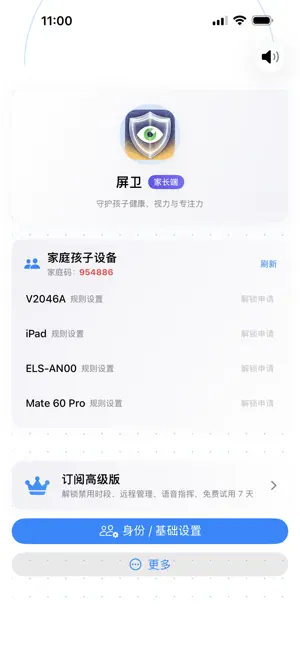
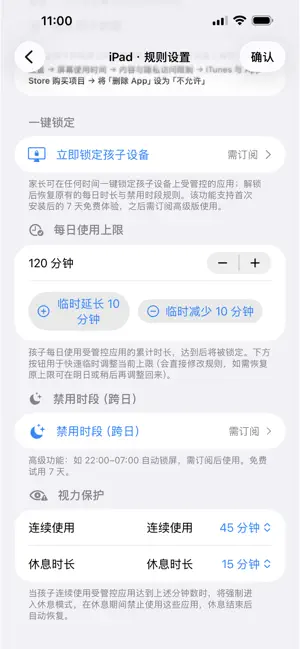
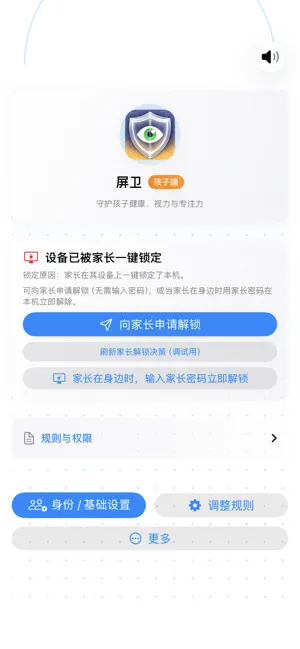
Screen Guardian (ScreenTimeGuardian) is a cross-device screen time tool for parents and self-disciplined users. Built on Screen Time and Family Sharing, it delivers stable, predictable control within iOS—parent approval, child accountability. 【Who it's for】 · Parents managing their child's iPhone / iPad usage · Users who want less time on short video, games, and social apps · Students and professionals building focus habits 【Core features】 Parent approval & remote authorization (Free — key differentiator) When daily time runs out, during a blocked period, or while locked, a child can request extra time or unlock until a set time. The parent reviews on their own iPhone / iPad, enters the parent password, and approves or denies. Changes apply on the child device automatically—clear accountability, no black-box automation. Daily usage limit (Free) Set a daily total (e.g. one hour) for a child or yourself. Works with Screen Time all day on managed apps; when the limit is reached, apps are restricted and the request-and-approve flow applies. In-app remote lock (Free) On the parent home screen, tap the red Lock button next to a child device to lock remotely, block managed apps, and play an alert. Remote lock is done only in the app—reliable and explicit. Blocked period (Premium) Set fixed hours (e.g. 10:00 p.m.–7:00 a.m.) to limit managed apps during night or study time. Remote management (Premium) Configure rules, approve unlock requests, and view device status from the parent device; the child device syncs automatically. 【Subscription】 Free: daily limit, child requests with parent approval, in-app remote lock/unlock, and other core controls. Premium: blocked period, remote management, and future usage reports (when available). Purchases are In-App; monthly or annual plans; annual includes a 7-day free trial. Manage or cancel in iPhone Settings → Apple ID → Subscriptions. Auto-renewable subscriptions: payment is charged to your Apple account. Subscription renews unless auto-renew is turned off at least 24 hours before the end of the current period. Your account is charged for renewal within 24 hours prior to the end of the current period. Manage or cancel in Settings → Apple ID → Subscriptions. Legal (read full terms in the app and on the web): Apple Standard EULA: https://www.apple.com/legal/internet-services/itunes/dev/stdeula/ Screen Guardian Terms: https://pw.ai3e.com/home/en/terms.html Privacy Policy: https://pw.ai3e.com/home/en/privacy.html 【Privacy & security】 Works with Screen Time and Family Sharing. No unrelated personal data collection. Rules and approvals stay within your family group, in line with Apple's privacy and review guidelines. 【Before you start】 Enable Screen Time on iPhone / iPad and, for child management, complete Family Sharing and Screen Time API authorization. Children install Screen Guardian and join the family; parents create a family and invite devices with the family code. If you want stable, predictable cross-device screen time management, download Screen Guardian.
What’s new
Version 1.15 · Updated September 21, 2026
This update hardens child-side bypass protections and uses the family time zone with a custom shield. • Custom shield page; hides the system “Ask for More Time” option • Blocked periods follow the family time zone instead of a fixed zone • After changing the system clock or rebooting, rules stay fail-closed until server time is confirmed • Supervised child devices apply parent blocked periods even without a local subscription • The child device cannot set the parent password or approve unlocks • Joining a family requires choosing managed apps; a child Apple ID is recommended, not required
App privacy
The developer, Shenzhen Zhengyilong Technology Co.,Ltd, reported these privacy practices to Apple.
Data Linked to You
The following data, which may be collected and linked to your identity, may be used for the following purposes:
- User Content: Customer Support
- Identifiers: User ID, Device ID
- Usage Data: Product Interaction
Used for: Analytics, App Functionality
Alternatives to ScreenTimeGuardian
Looking for apps like ScreenTimeGuardian? Here are 6 similar apps on the App Store. The highest rated is Parental Control App:PatLock (5.0/5), and all 6 are free to download.
-
 Parental Control App:PatLock
5.0
Parental Control App:PatLock
5.0
-
 FawnGuard: Parental Control
-
 Parental Controls: TapGuardian
5.0
Parental Controls: TapGuardian
5.0
-
 Parental Control App & Blocker
-
 PicSort - Photo Sort & Slim
-
 Ourlittlebird Parent Control
| App | Rating | Price | Last updated | Compare |
|---|---|---|---|---|
| ScreenTimeGuardian | – | Free | September 21, 2026 | |
| Parental Control App:PatLock | 5.0 / 5 (1) | Free | Oct 2, 2026 | Compare |
| FawnGuard: Parental Control | – | Free | Oct 15, 2026 | Compare |
| Parental Controls: TapGuardian | 5.0 / 5 (1) | Free | Oct 5, 2026 | Compare |
| Parental Control App & Blocker | – | Free | Oct 7, 2026 | Compare |
| PicSort - Photo Sort & Slim | – | Free | May 29, 2026 | Compare |
| Ourlittlebird Parent Control | – | Free | Aug 2, 2024 | Compare |
Compare ScreenTimeGuardian with the top alternatives: ratings, updates, ASO score and keyword gaps →