

Obscura Photo Vault
Orlio Inc Photo & Video iPhoneiPadiPod touch
Obscura Photo Vault is a free Photo & Video app for iPhone and iPad by Orlio Inc. Rated 4.1/5 from 19 ratings. Requires iOS 18.2. Updated October 20, 2026.
- Rating
- 4.1
- 19 ratings
- Price
- Free
- on the App Store
- Size
- 14 MB
- Age 4+
- Updated
- Oct 20
- 2026 · v1.16.0
Screenshots


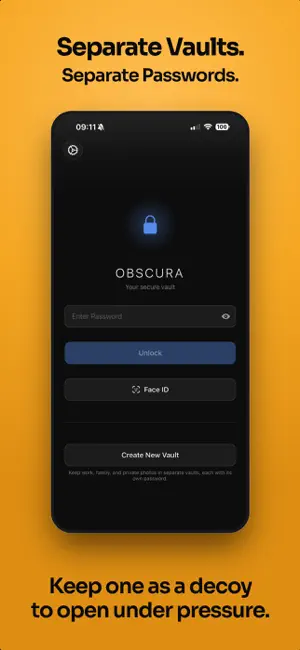

About Obscura Photo Vault
Hide your photos and videos behind AES-256-GCM encryption. No accounts, no cloud, no data collection. The code that encrypts your files is open source, so you can check it yourself. If you forget your password, your photos are gone. There is no reset, no recovery email, no way for anyone, including us, to get them back. If a vault app can recover your password, your photos were never truly secure. This is what makes your privacy real. ZERO DATA COLLECTION No analytics. No telemetry. No internet connection required. Everything runs entirely on your device. We cannot see your photos and we cannot see how you use the app. SEPARATE VAULTS Obscura keeps 10 encrypted vault slots in place at all times, and each vault opens only with its own password, so work, family, and private photos stay apart. Inside the app there is no vault list, no count, and no way to browse between vaults, regardless of how many you create. In your phone's storage, active and unused vault slots are built the same way and use independently randomized padding. OPEN-SOURCE ENCRYPTION The code that encrypts your files is published on GitHub. Anyone can read it, run its tests, and check that the files on their own iPhone match it. https://github.com/orlio-inc/ObscuraCrypto ENCRYPTION THAT DOES NOT CUT CORNERS Every photo, video, and database is protected with AES-256, a widely adopted encryption standard used across security-sensitive systems. Passwords go through 600,000 rounds of key derivation to resist brute-force attacks. Videos are decrypted in memory during playback and not stored unencrypted in Obscura's managed storage. Face ID and Touch ID are supported, with credentials secured through iOS Keychain and biometric access controls. Full specification, threat model, and design rationale: https://obscura-vault.com/security MORE THAN A VAULT Folders with optional second-layer password protection keep sensitive content separated even inside your vault. Crop, rotate, and flip your photos without leaving the app. Create collages of up to 10 photos with multiple layouts and aspect ratios. Find and clean up duplicate photos in batches. Extract frames from Live Photos. Reorder manually or sort by date. BACKUP AND TRANSFER Export your entire vault as an encrypted .obscura file protected with the same AES-256 encryption and 600,000 rounds of key derivation as your vault itself. Store it anywhere, even in cloud storage, because without your password it is unreadable. Import your backups on any device with Obscura Photo Vault installed. Transfer between iPhones through Files, AirDrop, or any file sharing method. Your photos stay encrypted during every step. FEATURES AT A GLANCE • AES-256 encryption on all photos, videos, and databases • Open-source encryption you can verify • Quick camera in Control Center • Slideshows with shuffle and resume • Share to and from Obscura Photo Vault • Face ID and Touch ID unlock • Auto-lock with configurable timeout • Automatic local backups with snapshot history • Photo editing: crop, rotate, flip • Collages of up to 10 photos • Duplicate photo detection • Recently Deleted • Live Photo frame extraction • Drag to reorder and date sorting • Favorites / Tags • iOS system iCloud backup • Unlimited photos (Pro) • Multiple vaults, each with its own password (Pro) • Folder passwords for double encryption • Vault export and import FREE TO START Store up to 50 photos in one vault. Folder passwords and encrypted vault export are included free. Obscura Pro lifts the two limits: unlimited photos and videos, and unlimited vaults. Subscribe monthly or yearly, with a one-week free trial on the yearly plan, or pay once with Lifetime and never see a renewal. If a subscription ends, your existing photos stay accessible. You can still view, organize, export and delete everything already in your vault. Only adding beyond the free limit stops. Terms of Use (EULA): https://www.apple.com/legal/internet-services/itunes/dev/stdeula/
Ratings & reviews
4.1
19 ratings
What’s new
Version 1.16.0 · Updated October 20, 2026
- New camera: take photos and videos straight into a folder from Add Media › Camera. Live Photos, lens switching, 48 MP photos and 4K video. - Quick camera: touch and hold the Obscura icon, or add the Obscura Camera button to Control Center, to take photos and videos without unlocking. Each shot is encrypted as you take it and waits in your vault for the next unlock. Turn on Settings › Share to Obscura for a vault first. - Slideshow: play a folder from its ⋯ menu, from a photo's touch and hold menu, or with the play button in the photo viewer. Shuffle, speed, videos and Live Photos, pinch to zoom, and Resume Slideshow picks up where you stopped. - Add photos and videos to Obscura from the share sheet in Photos, Files, Safari and other apps. Turn it on for a vault in Settings › Share to Obscura. - Share photos and videos from Obscura to Messages, Mail and other apps, with or without location and camera details. - The long-press menu in folders is grouped, so it fits on the screen. - Fixed: AirPlay showed a video as playing on the TV but nothing played. Video now stays on the iPhone, with the sound over AirPlay and the picture over Screen Mirroring. - Fixed: a deleted folder could come back without its photos if the app closed right after. - Fixed: a video kept playing after swiping to the next item. - Fixed: a GIF sometimes didn't play until you swiped away and back. - Fixed: a password shown while typing could be autocorrected or capitalized.
App privacy
The developer, Orlio Inc, reported these privacy practices to Apple.
Data Not Collected
The developer does not collect any data from this app.
Alternatives to Obscura Photo Vault
Looking for apps like Obscura Photo Vault? Here are 6 similar apps on the App Store. The highest rated is ArkWarden Hidden Photo Vault (5.0/5), and all 6 are free to download.
-
 Inner Gallery - Photo Vault
4.7
Inner Gallery - Photo Vault
4.7
-
 Photo Vault: Private Lock
4.5
Photo Vault: Private Lock
4.5
-
 Photo Vault - Vaultaire
4.7
Photo Vault - Vaultaire
4.7
-
 VaultSnap: Photo Vault
-
 ArkWarden Hidden Photo Vault
5.0
ArkWarden Hidden Photo Vault
5.0
-
 PureVault: Private Photo Vault
4.0
PureVault: Private Photo Vault
4.0
| App | Rating | Price | Last updated | Compare |
|---|---|---|---|---|
| Obscura Photo Vault | 4.1 / 5 (19 ratings) | Free | October 20, 2026 | |
| Inner Gallery - Photo Vault | 4.7 / 5 (6) | Free | Aug 3, 2026 | Compare |
| Photo Vault: Private Lock | 4.5 / 5 (4) | Free | Jun 30, 2026 | Compare |
| Photo Vault - Vaultaire | 4.7 / 5 (46) | Free | Oct 20, 2026 | Compare |
| VaultSnap: Photo Vault | – | Free | Aug 13, 2026 | Compare |
| ArkWarden Hidden Photo Vault | 5.0 / 5 (5) | Free | Oct 16, 2026 | Compare |
| PureVault: Private Photo Vault | 4.0 / 5 (4) | Free | Oct 16, 2026 | Compare |