

Photo Vault - Vaultaire
Wraxle LLC Photo & Video iPhoneiPadiPod touch
Photo Vault - Vaultaire is a free Photo & Video app for iPhone and iPad by Wraxle LLC. Rated 4.6/5 from 43 ratings. Requires iOS 17.0.
- Rating
- 4.6
- 43 ratings
- Price
- Free
- on the App Store
- Size
- 37 MB
- Age 4+
- Updated
- Oct 17
- 2026 · v1.0.23
Screenshots


About Photo Vault - Vaultaire
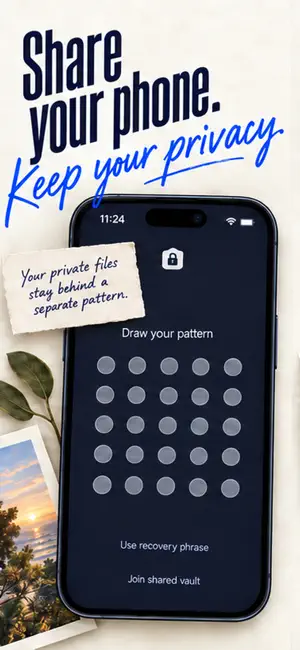
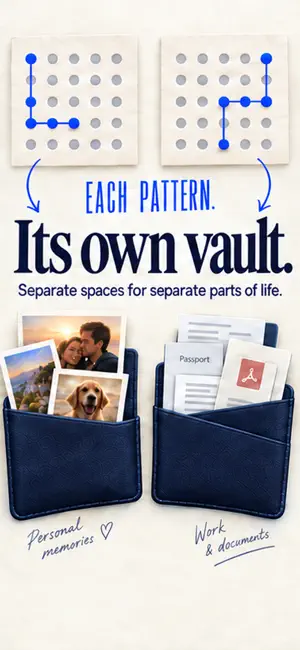
Vaultaire is a hidden photo vault and photo locker for iPhone. It encrypts photos, videos, and documents with AES-256-GCM, so your files are unreadable without the pattern you draw. FILES STAY ENCRYPTED Most photo locker apps hide files behind a passcode. Vaultaire encrypts them. Files are encrypted with a random key, and your pattern unlocks that key. Someone who copies your device storage finds encrypted files, not photos. Longer patterns with several turns are harder to guess. PATTERN LOCK Draw your own pattern to open the vault. No PIN to shoulder-surf, no password to forget. The pattern stays on your device. DECOY VAULT A different pattern opens a different vault. Fill one with harmless photos and open it when someone demands access to your phone. The app never shows a list of your vaults. With Pro, a duress vault goes further: drawing its pattern removes access to your other vaults on this device. Useful for travel, border crossings, journalism, or any moment when someone demands access to your phone. PRIVATE BY DESIGN Encryption runs on your iPhone. Vaultaire's servers never receive your files or keys. No account is required. ENCRYPTED BACKUP FOR EVERYONE Encrypted iCloud backup is included with both Free and Pro and is on by default. Vaultaire encrypts your vault on your device before storing the backup in your private iCloud account. Multi-device sync requires Vaultaire Pro. The Free plan supports up to 3 vaults, 100 photos, and 10 videos in total. SHARE A VAULT Share a separate encrypted vault with someone you trust. They open it in Vaultaire with a phrase you give them. Your main vault stays private. WHAT'S INSIDE - AES-256-GCM encryption for photos, videos, and files - Pattern lock without an account - Decoy vaults, plus a duress vault on Pro - Shared vaults with trusted contacts - Record video and take photos straight into the vault - Import from Photos, Files, or drag and drop - Folders inside each vault, with files in the order you choose - Hide photos and hide videos in a secure folder - Encrypted photo gallery that supports large files - Dark mode - No ads or cross-app tracking VAULTAIRE PRO Pro removes the Free plan's photo and video limits and adds more vaults, creating shared vaults, the duress vault, multi-device sync, and alternate app icons. Weekly, annual with a 7-day free trial, and lifetime plans available. Your photos are yours. Vaultaire keeps them that way. Terms of Use: https://vaultaire.app/terms/
Ratings & reviews
4.6
43 ratings
What’s new
Version 1.0.23 · Updated October 17, 2026
Import progress for videos. A long video shows each import step with a percentage until it is in your vault. Videos play as you swipe. A video starts on its own when you swipe to it and keeps playing during imports and backups. Seeking follows your finger. Drag the playback bar and the picture moves with it. Delete originals after import. After you add photos or files, Vaultaire can delete the originals for you. Deleted photos can come back. Photos keeps deleted originals in Recently Deleted for 30 days. Your choice every time. Tap Don't Ask Again to stop the question, and turn it back on in Settings. Vaults with missing data open. If some of a vault's data is missing from this device, the vault now opens and marks the files it cannot show. Keep what is left. Open a marked file to save what remains of it, or delete it as usual. No lock after a long import. The vault no longer locks right after a long import ends. Files open during an export. A large export no longer holds up other files and thumbnails. Arrow keys on iPad. With a keyboard, the arrow keys show the next or previous photo or video. Shared vault changes upload. If you change a shared vault while it is still uploading, your change now waits its turn instead of failing. Backups flag damaged files. If a backup finds a damaged file, it now stops and tells you instead of trying again and again. Drag to pick photos. When you add photos, drag your finger across them to pick many at once.
App privacy
The developer, Wraxle LLC, reported these privacy practices to Apple.
Data Linked to You
The following data, which may be collected and linked to your identity, may be used for the following purposes:
- Contact Info: Email Address
- User Content: Customer Support
Used for: App Functionality
Data Not Linked to You
The following data, which may be collected but is not linked to your identity, may be used for the following purposes:
- Usage Data: Product Interaction
- Diagnostics: Crash Data, Performance Data, Other Diagnostic Data
Used for: App Functionality
Alternatives to Photo Vault - Vaultaire
Looking for apps like Photo Vault - Vaultaire? Here are 6 similar apps on the App Store. The highest rated is ArkWarden Hidden Photo Vault (5.0/5), and all 6 are free to download.
-
 Business Headshot Generator
3.4
Business Headshot Generator
3.4
-
 Encamera Encrypted Photo Vault
4.5
Encamera Encrypted Photo Vault
4.5
-
 Obscura Photo Vault
4.1
Obscura Photo Vault
4.1
-
 Inner Gallery - Photo Vault
4.7
Inner Gallery - Photo Vault
4.7
-
 Photo Vault & Locker: iLockBox
4.8
Photo Vault & Locker: iLockBox
4.8
-
 ArkWarden Hidden Photo Vault
5.0
ArkWarden Hidden Photo Vault
5.0
| App | Rating | Price | Last updated | Compare |
|---|---|---|---|---|
| Photo Vault - Vaultaire | 4.6 / 5 (43 ratings) | Free | October 17, 2026 | |
| Business Headshot Generator | 3.4 / 5 (28) | Free | May 26, 2025 | Compare |
| Encamera Encrypted Photo Vault | 4.5 / 5 (145) | Free | Sep 8, 2026 | Compare |
| Obscura Photo Vault | 4.1 / 5 (19) | Free | Oct 14, 2026 | Compare |
| Inner Gallery - Photo Vault | 4.7 / 5 (6) | Free | Aug 3, 2026 | Compare |
| Photo Vault & Locker: iLockBox | 4.8 / 5 (18) | Free | Oct 2, 2026 | Compare |
| ArkWarden Hidden Photo Vault | 5.0 / 5 (5) | Free | Oct 16, 2026 | Compare |